About Glassbubble
Glassbubble: 3D Frosted Glass FAQ
Most FAQ sections are an afterthought. Glassbubble makes yours a feature.
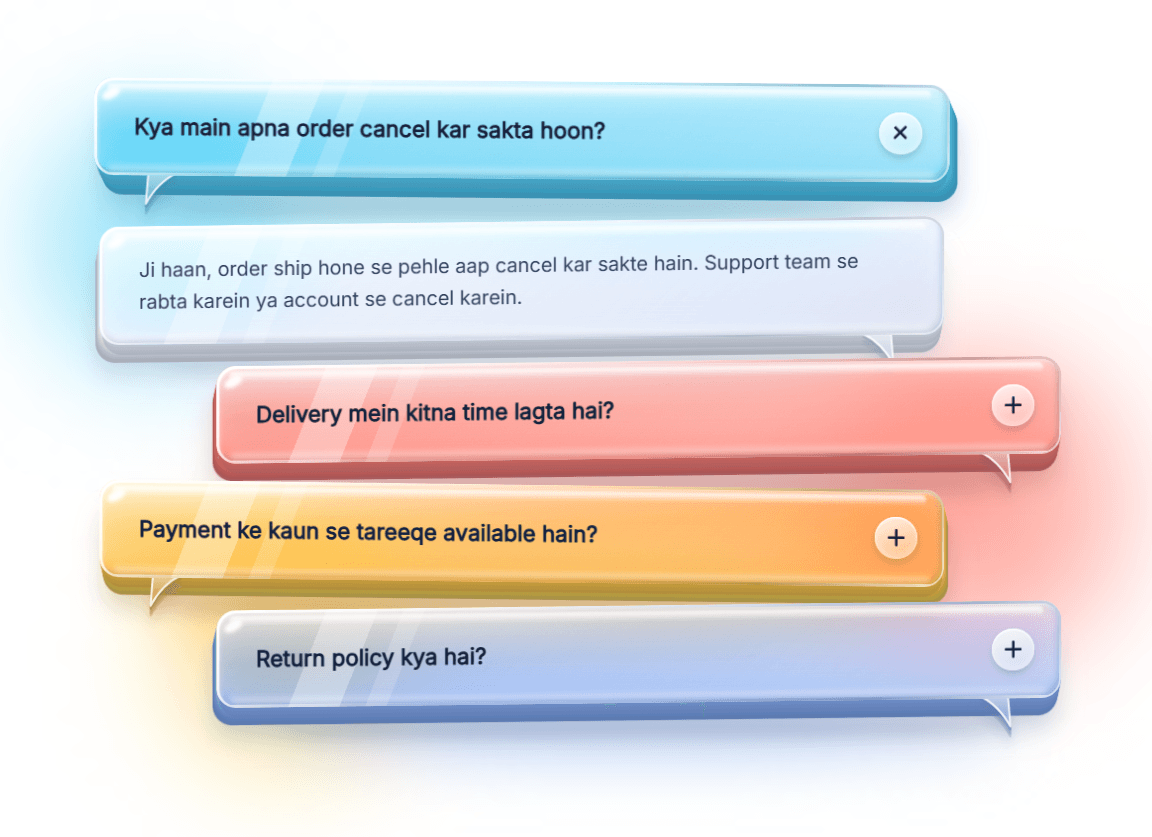
Every question is a thick, translucent glass bubble with a deep colored edge, soft reflections and real depth. Tap one and the answer replies in a frosted bubble from the opposite side, like a conversation. It feels playful and premium, and it still does the simple job of answering your visitors’ questions.
Why you’ll like it
Real glass look. Two-tone glass, frosted blur, bevelled rims and a solid side wall that gives each bubble true thickness.
Feels alive. Bubbles tilt toward the cursor, lift on hover and drift gently when idle. Each effect can be switched off.
Chat-style layout. Questions and answers alternate sides, so the section reads like a friendly conversation.
Easy to brand. Set colors, glass tint, blur, depth, radius, width and fonts from the properties panel. No code needed.
Built for real use. Single or multi-open mode, a choice of which item starts open, keyboard support and reduced motion for users who prefer it.
How to use it
Drag Glassbubble onto your canvas.
Add your questions and answers in the properties panel.
Pick your colors and adjust the glass settings until it matches your brand.
Best on A light or colorful background. The glass effect shines when there is something behind it to blur. The built-in backdrop glow and background color are included for this.
Perfect for SaaS landing pages, apps, portfolios, agencies and any site that wants an FAQ people actually enjoy opening.