About Keybar Nav
Keybar Nav is a premium navigation component for Framer with a search pill and keycap hint, the detail modern software sites use. It's built from native Framer layers, so you can click into any part and edit it like the rest of your site. No code, no setup.
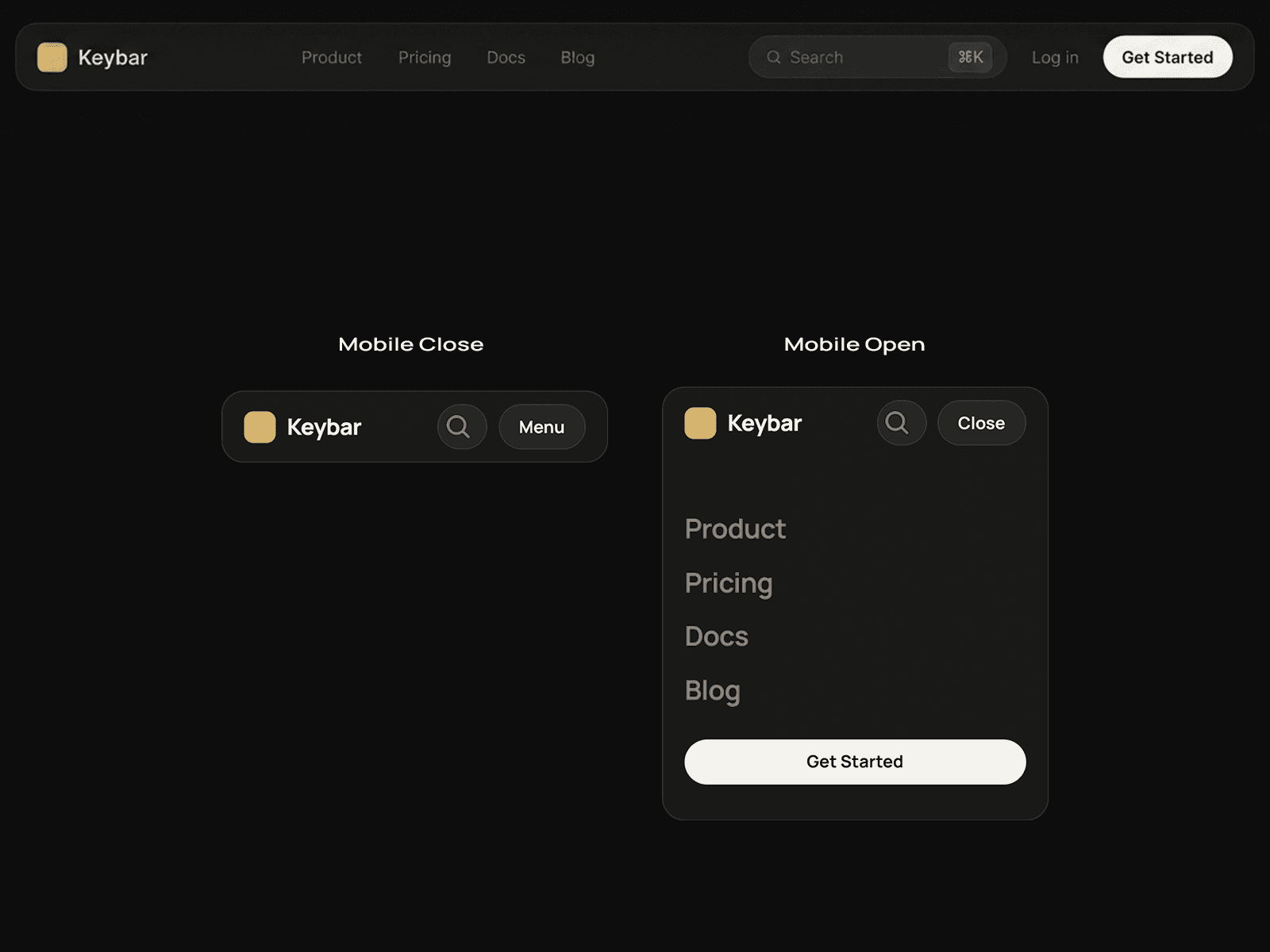
Default navbars blend in. Keybar Nav looks like a real product: a dark glass bar, a centered search pill with a ⌘K keycap, a clear call to action and a clean mobile menu, all ready to drop in.
WHAT YOU GET
- Desktop layout: logo, links, search pill, login and CTA
- Mobile layout with an open menu and a full-width CTA
- Search pill with a keycap badge
- Hover and pressed states on the links, search pill and CTA
- Color and text styles included, so restyling is quick
- Easy-to-swap logo, link names and CTA text
- Clean, clearly named layers
ABOUT SEARCH
The pill is built to work with Framer's built-in Search component. The ⌘K badge is a visual hint. For a working keyboard shortcut, add a shortcut component such as Key Master to your page.
HOW TO USE
1. Add Keybar Nav to your project.
2. Place it at the top of your page.
3. Edit the logo, links and CTA, then publish.
Perfect for SaaS, AI and developer-tool sites with product, pricing and docs pages.
Built by Framevia | The Visual Pratik.