About What's New Changelog
Show your customers what's new, right inside your Framer site.
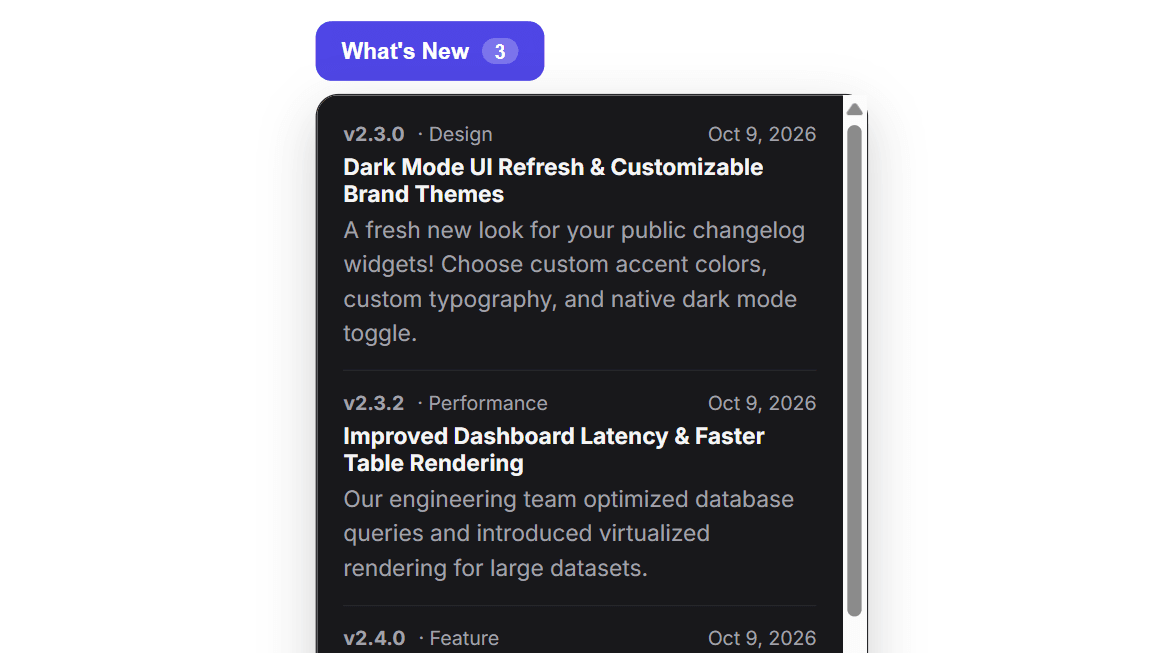
What's New Changelog Widget adds a button to your page. When visitors click it, a clean popup lists your latest product updates, with the version, category, date and details for each. You write and publish updates from a simple dashboard, and the widget updates itself. There is no need to republish your Framer site.
HOW IT WORKS
1. Create a free account at releasebadge.com
2. Add an update in the dashboard and set it to Published
3. Copy your Project Key from the dashboard
4. Drop this component onto your page and paste the key into the "Project Key" control
That's it.
WHAT YOU CAN CUSTOMIZE
- Button text, colors, corner radius
- Light or dark theme
- New-update dot and update count
- Popup width, alignment and direction (opens up or down)
FREE PLAN
- Up to 20 published updates
- 5,000 widget views per month
- 1 authorized domain
- JSON export
- Small "Powered by ReleaseBadge" link in the popup
PRO PLAN ($9/month, optional)
- Unlimited updates
- Up to 5 authorized domains
- No "Powered by" badge
- CSV export and full analytics
NOTES
- This component needs a free ReleaseBadge account and Project Key. Without a key it shows a "Add your Project Key" message.
This component loads your updates from releasebadge.com using your Project Key. No other data is collected or sent.
https://releasebadge.com/guides/add-whats-new-button-to-framer-site guide page on site.
- Support: support@releasebadge.com