About Code Controls
Code Controls — Make Framer Code Components Editable Without Coding
Stop editing TSX every time you want to change a title, color, size, or button label.
Code Controls is a powerful Framer plugin that transforms hardcoded values inside React and TSX Code Components into fully editable Framer Property Controls—without rebuilding your component or changing its original functionality.
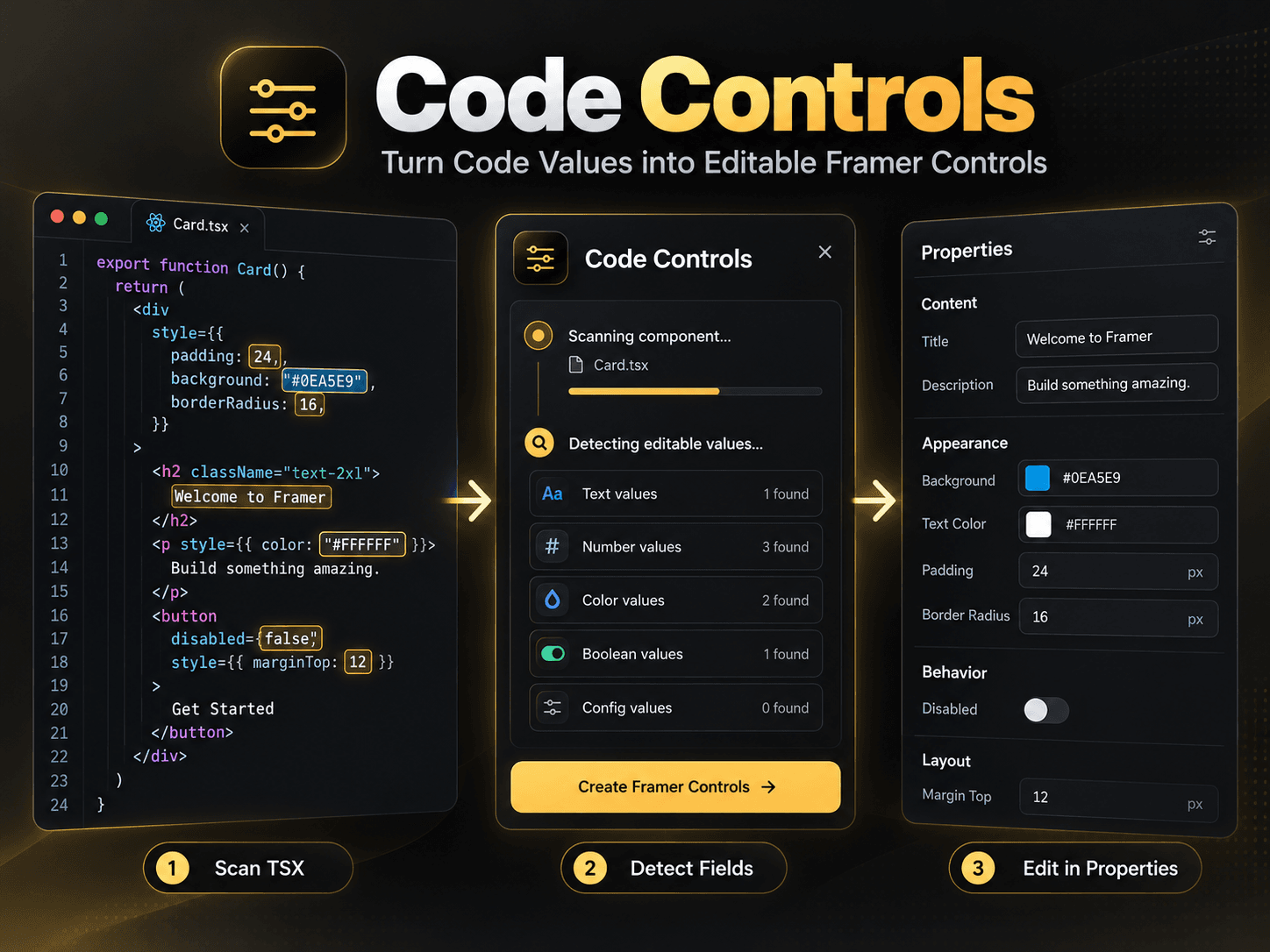
Simply select your Code Component, scan it with Code Controls, choose the fields you want to expose, and edit everything directly from the Framer Properties panel.
🚀 From Hardcoded Values to Visual Controls
✅ Text Fields — Edit titles, descriptions, labels, button text, and more.
✅ Number Controls — Adjust widths, heights, spacing, padding, and dimensions.
✅ Color Pickers — Customize backgrounds, text colors, and other supported colors.
✅ Boolean Toggles — Enable or disable supported features visually.
✅ Advanced Values — Detect supported values inside nested objects, arrays, configurations, and same-file components.
⚡ How It Works
Select any supported Framer Code Component.
Open Code Controls and scan its TSX source.
Choose the detected values to make editable.
Generate real Framer Property Controls.
Customize your component directly in Framer—no more repetitive code editing!
✨ Why Choose Code Controls?
No manual Property Controls setup
Keep your original React logic and interactions
Edit supported values directly from Framer's visual editor
Save time customizing templates and client projects
Make reusable components easier for non-developers
Works with supported existing TSX Code Components
🔓 Free & Pro
FREE: Convert one Code Component.
PRO: Unlock unlimited scans and conversions with lifetime access.
🎯 Perfect For
Framer developers, React creators, template designers, agencies, client websites, design systems, and anyone working with custom Framer components.
Turn code into creative control. Scan, convert, and customize visually with Code Controls.