Samuel Nathaniel
ExpertI help founders migrate from Custom-code to @Framer. Full control. Blazing speed. Built-in SEO. No code ✦ Click “Hiire Me” - Let’s chat
I help founders migrate from Custom-code to @Framer. Full control. Blazing speed. Built-in SEO. No code ✦ Click “Hiire Me” - Let’s chat
It is one of those reviews that feels as authentic as an ID card. 😂
You only get this kind of feedback when you genuinely support your clients and team members over the long haul.
Did i mention we've worked together for over 4years?
I'm super happy!
Shout out to my boss @iwualaval
...
PS: I help startups move their websites from custom-code over to @Framer.
You get full control back, easy system to publish blogs instantly, great built-in SEO, and a blazing-fast website - with absolutely zero coding or developers needed.
DM me 'Hi' and let's chat!
#webdesigner #framerdesigner #framerdeveloper
I’ve been using Boomshare for a while now. They are a great example of how to win customers, even when a giant competitor is already ruling the market (i discovered them online)
Here is what they do right on their website:
👉 The Headline: They don’t hide it. They instantly say they are the best alternative to Loom. Their offer is crazy-hot: "The same thing you get with Loom, but FREE."
👉 The Subheadline: Usually, subheading is where you explain how your product works. But since everyone already knows Loom, Boomshare just name-drops them. It basically says: "If you know Loom, you know us." Simple and smart. 😂
👉 Trust Factor: Right on the hero, they show that over 200,000 people use them. This made me feel safe. I'm not the first tester.
👉 Answering Doubts: The rest of the page answers objections. My biggest worry was: "Since it’s free, what's the catch? will the video quality be bad?" They answered that immediately and proved it's good.
My honest critique: At first glance, the design looked a bit dull. The red-on-gray color vibe made me think they were just a cheap copycat. But once you scroll, the site is interactive, and the copy + messaging is super tight.
Overall, I give them a solid 8.5/10.
Don't agree with me? Let me know in the comments! 👇 Want a roast? Also drop your site.
...
PS: I help startups move their websites from custom-code over to @Framer. You get full control back, easy system to publish blogs instantly, great built-in SEO, and a blazing-fast website - with absolutely zero coding or developers needed.
DM me 'Hi' and let's chat!
That shitty Lighthouse score on the Reachly site is officially gone.
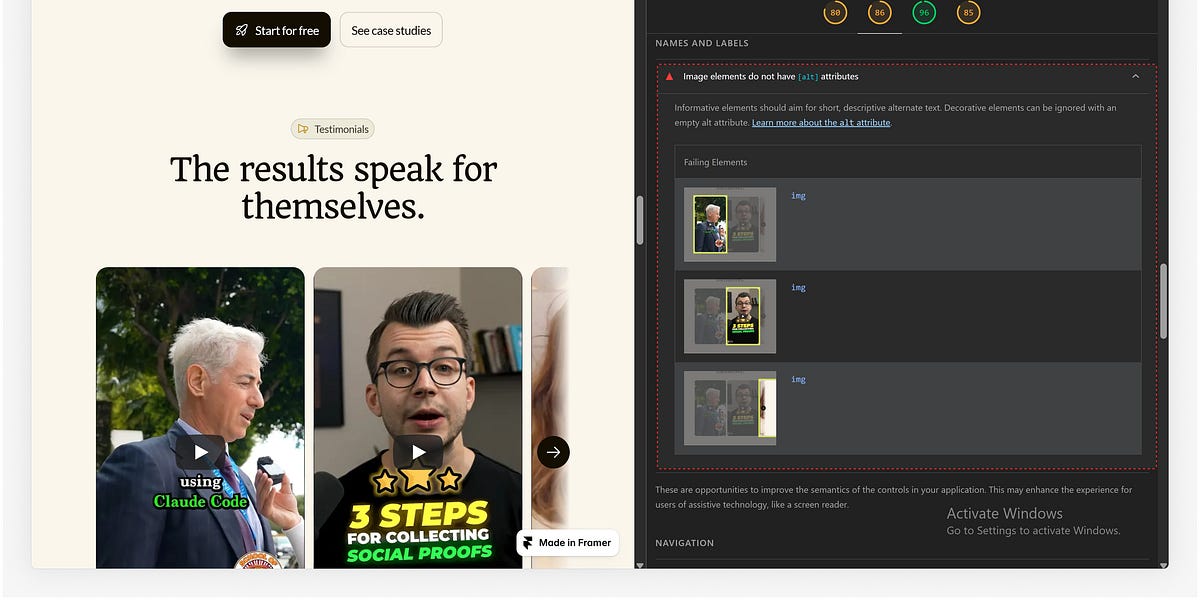
If you saw my post yesterday, you know Framer’s native YouTube component completely tanked the Accessibility and SEO scores for Reachly because of a hidden thumbnail "alt text" error.
I could have just handed the site off with a "yellow" score and called it a day. But ignoring what's under the hood is a massive mistake - technical debt like that is a silent killer for your client's SEO/Google rankings.
Instead, I found a 20-minute workaround that brought back those clean, green circles in the 90s.
Since a lot of you asked for the fix, I just published a quick, step-by-step breakdown on Substack. No fluff, just the exact HTML embed parameters you need to tweak to bypass the bug and keep your layouts responsive.
You can see the BEFORE & AFTER results and grab the full tutorial right here:
👇👇👇
Lighthouse gave me a shitty score during the weekend.
...
I was finishing up the marketing site for Reachly, and everything looked pixel-perfect. Then, I ran the initial Lighthouse test.
My heart sank: Accessibility and SEO were all yellow (not bad but i love me a Green). 😁
Google flagged a critical error: “Image elements do not have [alt] attributes.” (See image)
🚨The culprit? The video testimonials.
1. I was using Framer’s native YouTube component.
2. Lighthouse was demanding image alt text for a video thumbnail (weird).
3. Framer doesn't provide an option to add alt text to that native component.
So i spent a stressful Sunday down a research rabbit hole. Nothing worked. I closed my laptop and took the weekend off.
On Monday, with a clear head, I fixed it - took maybe 20 minutes.
🚨So how did i do it?:
"I ditched the native YouTube component & instead copied the raw HTML embed code for each video, inserted an Embed block and pasted the HTML embed code.
The error vanished. Lighthouse shot straight up into a clean, green circles all 90s
(Fun fact: Webflow users run into this exact same video thumbnail issue, though the workaround is slightly different).
🚨The takeaway:
Having design and building skills is great but learn the technical side too.
I could have easily ignored this error and handed off the site, but ignoring the technical side under the hood is a mistake. Hidden technical debt is a silent killer for your SEO and kills your chances of getting free customers from Google.
🚨PS: I'm thinking of writing a longer & more detailed, step-by-step guide on how I solved this probelm.
Would this be useful to you? Let me know in the comments.
#framerdesigner #framerdeveloper #webdesigner
Reachly is live. ⚡
Full website for an AI LinkedIn outreach tool — design, copy & Framer dev.
This one was fun to build. The product lives in a trust-sensitive space, so the site had to work harder than most to earn the click.
See it live 👇 [https://reachly.framer.ai
#framer #webdesign #framerdesign #saas #linkedinoutreach
Just published a new blog article in 4-mins via @Framer CMS blog 😎
Total time from finished article to live, indexed page: under 4 minutes.
No deploys. No staging environment. No waiting on a dev to push it live. No "I'll get to it Thursday."
Write → publish → done.
If you're still running a custom-coded site, this is probably the moment you felt a little pang watching it. Because on most custom builds, "publish a blog post" means:
→ opening a CMS that takes 10 clicks to find
→ pinging whoever built your site
→ waiting for a deploy
→ hoping nothing breaks
I work with businesses stuck in that cycle — sites that were custom-coded years ago and have quietly become a bottleneck every time marketing wants to ship content.
Migrating to @Framer doesn't just make the site look better. It changes who can publish, and how fast.
Video below — full publish, real time.
If your team dreads updating your site, I'd be happy to take a look and tell you honestly whether a migration makes sense for you. (Not every site needs one — but a lot of "custom" sites are paying a tax they don't need to.)
#framerdesigner #framerdeveloper #webdesigner
I'm conducting an aesthetics test for Reachly.
Wasn't really happy with the design so i did a v2. But let me know what you think.
A or B?
To celebrate the launch of our new @Framer template - TASKOFF, we're giving away 15 copies FREE and there's only 14 copies remaining
To enter the giveaway:
1. Comment TASKOFF
2. Like this post
All 14 winners will be announced as they win (..in the comments)
View template 👉 https://www.framer.com/community/marketplace/templates/taskoff/
After weeks of designing, writing, testing, and obsessing over tiny details...
TaskOff is finally live 🎉
Preview:👉 [https://taskoff.framer.website]
TaskOff is a Framer template built for AI SaaS founders.
A complete launch kit.
It comes with:
- 13-section conversion-focused homepage
- Pricing, About, Contact, Blog, Changelog & Careers pages
- Full CMS setup
- AI copywriting prompt for generating your website copy
- AI Schema Generator for SEO
- Coming soo (waitlist) page [If you haven't launched yet]
- 7 step-by-step launch tutorials
- Figma design files included