About CMS Forge
What is CMS Forge?
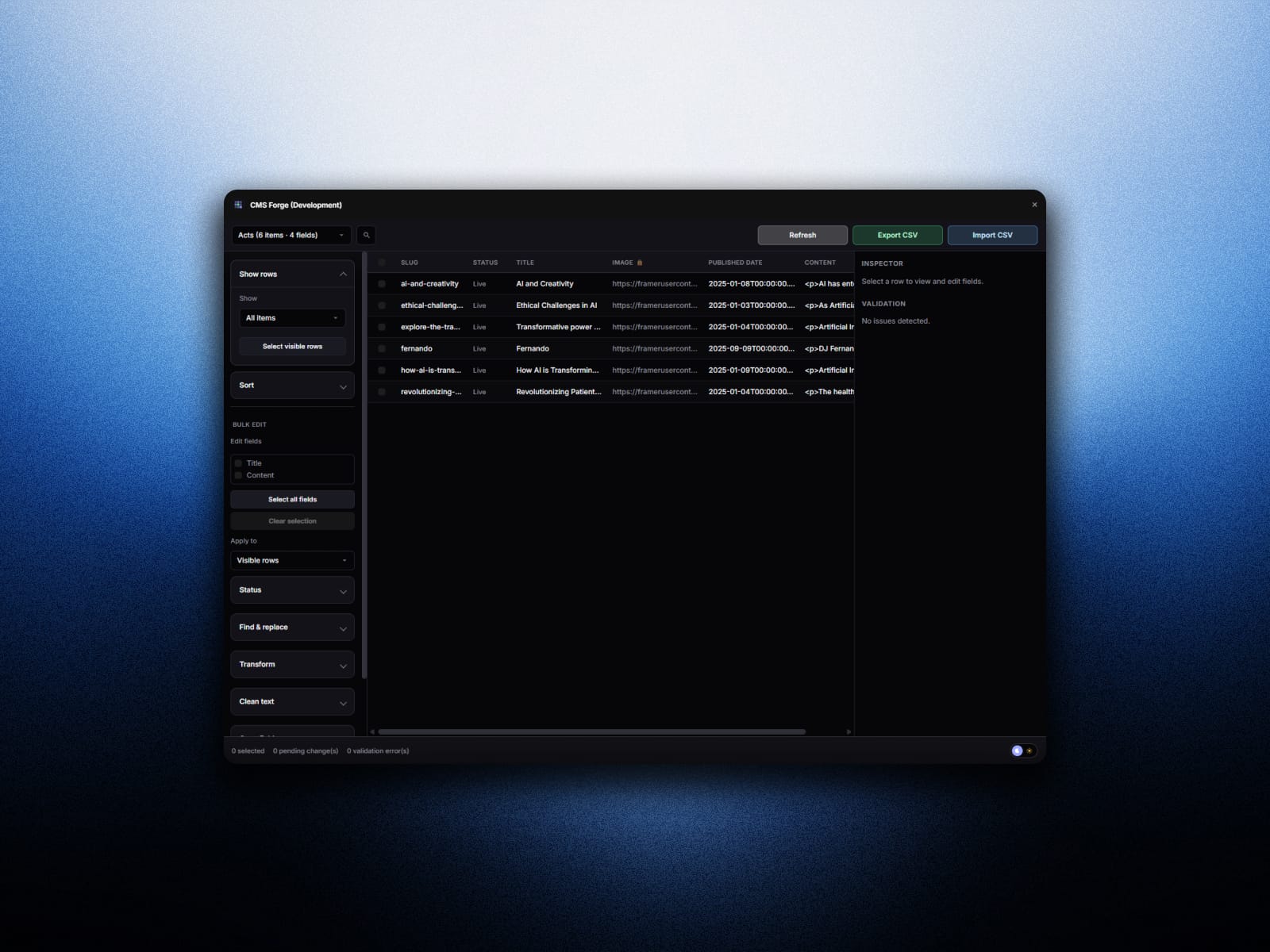
CMS Forge is a Framer CMS plugin for anyone managing large content libraries in Framer. Instead of editing collection items one by one, you work in a fast spreadsheet-style table: every field is a column, every CMS item is a row. Search, filter, sort, bulk edit, validate, and move data with CSV—all without leaving your Framer project.
Built for Framer designers, developers, and content teams who need bulk CMS editing, mass updates, and safer publishing workflows on the Framer Marketplace.
Key features
Spreadsheet table — Virtualized grid for large collections, sticky headers, and inline editing for text, numbers, booleans, dates, URLs, enums, and slugs.
Bulk editing — Find and replace, case transforms, prefixes and suffixes, slug-from-title, draft/publish status, multi-field selection, and preview-before-apply.
CSV export and import — Export full or filtered rows with item IDs and slugs. Import with column mapping, match by ID or slug, dry-run preview, and optional empty-field protection.
Validation — Surface duplicate slugs, invalid URLs, empty required fields, and long meta titles or descriptions before you publish.
Inspector panel — Select any row for field-level edits, image previews, and direct save to CMS.
Keyboard shortcuts — Cmd/Ctrl+S to apply changes, Cmd/Ctrl+F to focus search.
Who is it for?
Marketing and content sites with blogs, case studies, docs, or resource libraries
Agencies updating client Framer CMS content in bulk
Teams migrating, cleaning, or localizing collection data
Anyone who has outgrown single-item editing in Framer CMS
Framer CMS is ideal for structured content, but updating dozens or hundreds of items is slow. CMS Forge is a mass edit CMS tool that feels like a spreadsheet — purpose-built for Framer collections, with no external database required for everyday edits.
Safety first
Edits are staged until you apply them. Batch saves report success or failure per item. Validation highlights issues in the sidebar. Autosave stays off by default so you control when changes go live.
Getting started
Install CMS Forge from the Framer Marketplace, open a project with CMS collections, and launch the plugin from the collection view. Choose a collection, edit your content, and press Cmd+S when you are ready to sync.
Looking for a Framer plugin for CSV import, bulk CMS updates, or spreadsheet-style CMS management? CMS Forge is built for that workflow.