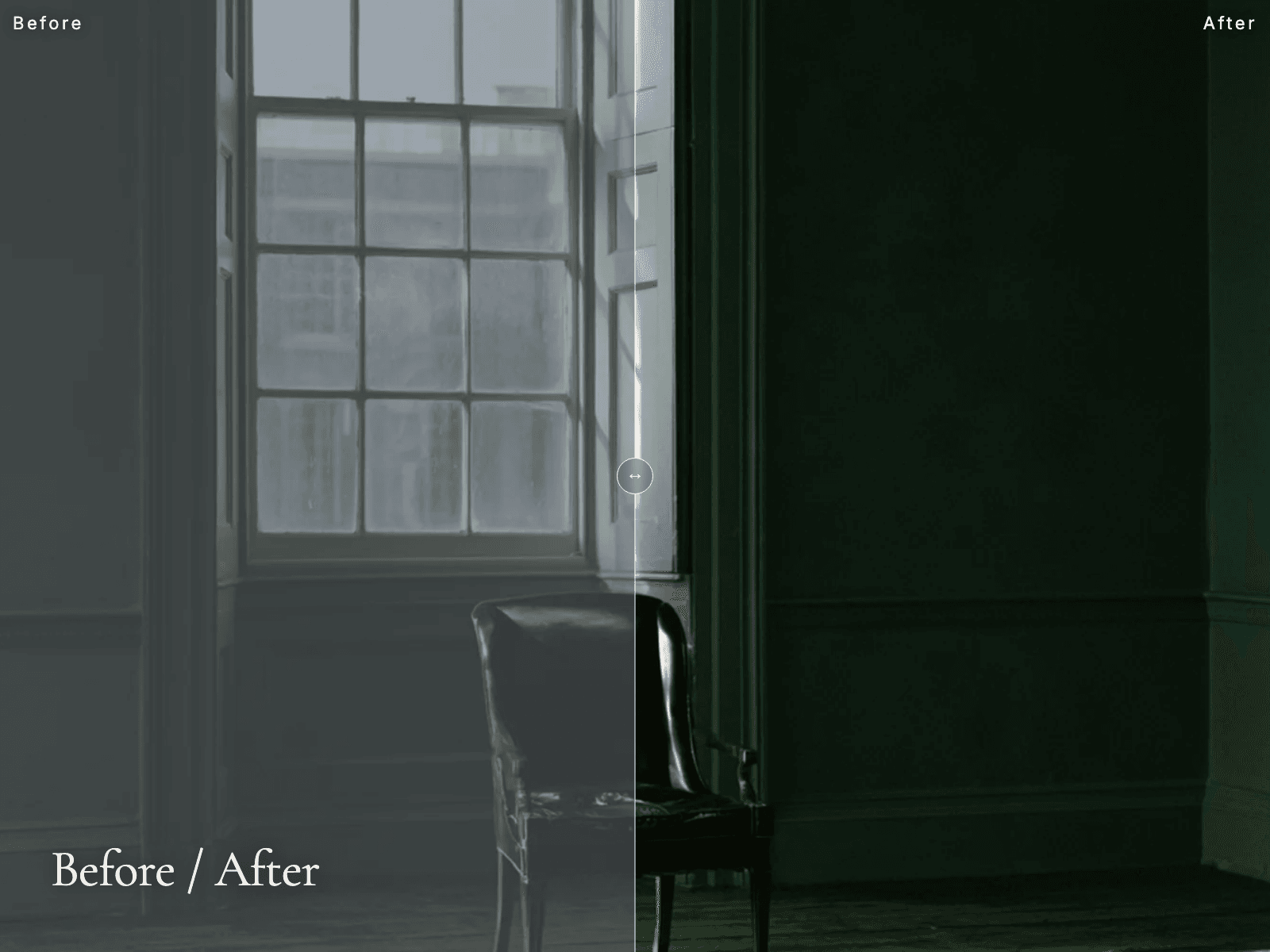
Before / After is out. A compare slider with a hairline divider - drag, click or hover, horizontal or vertical, and it moves with the arrow keys. Labels in any font, readable on light and dark photos. Ships with a graded / ungraded demo pair.
Tokyo studio. We make Framer read correctly in Japanese — line breaking, ruby, and script spacing. Sites and migrations from $3,000.
Before / After is out. A compare slider with a hairline divider - drag, click or hover, horizontal or vertical, and it moves with the arrow keys. Labels in any font, readable on light and dark photos. Ships with a graded / ungraded demo pair.
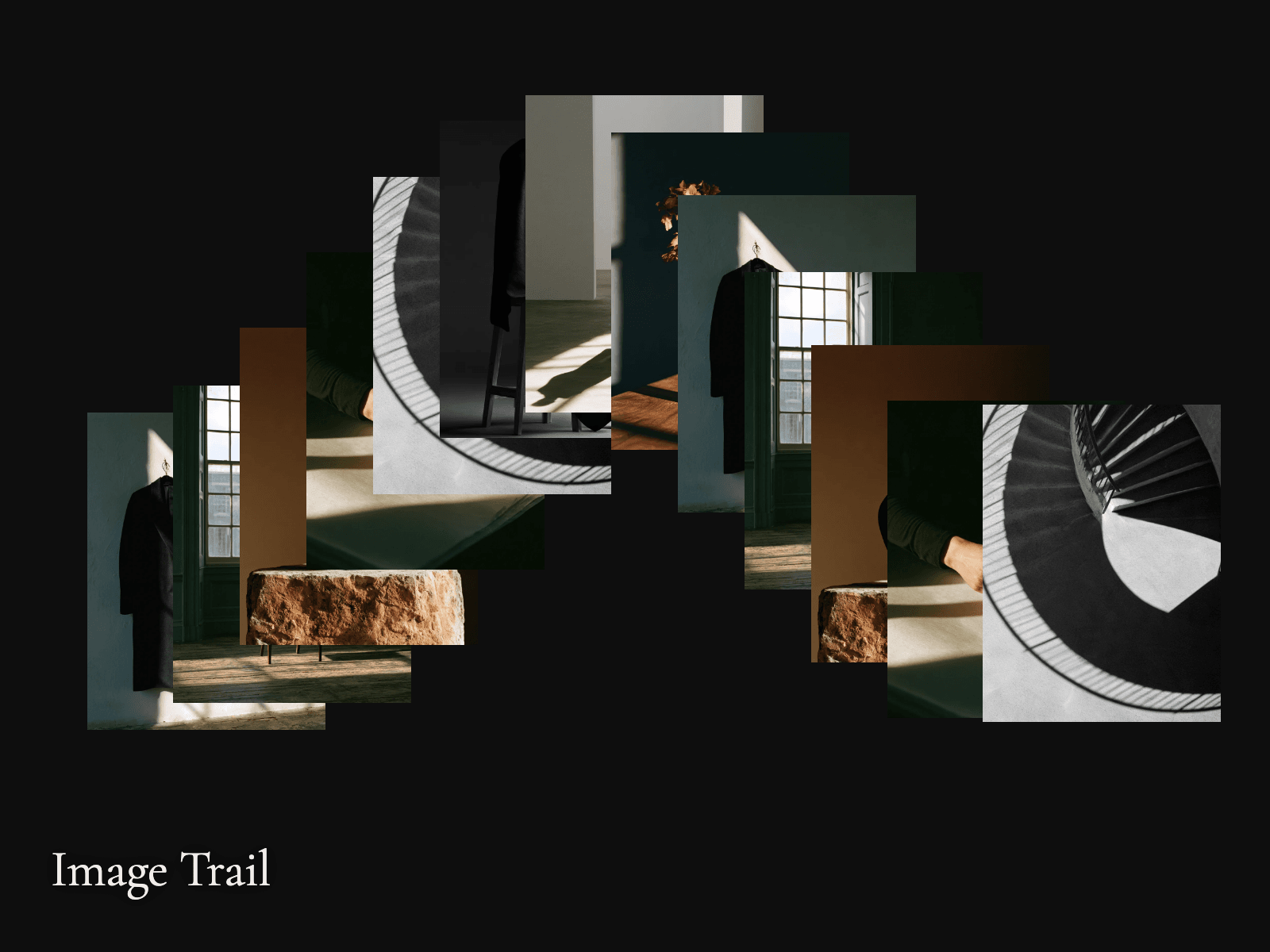
Image Trail is out. The cursor leaves a trail of photographs - an image is dropped only after the pointer travels a set distance, so a slow hand leaves a slow trail. Tilt, mono, caption, life and spacing in the panel. Ships with eight demo photographs.
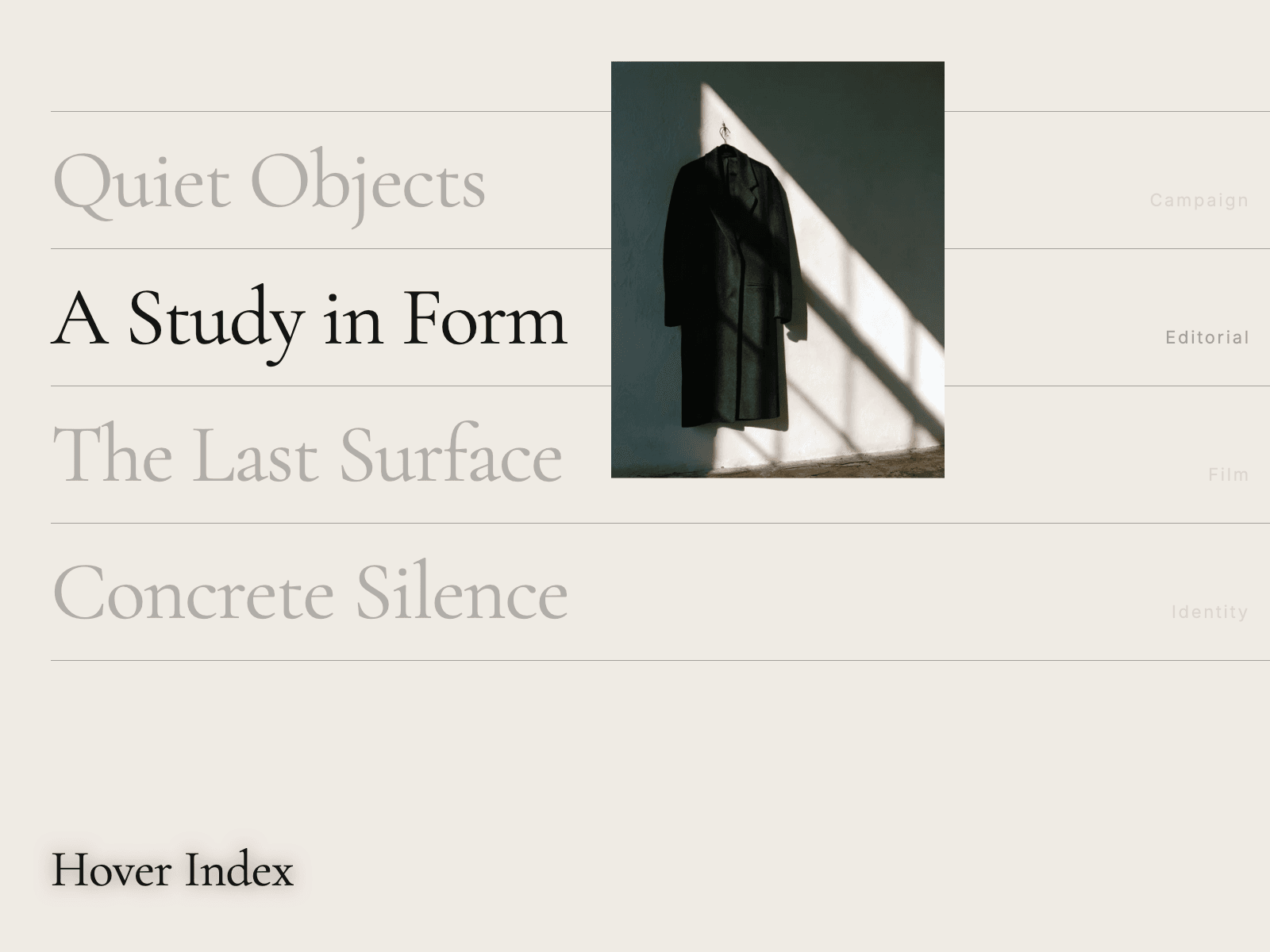
Hover Index is out. The editorial project list: hover a row and its image follows the cursor, easing behind it, while the other rows dim. Rows are real links, keyboard focus shows the image too, and touch screens get a plain list.
The place a Japanese page gives itself away fastest is a two-line heading with one character alone on the second line.
In print that is caught by hand every time. On the web nothing catches it, so it ships, and the heading reads slightly broken to a native reader who will never write to tell you why.
Headings are where to look first if you only have five minutes: https://khz-art.com/en/framer-japanese
It is not only Japanese. Simplified and Traditional Chinese have no spaces between words. Neither does Thai. The browser wraps all three wherever the box happens to end.
If you are shipping to those markets from Framer, the layout you approved in English is not the layout your reader sees.
We handle line breaking for Japanese, Chinese and Thai in one pass on the published site: https://khz-art.com/en/framer-japanese
A translation plugin moves the words. It does not move the typography.
That distinction is invisible in Latin languages, because the rules are the same on both sides of the swap. In Japanese they are not: the browser has no idea where a phrase ends, so it wraps mid-name and mid-number, and no amount of correct translation fixes it.
So there are two jobs, not one. The second one is written out here, with before and after: https://khz-art.com/en/framer-japanese
A question worth asking before you hand the Japanese version of a site to anyone: ask them what they do about line breaking.
If the answer is "the browser handles it", they have not built a Japanese page before. It does not.
We wrote down everything we check, so you can use it as a checklist whether or not you work with us: https://khz-art.com/en/framer-japanese
Some Japanese words cannot be read on sight — a family name, a place, a technical term. Print solves it with small characters set above the word. It is called furigana, and Chinese does the same thing with pinyin.
The web has had a tag for it since 2001 and almost no design tool exposes it.
If your Japanese page needs to be read by someone who is not already fluent, this is the piece: https://khz-art.com/en/framer-japanese
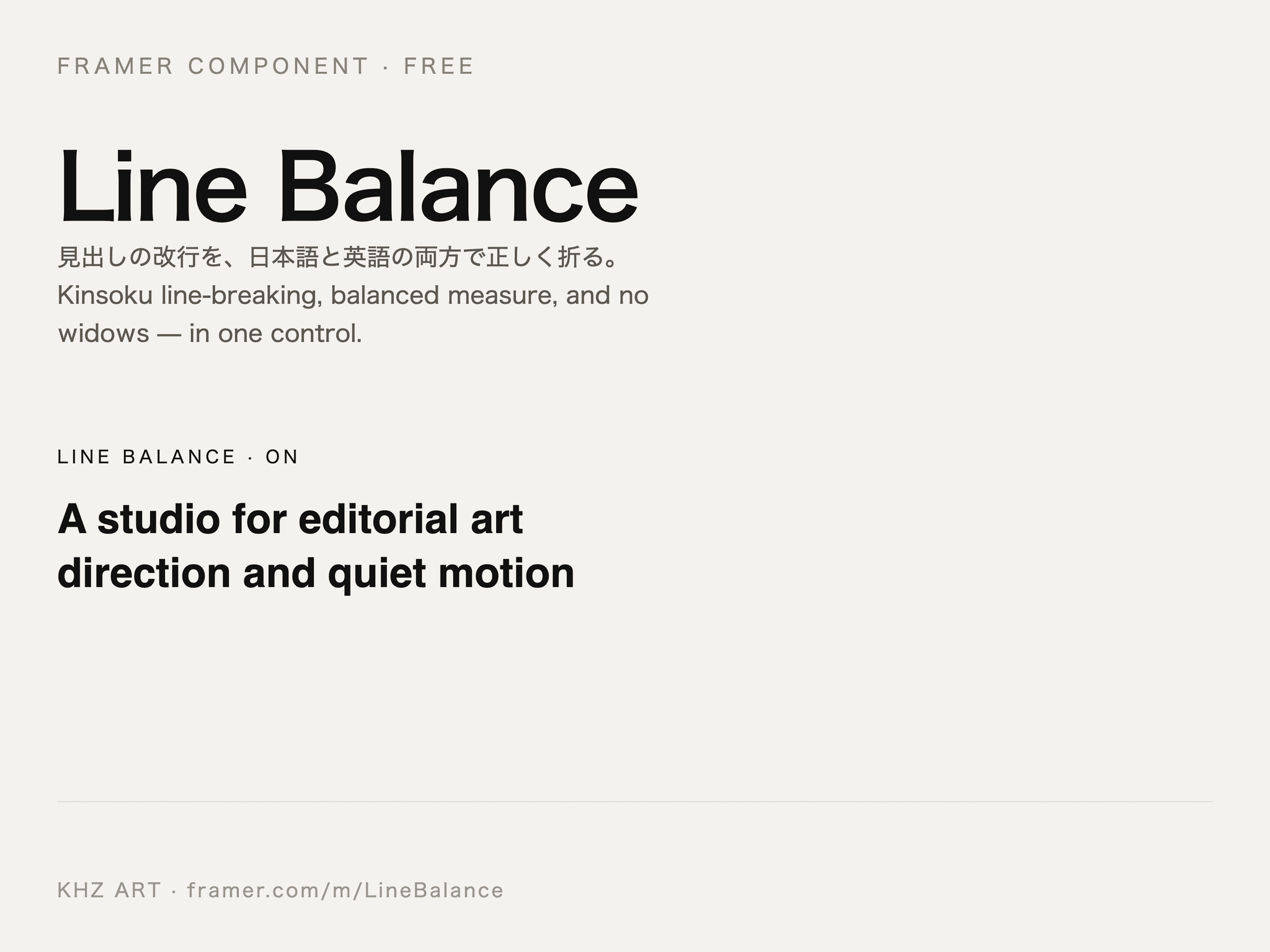
Line Balance is out, free. It fixes the three ways a headline breaks: a single word falling to its own line, lines of wildly different length, and — in Japanese — a line that starts with 、 or ). Measured over 90 headlines in Chromium: widows 24.4% to 1.1%, line-width SD 109px to 25px. No dependencies, no network, no animation.
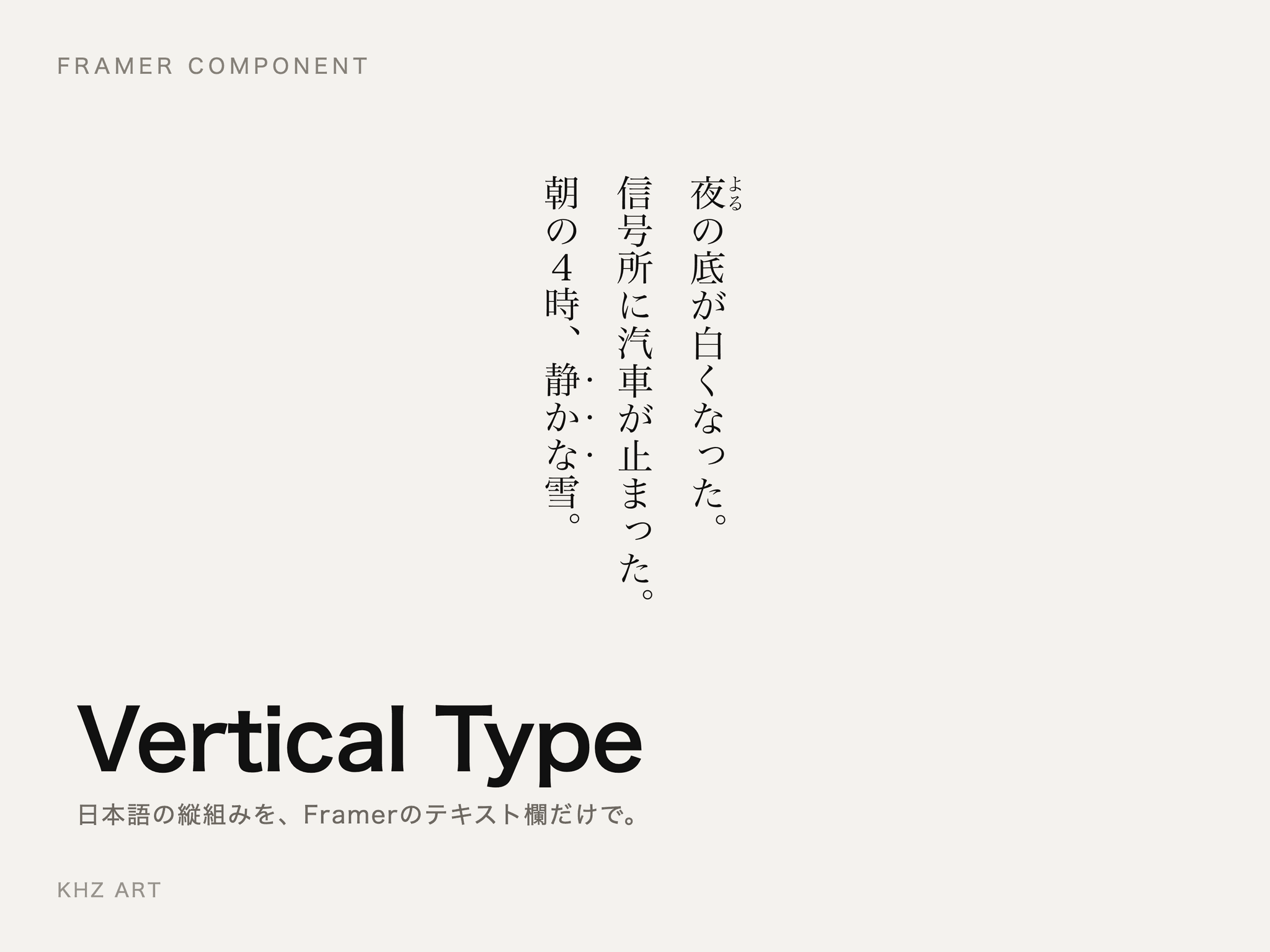
Vertical Type is out. It sets real Japanese tategaki in Framer — text top to bottom, columns right to left — with ruby written inline as 漢字《かんじ》, digits standing upright inside the line (4時, 2026年), kinsoku line-breaking, and emphasis dots. No dependencies, no network requests. Live preview on the listing.
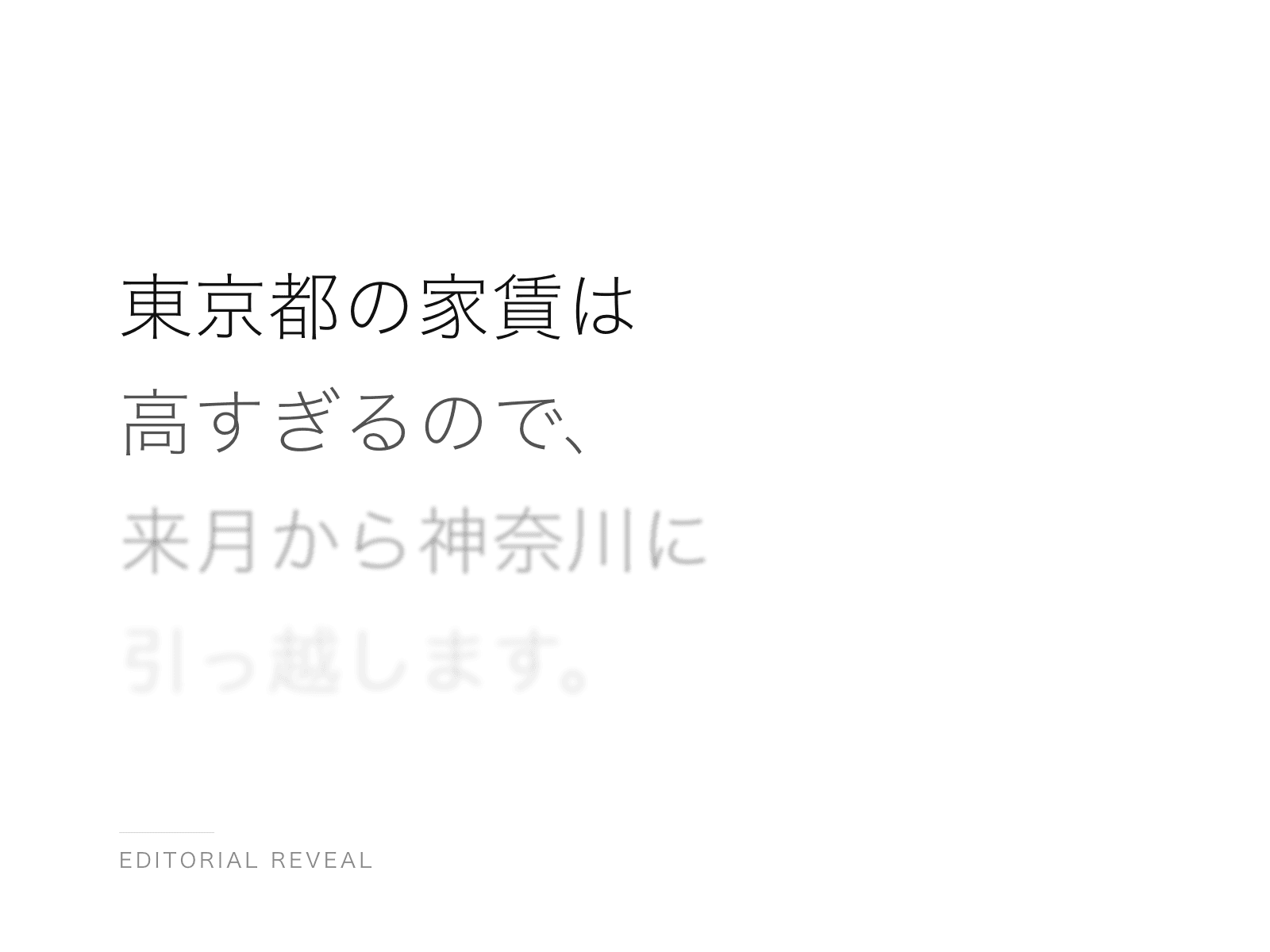
Editorial Reveal is out. It brings text in line by line — and it breaks Japanese and Chinese lines at phrase boundaries instead of wherever the box happens to end. Latin text keeps normal word wrapping. No dependencies, no network requests. Live preview on the listing.
Japanese has no spaces between words, so a browser is free to break a line anywhere — including in front of a closing bracket, a comma or a full stop. Japanese typesetting does not allow those characters to start a line.
We built a page that counts it instead of arguing about it. Paste any Japanese into it and it reads the line boxes your own browser just drew, then reports two numbers: how many lines began with a character that may not begin a line, and how many Latin words were broken mid-word. Drag the column width or the type size and watch the numbers move.
https://khz-art.com/en/japanese-line-break-test
If your site needs this fixed, the three plugins behind it are free on the Marketplace — Kumihan (phrase-aware line breaking, ja / zh-hans / zh-hant / th), Rubi (a reading above a word), Waei (the quarter-em of air between Japanese and Latin). In English they do nothing at all.
Japanese has no spaces between words, so a browser breaks a line wherever it runs out of room — mid-phrase, mid-name, mid-number. To a native reader, that one break is what makes a beautiful site look unfinished.
We rebuilt the Kumihan page today to show it in real type: browser default above, phrase-aware breaking below. The same for 简体中文, 繁體中文 and ไทย.
Free for headings. $25 once for the whole page.
日本語の改行を、文節で。
If you are shipping a multilingual Framer site, the translation is the easy half.
The hard half is what happens to the layout afterwards. German runs long and breaks your buttons. Japanese has no spaces and breaks your line endings. Thai has no spaces either and breaks differently again.
We only solved the CJK side of that, because it is the side nobody else has: https://khz-art.com/en/framer-japanese
In Japanese typesetting there is a rule that a line may not begin with a closing bracket, a small kana, or a full stop. Print has followed it for a century. The web ignores it.
The result is the thing you cannot unsee once you have seen it: a single punctuation mark alone at the start of a line, or one character stranded on the last line of a paragraph.
If you are building a Japanese page in Framer, this is what to look for first: https://khz-art.com/en/framer-japanese
One detail decides whether a Japanese page reads expensive or cheap: the quarter-em of space between Japanese characters and Latin ones.
Type has always put it there. Browsers never have. So a line like 2026年のKHZ ARTの映像 comes out jammed, and readers feel it without being able to name it.
It is a small fix and it changes the whole page. Free plugin, no account: https://khz-art.com/en/framer-japanese
Japanese is the language that breaks quietly. You run a translation plugin, the copy comes back correct, and the page looks fine at a glance — but the browser has split a person's name across two lines, and one lonely character is sitting by itself at the bottom of a paragraph.
Nothing in Framer stops that. Japanese has no spaces, so the line breaks land wherever the box happens to end.
We wrote three small plugins for the things that break after translation: line breaking, the quarter-em of air between Japanese and Latin characters, and readings set above a word. The whole problem is written out here, with before and after: https://khz-art.com/en/framer-japanese
Three things a browser will not do with Japanese type.
1. Line breaking. A browser breaks a Japanese line anywhere it likes. Japanese typesetting says a line cannot start with 。or 」and cannot end with 「. Without those rules, the first character of a line is a closing bracket, and every reader sees it.
2. Furigana. The small readings printed above kanji. It is not a font feature. It needs its own markup, and a browser will not add it for you.
3. The space between scripts. Japanese and Latin set side by side need a quarter-em gap. Without it, the words touch — and the page reads as a translation rather than a design.
We built three plugins for these and put every case on one page, before and after, so you can see what actually changes:
https://khz-art.com/en/framer-japanese
Japanese breaks lines wherever it likes. A browser will split a person's name in half, or leave one character alone on the last line, and nothing in Framer stops it.
We wrote three plugins for it — Kumihan for line breaking, Rubi for readings above a word, Waei for the quarter-em between Japanese and Latin — and a template that assumes all three are there.
If you are building the Japanese side of a site, the whole problem is written out here: https://khz-art.com/en/framer-japanese
SUMI — an editorial portfolio template, built around Japanese typesetting.
Japanese has no spaces between words, so a browser breaks a line wherever it likes: mid-name, mid-number, mid-place. Framer has no setting for it, and no way to put a reading above a word. So we wrote the three plugins that fix it, and then built a template that assumes they are there.
Eight static pages, two CMS layouts. One type scale, one motion curve, one accent colour. Nothing on the page moves without a reason, and the work is the only thing that is loud.
In English the template is unchanged — the plugins simply do nothing.
The plugins are free: Kumihan, Rubi, Waei. The template is $79.
https://www.framer.com/marketplace/templates/sumi/
Tokyo studio. We make Framer read correctly in Japanese — line breaking, ruby, and script spacing. Sites and migrations from $3,000.
Before / After is out. A compare slider with a hairline divider - drag, click or hover, horizontal or vertical, and it moves with the arrow keys. Labels in any font, readable on light and dark photos. Ships with a graded / ungraded demo pair.
Image Trail is out. The cursor leaves a trail of photographs - an image is dropped only after the pointer travels a set distance, so a slow hand leaves a slow trail. Tilt, mono, caption, life and spacing in the panel. Ships with eight demo photographs.
Hover Index is out. The editorial project list: hover a row and its image follows the cursor, easing behind it, while the other rows dim. Rows are real links, keyboard focus shows the image too, and touch screens get a plain list.
The place a Japanese page gives itself away fastest is a two-line heading with one character alone on the second line.
In print that is caught by hand every time. On the web nothing catches it, so it ships, and the heading reads slightly broken to a native reader who will never write to tell you why.
Headings are where to look first if you only have five minutes: https://khz-art.com/en/framer-japanese
It is not only Japanese. Simplified and Traditional Chinese have no spaces between words. Neither does Thai. The browser wraps all three wherever the box happens to end.
If you are shipping to those markets from Framer, the layout you approved in English is not the layout your reader sees.
We handle line breaking for Japanese, Chinese and Thai in one pass on the published site: https://khz-art.com/en/framer-japanese
A translation plugin moves the words. It does not move the typography.
That distinction is invisible in Latin languages, because the rules are the same on both sides of the swap. In Japanese they are not: the browser has no idea where a phrase ends, so it wraps mid-name and mid-number, and no amount of correct translation fixes it.
So there are two jobs, not one. The second one is written out here, with before and after: https://khz-art.com/en/framer-japanese
A question worth asking before you hand the Japanese version of a site to anyone: ask them what they do about line breaking.
If the answer is "the browser handles it", they have not built a Japanese page before. It does not.
We wrote down everything we check, so you can use it as a checklist whether or not you work with us: https://khz-art.com/en/framer-japanese
Some Japanese words cannot be read on sight — a family name, a place, a technical term. Print solves it with small characters set above the word. It is called furigana, and Chinese does the same thing with pinyin.
The web has had a tag for it since 2001 and almost no design tool exposes it.
If your Japanese page needs to be read by someone who is not already fluent, this is the piece: https://khz-art.com/en/framer-japanese
Line Balance is out, free. It fixes the three ways a headline breaks: a single word falling to its own line, lines of wildly different length, and — in Japanese — a line that starts with 、 or ). Measured over 90 headlines in Chromium: widows 24.4% to 1.1%, line-width SD 109px to 25px. No dependencies, no network, no animation.
Vertical Type is out. It sets real Japanese tategaki in Framer — text top to bottom, columns right to left — with ruby written inline as 漢字《かんじ》, digits standing upright inside the line (4時, 2026年), kinsoku line-breaking, and emphasis dots. No dependencies, no network requests. Live preview on the listing.
Editorial Reveal is out. It brings text in line by line — and it breaks Japanese and Chinese lines at phrase boundaries instead of wherever the box happens to end. Latin text keeps normal word wrapping. No dependencies, no network requests. Live preview on the listing.
Japanese has no spaces between words, so a browser is free to break a line anywhere — including in front of a closing bracket, a comma or a full stop. Japanese typesetting does not allow those characters to start a line.
We built a page that counts it instead of arguing about it. Paste any Japanese into it and it reads the line boxes your own browser just drew, then reports two numbers: how many lines began with a character that may not begin a line, and how many Latin words were broken mid-word. Drag the column width or the type size and watch the numbers move.
https://khz-art.com/en/japanese-line-break-test
If your site needs this fixed, the three plugins behind it are free on the Marketplace — Kumihan (phrase-aware line breaking, ja / zh-hans / zh-hant / th), Rubi (a reading above a word), Waei (the quarter-em of air between Japanese and Latin). In English they do nothing at all.
Japanese has no spaces between words, so a browser breaks a line wherever it runs out of room — mid-phrase, mid-name, mid-number. To a native reader, that one break is what makes a beautiful site look unfinished.
We rebuilt the Kumihan page today to show it in real type: browser default above, phrase-aware breaking below. The same for 简体中文, 繁體中文 and ไทย.
Free for headings. $25 once for the whole page.
日本語の改行を、文節で。
If you are shipping a multilingual Framer site, the translation is the easy half.
The hard half is what happens to the layout afterwards. German runs long and breaks your buttons. Japanese has no spaces and breaks your line endings. Thai has no spaces either and breaks differently again.
We only solved the CJK side of that, because it is the side nobody else has: https://khz-art.com/en/framer-japanese
In Japanese typesetting there is a rule that a line may not begin with a closing bracket, a small kana, or a full stop. Print has followed it for a century. The web ignores it.
The result is the thing you cannot unsee once you have seen it: a single punctuation mark alone at the start of a line, or one character stranded on the last line of a paragraph.
If you are building a Japanese page in Framer, this is what to look for first: https://khz-art.com/en/framer-japanese
One detail decides whether a Japanese page reads expensive or cheap: the quarter-em of space between Japanese characters and Latin ones.
Type has always put it there. Browsers never have. So a line like 2026年のKHZ ARTの映像 comes out jammed, and readers feel it without being able to name it.
It is a small fix and it changes the whole page. Free plugin, no account: https://khz-art.com/en/framer-japanese
Japanese is the language that breaks quietly. You run a translation plugin, the copy comes back correct, and the page looks fine at a glance — but the browser has split a person's name across two lines, and one lonely character is sitting by itself at the bottom of a paragraph.
Nothing in Framer stops that. Japanese has no spaces, so the line breaks land wherever the box happens to end.
We wrote three small plugins for the things that break after translation: line breaking, the quarter-em of air between Japanese and Latin characters, and readings set above a word. The whole problem is written out here, with before and after: https://khz-art.com/en/framer-japanese
Three things a browser will not do with Japanese type.
1. Line breaking. A browser breaks a Japanese line anywhere it likes. Japanese typesetting says a line cannot start with 。or 」and cannot end with 「. Without those rules, the first character of a line is a closing bracket, and every reader sees it.
2. Furigana. The small readings printed above kanji. It is not a font feature. It needs its own markup, and a browser will not add it for you.
3. The space between scripts. Japanese and Latin set side by side need a quarter-em gap. Without it, the words touch — and the page reads as a translation rather than a design.
We built three plugins for these and put every case on one page, before and after, so you can see what actually changes:
https://khz-art.com/en/framer-japanese
Japanese breaks lines wherever it likes. A browser will split a person's name in half, or leave one character alone on the last line, and nothing in Framer stops it.
We wrote three plugins for it — Kumihan for line breaking, Rubi for readings above a word, Waei for the quarter-em between Japanese and Latin — and a template that assumes all three are there.
If you are building the Japanese side of a site, the whole problem is written out here: https://khz-art.com/en/framer-japanese
SUMI — an editorial portfolio template, built around Japanese typesetting.
Japanese has no spaces between words, so a browser breaks a line wherever it likes: mid-name, mid-number, mid-place. Framer has no setting for it, and no way to put a reading above a word. So we wrote the three plugins that fix it, and then built a template that assumes they are there.
Eight static pages, two CMS layouts. One type scale, one motion curve, one accent colour. Nothing on the page moves without a reason, and the work is the only thing that is loud.
In English the template is unchanged — the plugins simply do nothing.
The plugins are free: Kumihan, Rubi, Waei. The template is $79.
https://www.framer.com/marketplace/templates/sumi/
Before / After is out. A compare slider with a hairline divider - drag, click or hover, horizontal or vertical, and it moves with the arrow keys. Labels in any font, readable on light and dark photos. Ships with a graded / ungraded demo pair.
Image Trail is out. The cursor leaves a trail of photographs - an image is dropped only after the pointer travels a set distance, so a slow hand leaves a slow trail. Tilt, mono, caption, life and spacing in the panel. Ships with eight demo photographs.
Hover Index is out. The editorial project list: hover a row and its image follows the cursor, easing behind it, while the other rows dim. Rows are real links, keyboard focus shows the image too, and touch screens get a plain list.
The place a Japanese page gives itself away fastest is a two-line heading with one character alone on the second line.
In print that is caught by hand every time. On the web nothing catches it, so it ships, and the heading reads slightly broken to a native reader who will never write to tell you why.
Headings are where to look first if you only have five minutes: https://khz-art.com/en/framer-japanese
It is not only Japanese. Simplified and Traditional Chinese have no spaces between words. Neither does Thai. The browser wraps all three wherever the box happens to end.
If you are shipping to those markets from Framer, the layout you approved in English is not the layout your reader sees.
We handle line breaking for Japanese, Chinese and Thai in one pass on the published site: https://khz-art.com/en/framer-japanese
A translation plugin moves the words. It does not move the typography.
That distinction is invisible in Latin languages, because the rules are the same on both sides of the swap. In Japanese they are not: the browser has no idea where a phrase ends, so it wraps mid-name and mid-number, and no amount of correct translation fixes it.
So there are two jobs, not one. The second one is written out here, with before and after: https://khz-art.com/en/framer-japanese
A question worth asking before you hand the Japanese version of a site to anyone: ask them what they do about line breaking.
If the answer is "the browser handles it", they have not built a Japanese page before. It does not.
We wrote down everything we check, so you can use it as a checklist whether or not you work with us: https://khz-art.com/en/framer-japanese
Some Japanese words cannot be read on sight — a family name, a place, a technical term. Print solves it with small characters set above the word. It is called furigana, and Chinese does the same thing with pinyin.
The web has had a tag for it since 2001 and almost no design tool exposes it.
If your Japanese page needs to be read by someone who is not already fluent, this is the piece: https://khz-art.com/en/framer-japanese
Line Balance is out, free. It fixes the three ways a headline breaks: a single word falling to its own line, lines of wildly different length, and — in Japanese — a line that starts with 、 or ). Measured over 90 headlines in Chromium: widows 24.4% to 1.1%, line-width SD 109px to 25px. No dependencies, no network, no animation.
Vertical Type is out. It sets real Japanese tategaki in Framer — text top to bottom, columns right to left — with ruby written inline as 漢字《かんじ》, digits standing upright inside the line (4時, 2026年), kinsoku line-breaking, and emphasis dots. No dependencies, no network requests. Live preview on the listing.
Editorial Reveal is out. It brings text in line by line — and it breaks Japanese and Chinese lines at phrase boundaries instead of wherever the box happens to end. Latin text keeps normal word wrapping. No dependencies, no network requests. Live preview on the listing.
Japanese has no spaces between words, so a browser is free to break a line anywhere — including in front of a closing bracket, a comma or a full stop. Japanese typesetting does not allow those characters to start a line.
We built a page that counts it instead of arguing about it. Paste any Japanese into it and it reads the line boxes your own browser just drew, then reports two numbers: how many lines began with a character that may not begin a line, and how many Latin words were broken mid-word. Drag the column width or the type size and watch the numbers move.
https://khz-art.com/en/japanese-line-break-test
If your site needs this fixed, the three plugins behind it are free on the Marketplace — Kumihan (phrase-aware line breaking, ja / zh-hans / zh-hant / th), Rubi (a reading above a word), Waei (the quarter-em of air between Japanese and Latin). In English they do nothing at all.
Japanese has no spaces between words, so a browser breaks a line wherever it runs out of room — mid-phrase, mid-name, mid-number. To a native reader, that one break is what makes a beautiful site look unfinished.
We rebuilt the Kumihan page today to show it in real type: browser default above, phrase-aware breaking below. The same for 简体中文, 繁體中文 and ไทย.
Free for headings. $25 once for the whole page.
日本語の改行を、文節で。
If you are shipping a multilingual Framer site, the translation is the easy half.
The hard half is what happens to the layout afterwards. German runs long and breaks your buttons. Japanese has no spaces and breaks your line endings. Thai has no spaces either and breaks differently again.
We only solved the CJK side of that, because it is the side nobody else has: https://khz-art.com/en/framer-japanese
In Japanese typesetting there is a rule that a line may not begin with a closing bracket, a small kana, or a full stop. Print has followed it for a century. The web ignores it.
The result is the thing you cannot unsee once you have seen it: a single punctuation mark alone at the start of a line, or one character stranded on the last line of a paragraph.
If you are building a Japanese page in Framer, this is what to look for first: https://khz-art.com/en/framer-japanese
One detail decides whether a Japanese page reads expensive or cheap: the quarter-em of space between Japanese characters and Latin ones.
Type has always put it there. Browsers never have. So a line like 2026年のKHZ ARTの映像 comes out jammed, and readers feel it without being able to name it.
It is a small fix and it changes the whole page. Free plugin, no account: https://khz-art.com/en/framer-japanese
Japanese is the language that breaks quietly. You run a translation plugin, the copy comes back correct, and the page looks fine at a glance — but the browser has split a person's name across two lines, and one lonely character is sitting by itself at the bottom of a paragraph.
Nothing in Framer stops that. Japanese has no spaces, so the line breaks land wherever the box happens to end.
We wrote three small plugins for the things that break after translation: line breaking, the quarter-em of air between Japanese and Latin characters, and readings set above a word. The whole problem is written out here, with before and after: https://khz-art.com/en/framer-japanese
Three things a browser will not do with Japanese type.
1. Line breaking. A browser breaks a Japanese line anywhere it likes. Japanese typesetting says a line cannot start with 。or 」and cannot end with 「. Without those rules, the first character of a line is a closing bracket, and every reader sees it.
2. Furigana. The small readings printed above kanji. It is not a font feature. It needs its own markup, and a browser will not add it for you.
3. The space between scripts. Japanese and Latin set side by side need a quarter-em gap. Without it, the words touch — and the page reads as a translation rather than a design.
We built three plugins for these and put every case on one page, before and after, so you can see what actually changes:
https://khz-art.com/en/framer-japanese
Japanese breaks lines wherever it likes. A browser will split a person's name in half, or leave one character alone on the last line, and nothing in Framer stops it.
We wrote three plugins for it — Kumihan for line breaking, Rubi for readings above a word, Waei for the quarter-em between Japanese and Latin — and a template that assumes all three are there.
If you are building the Japanese side of a site, the whole problem is written out here: https://khz-art.com/en/framer-japanese
SUMI — an editorial portfolio template, built around Japanese typesetting.
Japanese has no spaces between words, so a browser breaks a line wherever it likes: mid-name, mid-number, mid-place. Framer has no setting for it, and no way to put a reading above a word. So we wrote the three plugins that fix it, and then built a template that assumes they are there.
Eight static pages, two CMS layouts. One type scale, one motion curve, one accent colour. Nothing on the page moves without a reason, and the work is the only thing that is loud.
In English the template is unchanged — the plugins simply do nothing.
The plugins are free: Kumihan, Rubi, Waei. The template is $79.
https://www.framer.com/marketplace/templates/sumi/