





404 page from "Jarvis" Project!
A cute mascot who has tried all his tricks but couldn't get any result.
10 years of product design experience to Framer, blending business strategy, UX, and expressive motion in websites that converts and work.
404 page from "Jarvis" Project!
A cute mascot who has tried all his tricks but couldn't get any result.
What can "Jarvis" do for you?
This animation clearly shows you the answer. It can automate your night so that you can wake up to a fresh and free morning.
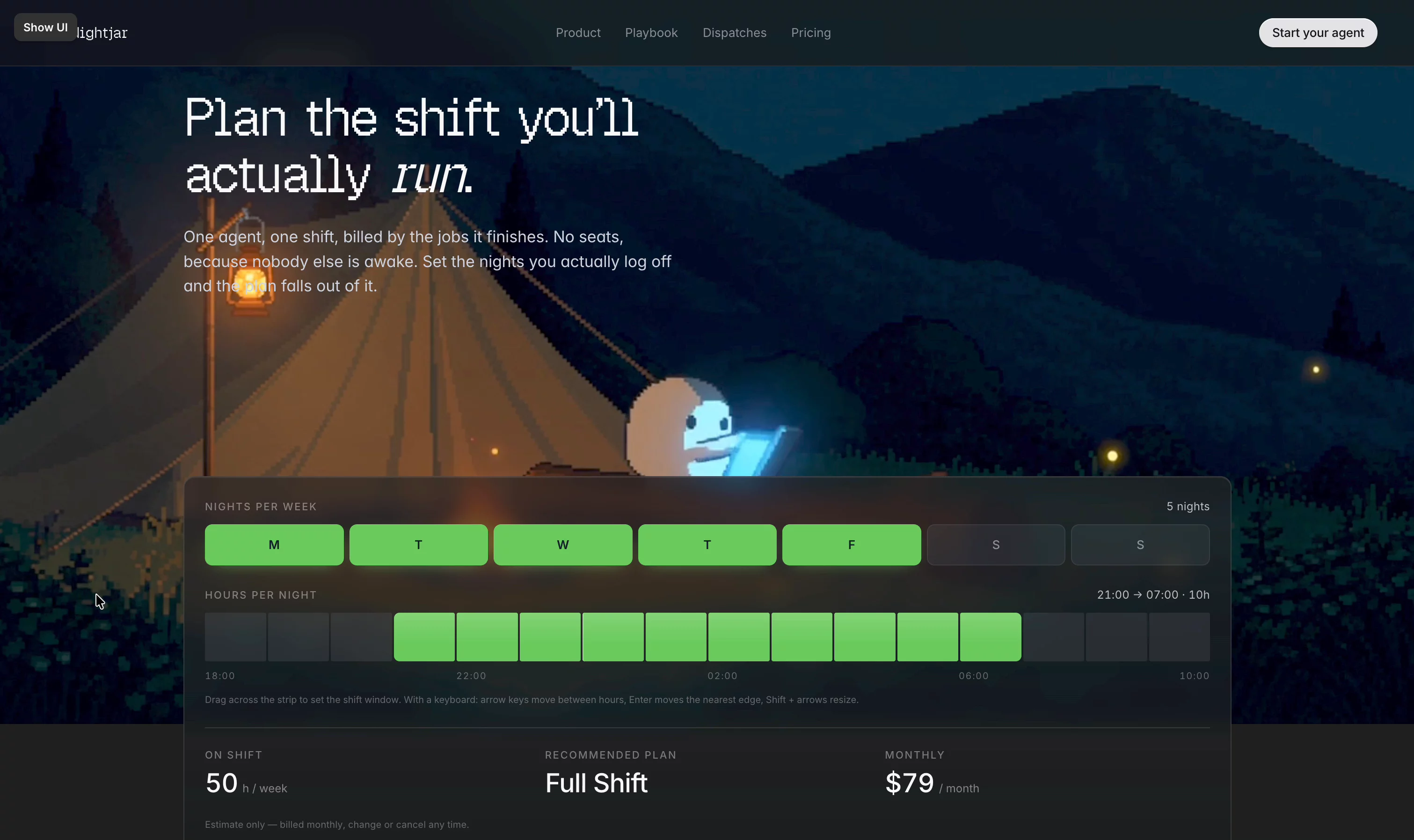
Jarvis Plan Page.
Pay for as much as you use. When you use, how ever you use.
Made the video background with Seedance 2.5 and rest of the page fully native in framer.
Orders page hero section from "Jarvis" Project.
Continuing the same story arc, Jarvis already has his task orders written on the board. Time to get them done one by one and publish a full report in the morning.
How it works page from "Jarvis" project!
Nightjar runs one shift a night. Here is every phase of it in order, including the parts where it stops and waits for you, and the part where you stop it.
Detail animation from the NightJar project.
Every job that you create gets a plan you can read in ten seconds. It writes it out before it touches anything - one step at a time, each with a timestamp and a tag and marks the step where it stops and asks you. Ten seconds is the spec, not a nice-to-have.
Interactive playable "404" page from Keystone Template!
Built fully in 3JS, all the buildings and the whole neighbourhood is mapped by 3. Everything is connected to your CMS Schema, so absolute zero hallucination.
Built a header where the product is visibly working while you read the headline.
Pixel-art night camp: you're asleep in the tent, the agent is at the laptop by the fire. Above the laptop, a live pipeline promotes Queued → Working → Done every 3.2s, timestamps walking through the night, counter climbing.
The scene is a 1.9MB looping video, not code — fire, fireflies and clouds for one decode. Its seam only stopped popping once I crossfaded the tail over the head; matching start and end frames at generation time wasn't enough.
Two things that bit me: re-keying all three pills each cycle made the whole stack blink, and anchoring the pills as a % of the viewport slid them off the laptop the moment the video got cover-cropped — the offset has to be a ratio of the video's width.
Built a "here's the problem" section where the icons act out the numbers instead of decorating them.
A vial fills to a quarter of the 1g line — that's the 4x. A globe turns under a map pin that never resolves to a place — that's the unsourced 76%.
The middle one is my favourite: a certification stamp drops onto a shield, holds just long enough to read as approved, then peels off and flies away, leaving a question mark. Certified, then not. That's the 85%.
Every card carries its source in the card, not in a footnote.
A hero that walks you through the house — room dock + Matterport, built in Framer.
Built a property hero in Framer where the gallery is the tour.
A frosted dock of rooms sits on the hero — hover across and the active one morphs open with its name, spec and a "3D tour" link while the photo crossfades. That link scrolls to a real Matterport scan that only loads its bundle on click, so the page stays fast for everyone who never opens it.
All CMS-driven — labels, specs and room photos come from each listing.
KeyStone Template — a word search that finds your neighbourhood
Small detail from the KeyStone homepage I had way too much fun building.
Below the neighbourhood cards sits a grid of letters — an actual word search. Hover a card and the grid solves itself: the neighbourhood's name gets circled, letter by letter, exactly like you'd ring an answer with a pen. Hillcrest, Marina District, Oak Park, Sunset Ridge — plus the cities hiding in the rows around them.
How it works under the hood:
- The grid is real text, not an image — every letter is a live layer, so it stays crisp at any size and picks up your typography
- Each card is linked to its word's position in the grid; hover triggers the circle to draw around the right letters while they snap to full contrast
- Words also cycle on their own when nothing's hovered, so the section never sits still
- Content stays editable — swap the neighbourhood names and the grid updates to match
The idea: browsing for a home is a search. So the section literally is one.
KeyStone Template — Residence page hero with WebGL image distortion
Hero section for the Residence page in KeyStone, my real-estate template.
The images run through a WebGL warping shader — as you move, the texture bends and tears for a split second before snapping back into place. It reads like a glitch, but it's fully controlled: displacement mapping driven by pointer velocity, so the distortion feels physical rather than random.
A few notes from building it:
- The effect lives in a code component layered behind native frames, so the layout stays fully editable on the canvas
- Distortion intensity is exposed as a property control — dial it from "subtle ripple" to "full glitch"
- Falls back to static images when WebGL isn't available, so nothing breaks
Nobody scrolls a real estate homepage. So I stopped putting a slideshow there. KeyStone's hero is a 3D model of the neighbourhood built with @threejs
: park, lake, swans, kids on the swings. Twelve houses wear for-sale signs. Hover over one, and it lifts with its price. Click it, and you land on that property's page. The other half is the finder: seven questions, then the three closest homes, with a WhatsApp or email hand-off. It's scripted, not AI — nothing to wire up, no key, no per-message cost, and it can't hallucinate a house that isn't in your CMS.
Live Demo: http://keystones.framer.website
Learning @threejs by building the dumbest possible logo section: no marquee — she walks in with a stepladder and a pot of paint and brushes your client logos onto the wall one at a time. Then rolls white over them and paints the next five.
Dark mode? She's an electrician.
KeyStone is a real estate template for brokerages, independent agents and property managers who need more than a brochure.
It ships a real property search — sticky multi-select filters for price, beds, baths and home type, live results, five sorts, pagination — beside a draggable, zoomable map whose pins pair with your listings. No API key, no billing account.
Also inside: a scripted property finder that asks seven questions and returns the three closest homes, a mortgage calculator, 5 CMS collections, and two playable 404s.
Live preview: https://keystones.framer.website
CMS Discovery OS Pro is live ⚡
Search, filter and sort any Framer CMS collection — without giving up the cards you designed. The controller never renders your cards; a small Bridge goes inside the card you already built.
Operators, multi-field sort profiles, numbered pagination, and a Setup Doctor that scores your wiring out of 100.
A testimonial section is usually a carousel. I wanted one where someone physically drags the next quote into frame. Everything in the frame is one WebGL scene. The rope is real braid — 3 strands wound on a core — and its lay shifts by exactly the length hauled, so you see it running through her hands instead of sitting there like a prop.
Play with it here: https://mehedihasan27.github.io/jerry-rope-testimonials/