About 01 Team Org Chart
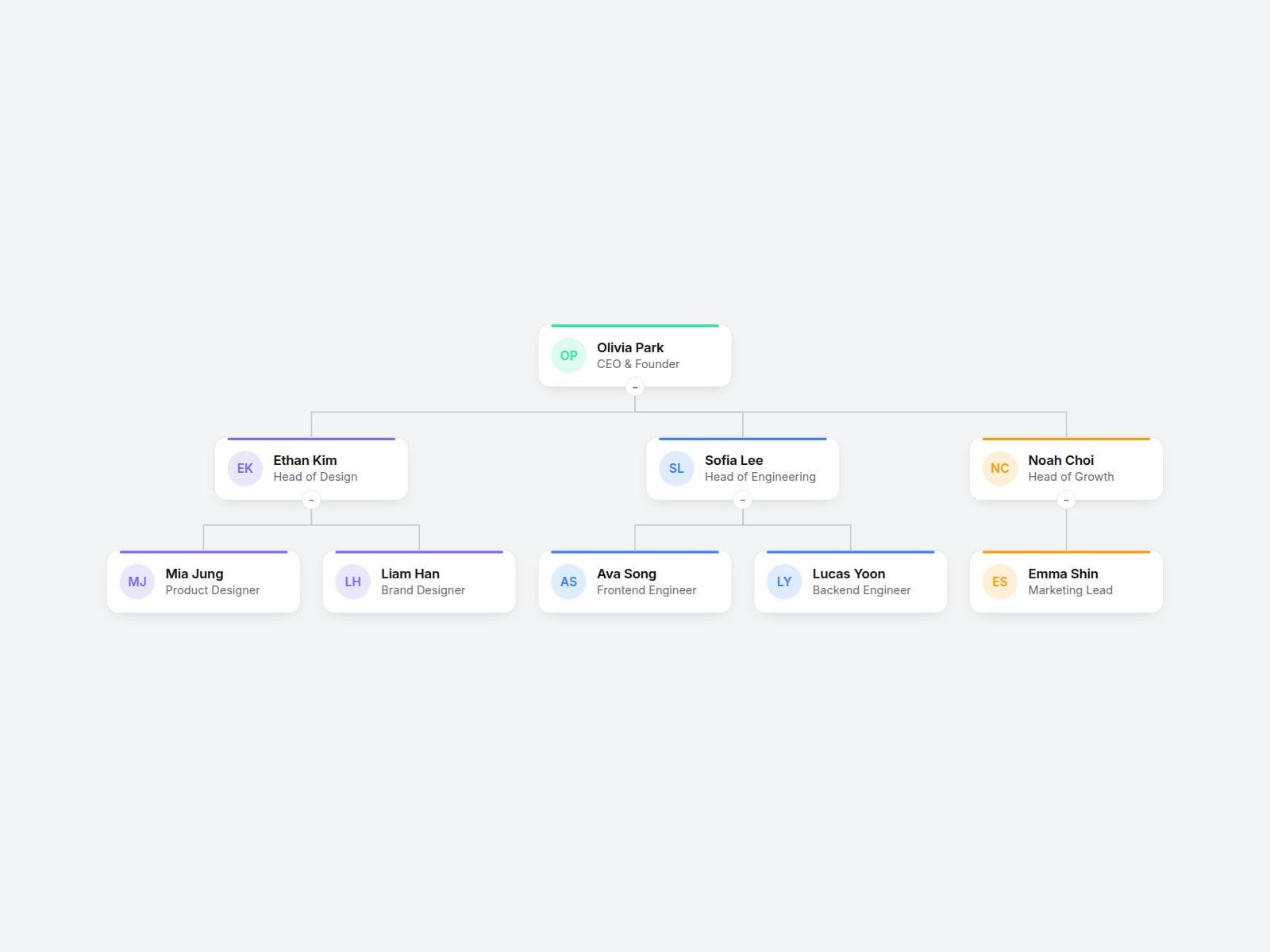
Add people, type who they report to, and Org Chart builds the whole hierarchy for you. Cards, connector lines and spacing are laid out automatically. No manual positioning, no nested frames. Perfect for About, Team and Company pages.
What you can customize
- People: name, role, photo, "Reports To" and team color
- Direction: vertical (top-down) or horizontal (left-to-right)
- Lines: elbow or curved connectors
- Expanded Levels: how many levels are open on load
- Collapsible: click a card to expand or collapse its team (+N badge shows hidden people)
- Overflow: Fit, Shrink or Scroll, so large teams never break on mobile
- Layout, colors, radius, shadow and separate name/role fonts
Why it's different
- Built from a flat list: just type the manager's name and the tree updates itself.
- Big org? Collapse teams and let Fit/Shrink keep everything readable on any screen.
- No photo? Initials avatars in each team's color are generated automatically.
How to install: copy the Component URL and paste it onto your Framer canvas (Cmd/Ctrl + V).
Built with code but fully customizable via property controls, no coding needed. Unlink is not provided so we can keep shipping updates. When an update is available, just click Update on the component.
Made by BrandingUp.