About Highlight Compare
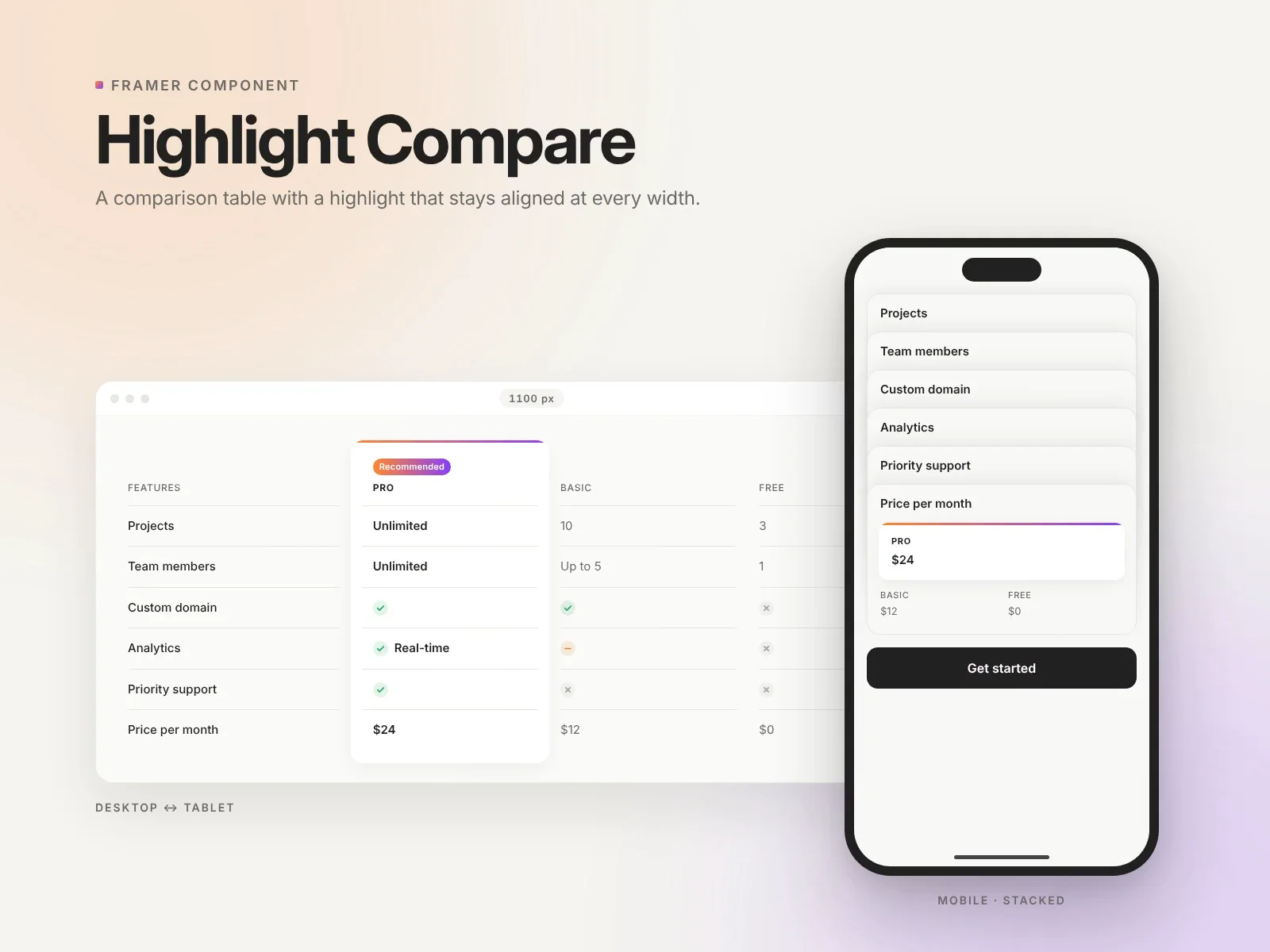
Compare plans, products or competitors in a clean, editable table, and highlight the column you want people to pick.
Most comparison tables in Framer fake the highlight with a card placed on top of the table. It looks right at one width and slips out of place at every other. Here the highlight is part of the grid itself, so it stays locked to its column on any screen.
Features
Up to 5 columns and unlimited rows, all edited in the properties panel
Highlight any column, with an optional badge ("Recommended", "Most popular"…)
Text or icons in every cell: type
yes,noorpartial, oryes: Real-timefor an icon with textStacks into readable blocks on mobile, with the highlighted answer first
The breakpoint follows the component's own width, so it also works in narrow columns
Real table semantics and screen-reader labels for the icons, which you can translate
Pick your font plus 9 color controls, so it fits your brand
Adjustable radius, column gap, row padding, first-column width and max width
Lightweight: no images, no external libraries
How to use
Drop the component onto your page and set its width to Fill.
Add your columns and rows in the properties panel.
Set "Highlight" to the column number you want to feature (0 = none).