About Booking Time Picker
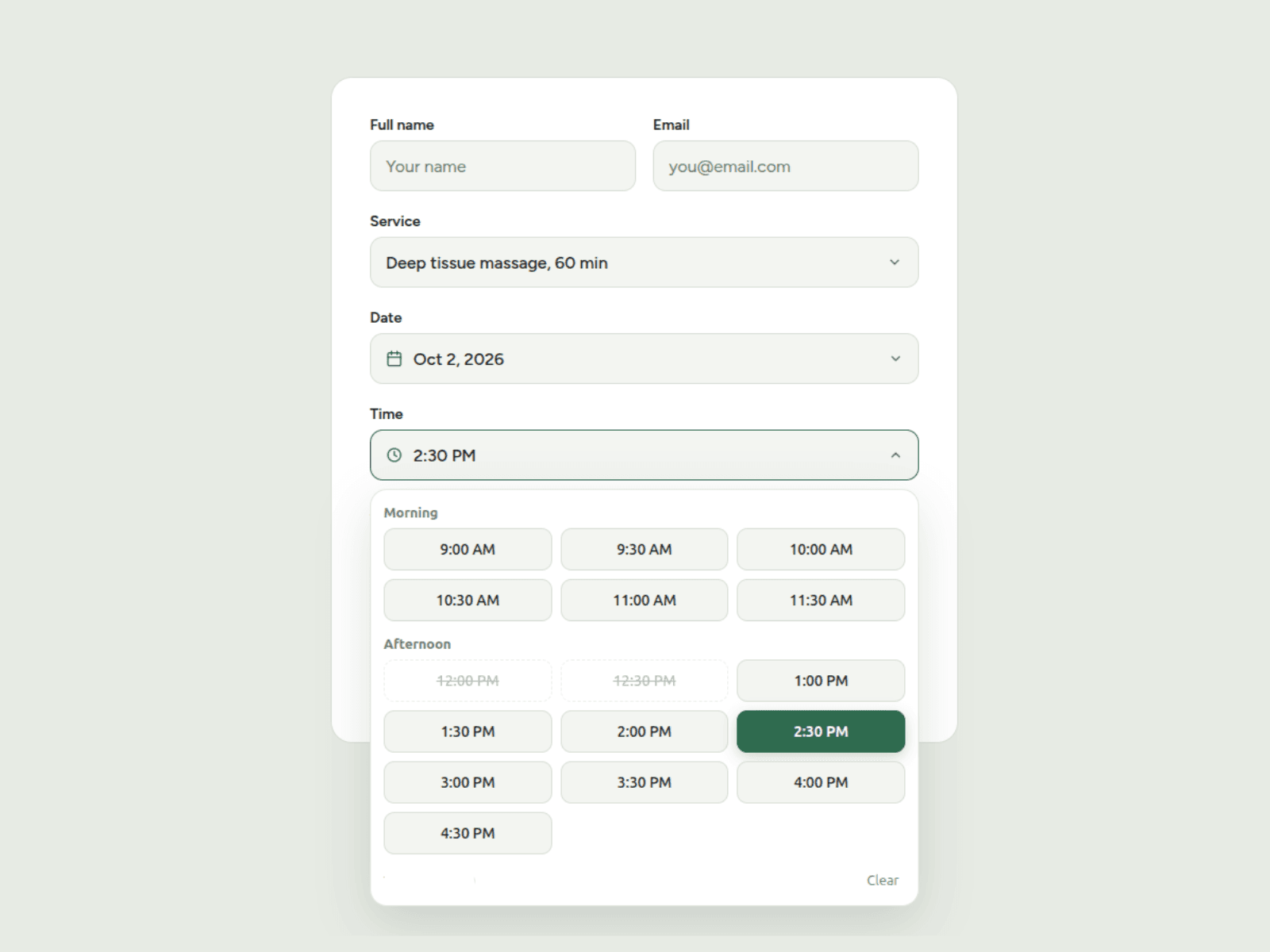
Booking Time Slot Picker is a fully customizable time picker built for Framer Forms. Visitors choose from a clean grid of available time slots instead of typing a time, which makes it ideal for appointments, consultations and reservations. It supports custom opening hours, flexible slot lengths, blocked times, same-day booking rules and advanced styling, and it matches the Booking Date Picker so your whole form looks consistent.
How to Use
Add to project: Copy and paste the component into a native Framer form. The component must be placed inside a Framer form to submit its value.
Set your hours: Enter your opening and closing times in 24h format (for example 09:00 and 17:00), then choose a slot length from 15 minutes to 2 hours. Slots are generated automatically.
Choose the display: Pick 12h (2:30 PM) or 24h (14:30) format, group slots into Morning, Afternoon and Evening, show end times (9:00 – 9:30), and set how many columns the grid uses.
Style it: Adjust fonts, colors, fill, borders, shadows, slot radius and placeholder text via the property panel. Use the same Primary Color as your Booking Date Picker and both components will match.
Optional restrictions: Block single times or whole ranges (for example
12:00, 15:00-16:00for lunch and meetings). Turn on Same-Day Only to hide times that have already passed, and set how much notice you need before a booking. You can also add a time zone note such as "EAT (GMT+3)" so customers know which time they're booking in.
The selected time is always submitted in a clean 24h format (for example 14:30), whatever display format you choose, so your form data stays consistent.
Use Cases
Appointment booking for salons, clinics, spas, coaches and consultants.
Restaurant and table reservations.
Discovery calls, demos and meeting scheduling.
Classes, tours and sessions with fixed start times.
Pair it with the Booking Date Picker for a complete date and time booking form.