About CMS Project Index
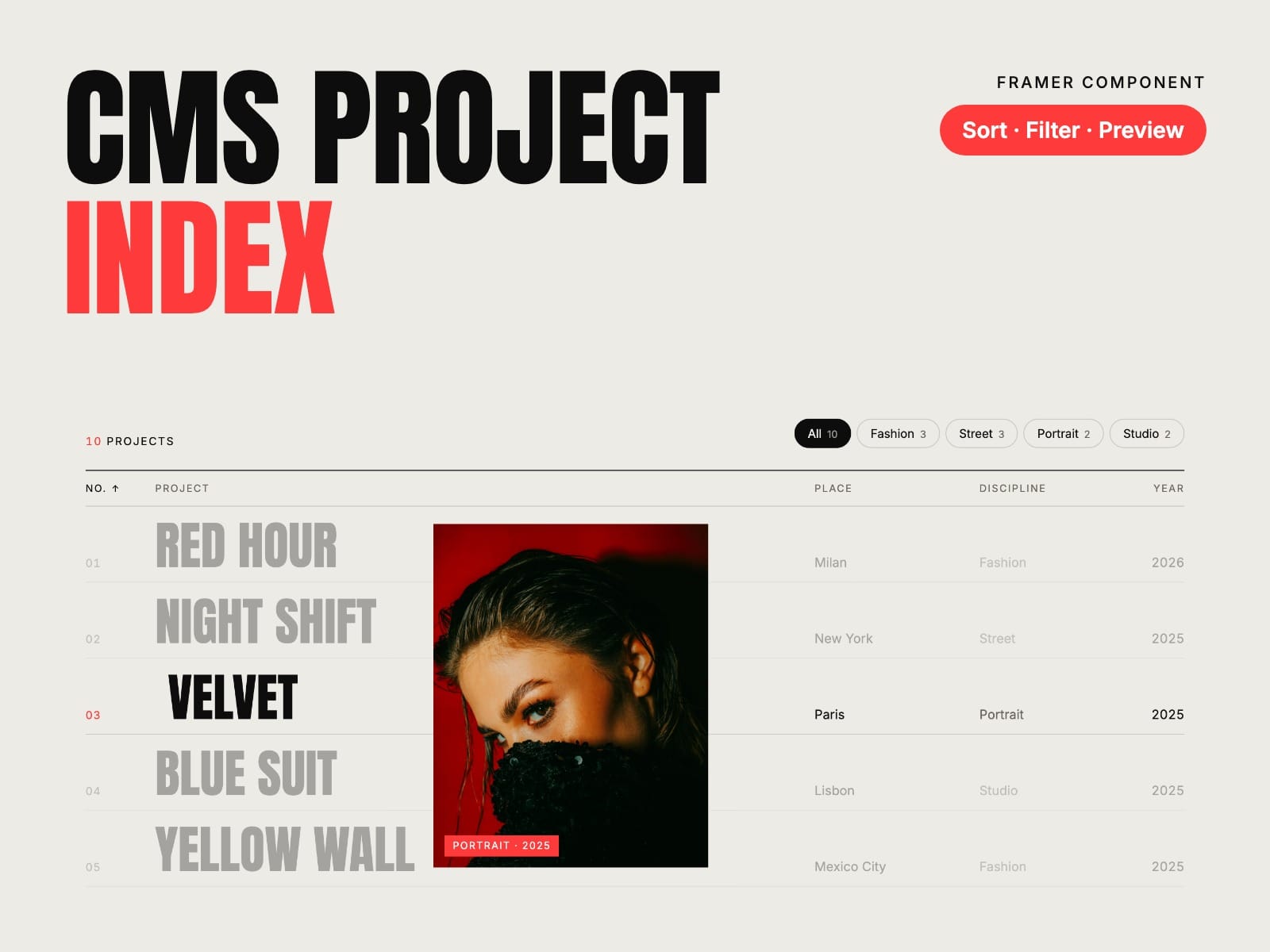
Your projects, one line each. The project index of a studio site, from your CMS: columns that sort, filters with counts, and the photo or video following the cursor, beside the list or opening in the row. Launch week: 30% off with the code INDEX30, until 12 November.
How to use
Paste CMS Project Index and its Index Item into your Framer project
Put an Index Item in your Collection List and connect title, place, discipline, year or date, image, video, summary and link
Pick the preview, the columns, your fonts and colours
Key features
Number, project, place, discipline and year in columns
Sort by any column from the header, or set the starting order
Filters by discipline with counts; Framer’s own filters work too
Three previews: follows the cursor, split beside the list, or opens in the row
Video previews from a File field, muted and in a loop
Phones and touch screens open the photo in the row
Keyboard, screen reader and reduced motion friendly, no network requests of its own
Full documentation: miguelrecio-components.framer.website/cms-project-index/docs
One-time payment. Single-Use licence: one website or project per licence. Questions: info@miguelrecio.es.