About Shop the Photo
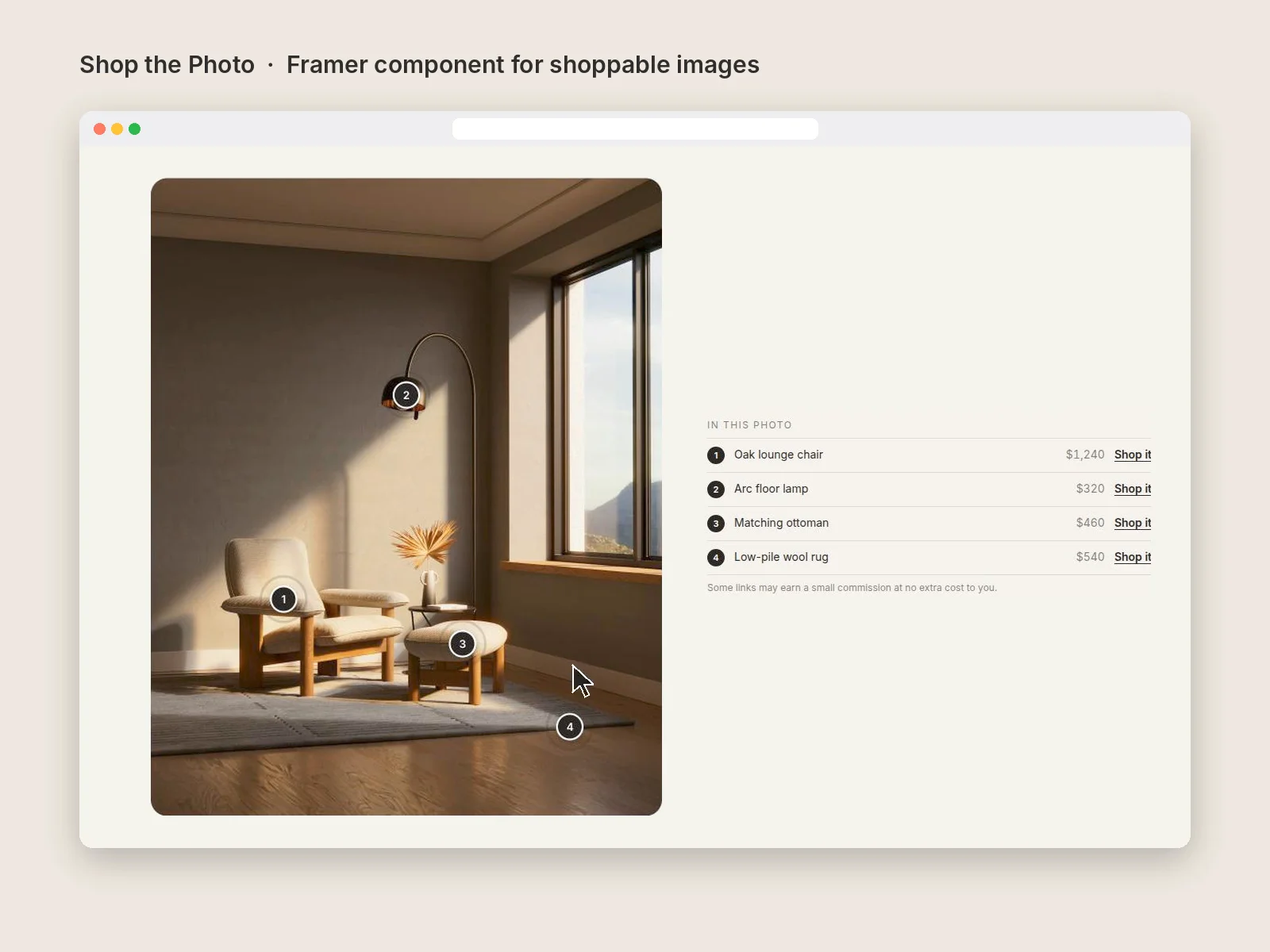
Put tappable dots on any photo. Each dot opens a small card with the product name, price, a note and a link. A placement grid shows on the canvas while you edit, so you can place each dot by reading two numbers instead of nudging it around. An optional list under the photo repeats every item for people who'd rather scroll. Built for interior designers, home stagers, fashion and lifestyle bloggers, and shops.
What's included:
Up to 12 dots per photo, numbered or plain, with a soft pulse
Product card with name, price, note and link; closes on Escape or a tap outside
Placement grid that only appears on the canvas, never to visitors
Optional item list under the photo
Affiliate mode: marks links as sponsored for Google and adds a short disclosure line
Five photo shapes, your colors, corners and font
How to use it:
Drag Shop the Photo onto a page and set its width.
Choose your Photo and its Shape.
Turn on Placement grid. Lines labelled 10 to 90 appear over the photo on the canvas.
Under Dots, add one dot per product. Read the grid to set Across % (left to right) and Down % (top to bottom). Fill in Name, Price, Note, Link text and Link.
Turn Placement grid off when you're done (visitors never see it either way).
Turn on Affiliate links if you earn commission from the links.