About Gooey Balloon slider
Description
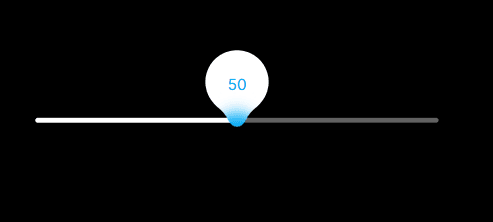
Gooey Balloon Slider transforms a practical questionnaire or calculator input into a tactile liquid interaction. Press the thumb and its value lifts into a balloon connected through a soft SVG goo effect; drag or flick across the track and the label follows with elastic weight before settling back into place.
Features
Configurable minimum, maximum, step and starting value with safe clamping.
Automatic decimal formatting plus editable prefix and suffix.
Optional question text with Preselected or Unanswered start behavior.
Independent question typography, size, alignment and prompt-to-slider spacing.
Required-answer validation with custom error copy and accessible invalid state.
Semantic endpoint labels such as Not likely and Very likely.
Lifted SVG value balloon, shrinking thumb and adjustable goo connection.
Direct pointer/touch dragging, track clicking and optional projected inertia.
Optional minimum/maximum labels and progress fill.
Editable track, balloon, thumb and text colors with Framer-native Font control.
Source-timed entrance from Minimum to Value, with adjustable duration and liquid/text propagation.
Source-faithful white resting orb, with an optional text-only mode.
Hidden named form value plus Framer On Change and On Commit events.
Reduced-motion behavior and stable Canvas/export rendering.
One TSX file with no GSAP, Draggable, ThrowPropsPlugin or extra runtime dependency.
Setup
Paste the Component URL into a Framer project.
Set Minimum, Maximum, Step and Value, then give the answer a unique Form Name.
For questionnaires, select Questionnaire → Unanswered, add the question and endpoint labels, and keep Required enabled if needed.
Place the component inside the same native Framer Form as its Submit button and select the Form destination.
Tune Track, Balloon, Font and Motion, then test submission, pointer, touch and keyboard behavior in Preview and published output.