Aman Qureshi10h
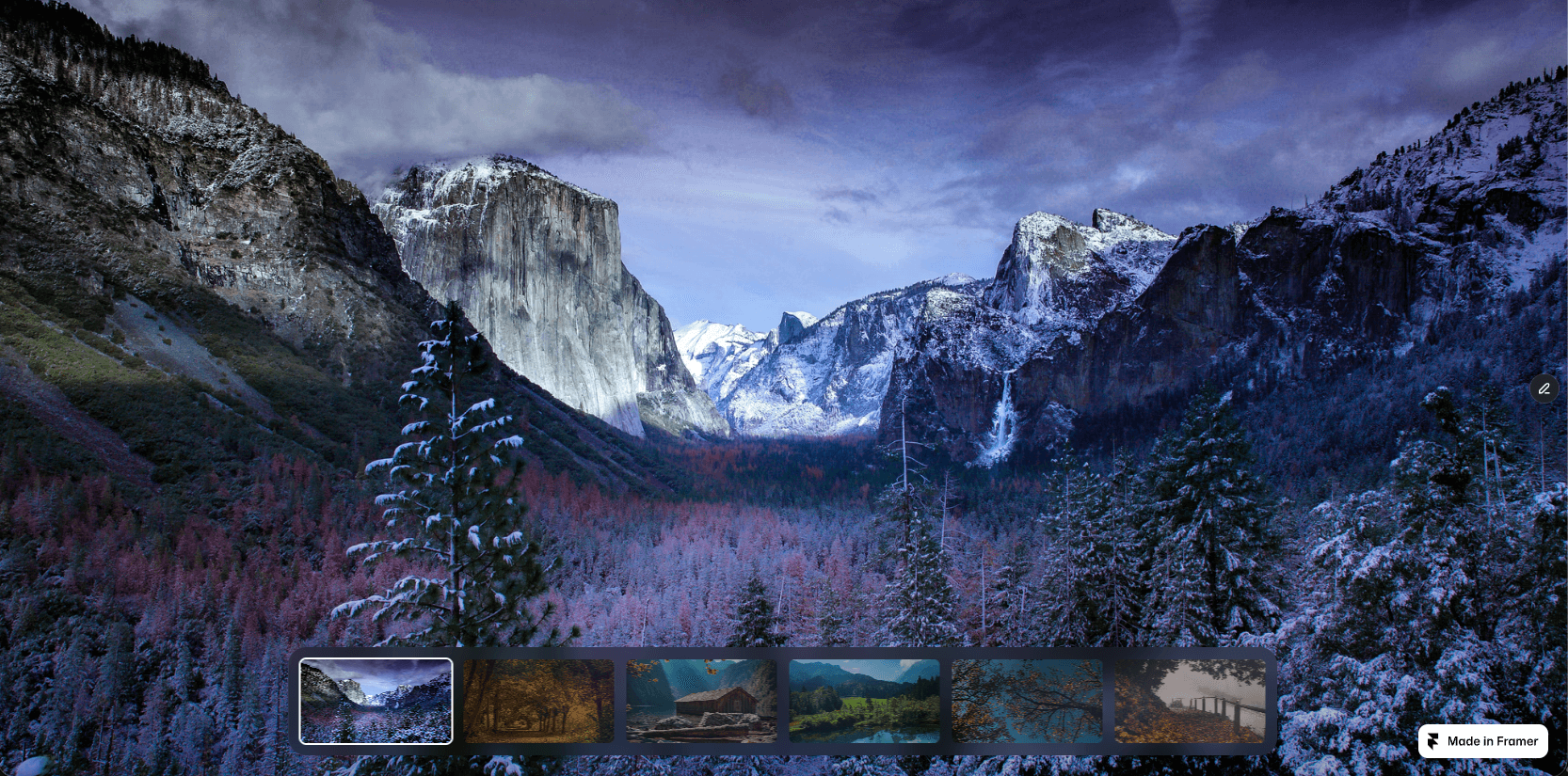
Took a plain screenshot of the Tabfolio Pro Framer template by @Sebastian and made it presentable in about 2 minutes.
Dropped it in, picked a matching background, exported.
Made with Mockship.
try it now at: mockship.app

Took a plain screenshot of the Tabfolio Pro Framer template by @Sebastian and made it presentable in about 2 minutes.
Dropped it in, picked a matching background, exported.
Made with Mockship.
try it now at: mockship.app
Every time I needed a clean screenshot for a landing page or a case study, I'd lose 20 minutes hunting Figma templates. Then another 10 tweaking shadows. Now it's one drop and one export. mockship.app
It's live. Mockship is a screenshot mockup editor — drop a screenshot, pick a browser frame or device mockup, choose a background that matches your colors, export up to 6K. No Figma templates. No Photoshop. Built solo over the last few months. mockship.app
It's done. Mockship is complete and tested.
For anyone who missed the earlier posts — it's a screenshot mockup editor I built solo. Drop a website or app screenshot, style it, export something that looks like it belongs in a portfolio.
What's shipping:
✅ Full editor
✅ Browser frames — Chrome and Safari, light and dark, with your own favicon and URL
✅ Device mockups — phones, tablets, laptops
✅ Backgrounds, overlays, patterns, effects
✅ Saved designs
✅ Shareable links
✅ Cloud storage
✅ Payments
✅ Marketing site
✅ Export up to 6K in PNG, JPEG, or WebP
Every box checked. Every flow tested.
Built this because I kept losing 20 minutes hunting Figma templates every time a project needed a clean showcase image. If you've felt that, it's for you.
Launching next week → mockship.app
Designers spend 20 minutes hunting Figma templates just to put a website screenshot on a nice background.
So I built this into Mockship:
Drop your full screenshot. Pick a background. Ship it.
No frames. No devices. Just your website looking like it belongs in a portfolio.
Stop designing the showcase. Start shipping it 👇
mockship.app — coming soon. 🚀
Every landing page needs a product shot in the hero. And it's always the last thing you do, at 11pm, when the rest of the site is already done.
I've been building Mockship to make that part take two minutes instead of forty.
15 templates so far. Each one is a finished setup — background, browser or device frame, tilt, shadow, layout. Drop a screenshot in, export at up to 6K, drag it into your Framer project.
Screenshot Clean when the UI should carry it. Browser Frost for hero sections. Three Phones Dark for app pages. Browser Canopy when the shot needs to feel like it lives somewhere.
Adding more. If there's a style you keep rebuilding by hand for client sites, tell me — I'll make it a preset.
Been quiet here lately — that's because I've been heads down building something.
Meet Mockship — a screenshot mockup editor I'm building from scratch.
Drop a screenshot. Pick a browser frame, device mockup, or go frameless. Style the background, tilt it, add your brand's favicon and URL. Export up to 6K in PNG, JPEG, or WebP.
Built for designers, devs, and creators who are tired of hunting Figma templates every time they need a clean showcase image.
Here are some exports made entirely inside the tool 👇
Launching end of this month at mockship
Would love to hear what features you'd want in something like this.
first sale on Cinestrip Slider 🎉parallax gallery slider for Framer, live on the marketplace.onto the next one.
TextScroll — three-stage scroll color reveal
Your text moves through Initial → Accent → Final as it scrolls. Character, Word, or Line. Pin Section for locked hero moments. GSAP ScrollTrigger under the hood, native Framer fonts on top.
Plug in, pick three colors, ship.
Preview Link: https://textscrollwith3colors.framer.website/
CineStrip Slider v2 is live 🎬
20 image slots, CMS-ready, auto-centering dock, and buttery editor performance.
Free update for everyone who owns it.
Live on Marketplace now.
Preview Link: https://calm-gibbon-082209.framer.app/
Just shipped: CineDock Slider 🎬
A full-viewport parallax slider with a glass dock that auto-scrolls to follow your slides. Add up to 20 images from the Property Panel — or connect the image slots to your CMS and let clients manage slides without ever opening the canvas.
My favorite detail: jump from slide 2 to slide 14 and it animates as one clean cinematic step — no filmstrip chaos flying across the screen.
Built for photography portfolios, interiors, real estate, and heroes that need to hit hard on first load.
✦ CMS-ready image slots
✦ Auto-scrolling glass thumbnail dock
✦ 4 curated easing curves + parallax depth
✦ Responsive thumb sizes per breakpoint
Live preview : https://calm-gibbon-082209.framer.app/
Would love feedback from anyone building image-heavy sites 👇
New component: CineStrip Slider 🎬
✦ Cinematic parallax transitions
✦ Auto-scrolling glass thumbnail dock
✦ Up to 20 images, added in clicks
✦ 4 curated easing curves
✦ Works beautifully on every breakpoint
Made for portfolios and showcase sites
Just launched my Parallax Slider CMS on the Framer Marketplace!
1000+ lines of code packed into a fully responsive component — viewport-aware sizing, per-breakpoint controls, sidebar toggle, all customizable from the panel, no code needed.
Would love for you to check it out and share feedback
Took a plain screenshot of the Tabfolio Pro Framer template by @Sebastian and made it presentable in about 2 minutes.
Dropped it in, picked a matching background, exported.
Made with Mockship.
try it now at: mockship.app
Every time I needed a clean screenshot for a landing page or a case study, I'd lose 20 minutes hunting Figma templates. Then another 10 tweaking shadows. Now it's one drop and one export. mockship.app
It's live. Mockship is a screenshot mockup editor — drop a screenshot, pick a browser frame or device mockup, choose a background that matches your colors, export up to 6K. No Figma templates. No Photoshop. Built solo over the last few months. mockship.app
It's done. Mockship is complete and tested.
For anyone who missed the earlier posts — it's a screenshot mockup editor I built solo. Drop a website or app screenshot, style it, export something that looks like it belongs in a portfolio.
What's shipping:
✅ Full editor
✅ Browser frames — Chrome and Safari, light and dark, with your own favicon and URL
✅ Device mockups — phones, tablets, laptops
✅ Backgrounds, overlays, patterns, effects
✅ Saved designs
✅ Shareable links
✅ Cloud storage
✅ Payments
✅ Marketing site
✅ Export up to 6K in PNG, JPEG, or WebP
Every box checked. Every flow tested.
Built this because I kept losing 20 minutes hunting Figma templates every time a project needed a clean showcase image. If you've felt that, it's for you.
Launching next week → mockship.app
Designers spend 20 minutes hunting Figma templates just to put a website screenshot on a nice background.
So I built this into Mockship:
Drop your full screenshot. Pick a background. Ship it.
No frames. No devices. Just your website looking like it belongs in a portfolio.
Stop designing the showcase. Start shipping it 👇
mockship.app — coming soon. 🚀
Every landing page needs a product shot in the hero. And it's always the last thing you do, at 11pm, when the rest of the site is already done.
I've been building Mockship to make that part take two minutes instead of forty.
15 templates so far. Each one is a finished setup — background, browser or device frame, tilt, shadow, layout. Drop a screenshot in, export at up to 6K, drag it into your Framer project.
Screenshot Clean when the UI should carry it. Browser Frost for hero sections. Three Phones Dark for app pages. Browser Canopy when the shot needs to feel like it lives somewhere.
Adding more. If there's a style you keep rebuilding by hand for client sites, tell me — I'll make it a preset.
Been quiet here lately — that's because I've been heads down building something.
Meet Mockship — a screenshot mockup editor I'm building from scratch.
Drop a screenshot. Pick a browser frame, device mockup, or go frameless. Style the background, tilt it, add your brand's favicon and URL. Export up to 6K in PNG, JPEG, or WebP.
Built for designers, devs, and creators who are tired of hunting Figma templates every time they need a clean showcase image.
Here are some exports made entirely inside the tool 👇
Launching end of this month at mockship
Would love to hear what features you'd want in something like this.
first sale on Cinestrip Slider 🎉parallax gallery slider for Framer, live on the marketplace.onto the next one.
TextScroll — three-stage scroll color reveal
Your text moves through Initial → Accent → Final as it scrolls. Character, Word, or Line. Pin Section for locked hero moments. GSAP ScrollTrigger under the hood, native Framer fonts on top.
Plug in, pick three colors, ship.
Preview Link: https://textscrollwith3colors.framer.website/
CineStrip Slider v2 is live 🎬
20 image slots, CMS-ready, auto-centering dock, and buttery editor performance.
Free update for everyone who owns it.
Live on Marketplace now.
Preview Link: https://calm-gibbon-082209.framer.app/
Just shipped: CineDock Slider 🎬
A full-viewport parallax slider with a glass dock that auto-scrolls to follow your slides. Add up to 20 images from the Property Panel — or connect the image slots to your CMS and let clients manage slides without ever opening the canvas.
My favorite detail: jump from slide 2 to slide 14 and it animates as one clean cinematic step — no filmstrip chaos flying across the screen.
Built for photography portfolios, interiors, real estate, and heroes that need to hit hard on first load.
✦ CMS-ready image slots
✦ Auto-scrolling glass thumbnail dock
✦ 4 curated easing curves + parallax depth
✦ Responsive thumb sizes per breakpoint
Live preview : https://calm-gibbon-082209.framer.app/
Would love feedback from anyone building image-heavy sites 👇
New component: CineStrip Slider 🎬
✦ Cinematic parallax transitions
✦ Auto-scrolling glass thumbnail dock
✦ Up to 20 images, added in clicks
✦ 4 curated easing curves
✦ Works beautifully on every breakpoint
Made for portfolios and showcase sites
Just launched my Parallax Slider CMS on the Framer Marketplace!
1000+ lines of code packed into a fully responsive component — viewport-aware sizing, per-breakpoint controls, sidebar toggle, all customizable from the panel, no code needed.
Would love for you to check it out and share feedback
Took a plain screenshot of the Tabfolio Pro Framer template by @Sebastian and made it presentable in about 2 minutes.
Dropped it in, picked a matching background, exported.
Made with Mockship.
try it now at: mockship.app
Every time I needed a clean screenshot for a landing page or a case study, I'd lose 20 minutes hunting Figma templates. Then another 10 tweaking shadows. Now it's one drop and one export. mockship.app
It's live. Mockship is a screenshot mockup editor — drop a screenshot, pick a browser frame or device mockup, choose a background that matches your colors, export up to 6K. No Figma templates. No Photoshop. Built solo over the last few months. mockship.app
It's done. Mockship is complete and tested.
For anyone who missed the earlier posts — it's a screenshot mockup editor I built solo. Drop a website or app screenshot, style it, export something that looks like it belongs in a portfolio.
What's shipping:
✅ Full editor
✅ Browser frames — Chrome and Safari, light and dark, with your own favicon and URL
✅ Device mockups — phones, tablets, laptops
✅ Backgrounds, overlays, patterns, effects
✅ Saved designs
✅ Shareable links
✅ Cloud storage
✅ Payments
✅ Marketing site
✅ Export up to 6K in PNG, JPEG, or WebP
Every box checked. Every flow tested.
Built this because I kept losing 20 minutes hunting Figma templates every time a project needed a clean showcase image. If you've felt that, it's for you.
Launching next week → mockship.app
Designers spend 20 minutes hunting Figma templates just to put a website screenshot on a nice background.
So I built this into Mockship:
Drop your full screenshot. Pick a background. Ship it.
No frames. No devices. Just your website looking like it belongs in a portfolio.
Stop designing the showcase. Start shipping it 👇
mockship.app — coming soon. 🚀
Every landing page needs a product shot in the hero. And it's always the last thing you do, at 11pm, when the rest of the site is already done.
I've been building Mockship to make that part take two minutes instead of forty.
15 templates so far. Each one is a finished setup — background, browser or device frame, tilt, shadow, layout. Drop a screenshot in, export at up to 6K, drag it into your Framer project.
Screenshot Clean when the UI should carry it. Browser Frost for hero sections. Three Phones Dark for app pages. Browser Canopy when the shot needs to feel like it lives somewhere.
Adding more. If there's a style you keep rebuilding by hand for client sites, tell me — I'll make it a preset.
Been quiet here lately — that's because I've been heads down building something.
Meet Mockship — a screenshot mockup editor I'm building from scratch.
Drop a screenshot. Pick a browser frame, device mockup, or go frameless. Style the background, tilt it, add your brand's favicon and URL. Export up to 6K in PNG, JPEG, or WebP.
Built for designers, devs, and creators who are tired of hunting Figma templates every time they need a clean showcase image.
Here are some exports made entirely inside the tool 👇
Launching end of this month at mockship
Would love to hear what features you'd want in something like this.
first sale on Cinestrip Slider 🎉parallax gallery slider for Framer, live on the marketplace.onto the next one.
TextScroll — three-stage scroll color reveal
Your text moves through Initial → Accent → Final as it scrolls. Character, Word, or Line. Pin Section for locked hero moments. GSAP ScrollTrigger under the hood, native Framer fonts on top.
Plug in, pick three colors, ship.
Preview Link: https://textscrollwith3colors.framer.website/
CineStrip Slider v2 is live 🎬
20 image slots, CMS-ready, auto-centering dock, and buttery editor performance.
Free update for everyone who owns it.
Live on Marketplace now.
Preview Link: https://calm-gibbon-082209.framer.app/
Just shipped: CineDock Slider 🎬
A full-viewport parallax slider with a glass dock that auto-scrolls to follow your slides. Add up to 20 images from the Property Panel — or connect the image slots to your CMS and let clients manage slides without ever opening the canvas.
My favorite detail: jump from slide 2 to slide 14 and it animates as one clean cinematic step — no filmstrip chaos flying across the screen.
Built for photography portfolios, interiors, real estate, and heroes that need to hit hard on first load.
✦ CMS-ready image slots
✦ Auto-scrolling glass thumbnail dock
✦ 4 curated easing curves + parallax depth
✦ Responsive thumb sizes per breakpoint
Live preview : https://calm-gibbon-082209.framer.app/
Would love feedback from anyone building image-heavy sites 👇
New component: CineStrip Slider 🎬
✦ Cinematic parallax transitions
✦ Auto-scrolling glass thumbnail dock
✦ Up to 20 images, added in clicks
✦ 4 curated easing curves
✦ Works beautifully on every breakpoint
Made for portfolios and showcase sites
Just launched my Parallax Slider CMS on the Framer Marketplace!
1000+ lines of code packed into a fully responsive component — viewport-aware sizing, per-breakpoint controls, sidebar toggle, all customizable from the panel, no code needed.
Would love for you to check it out and share feedback