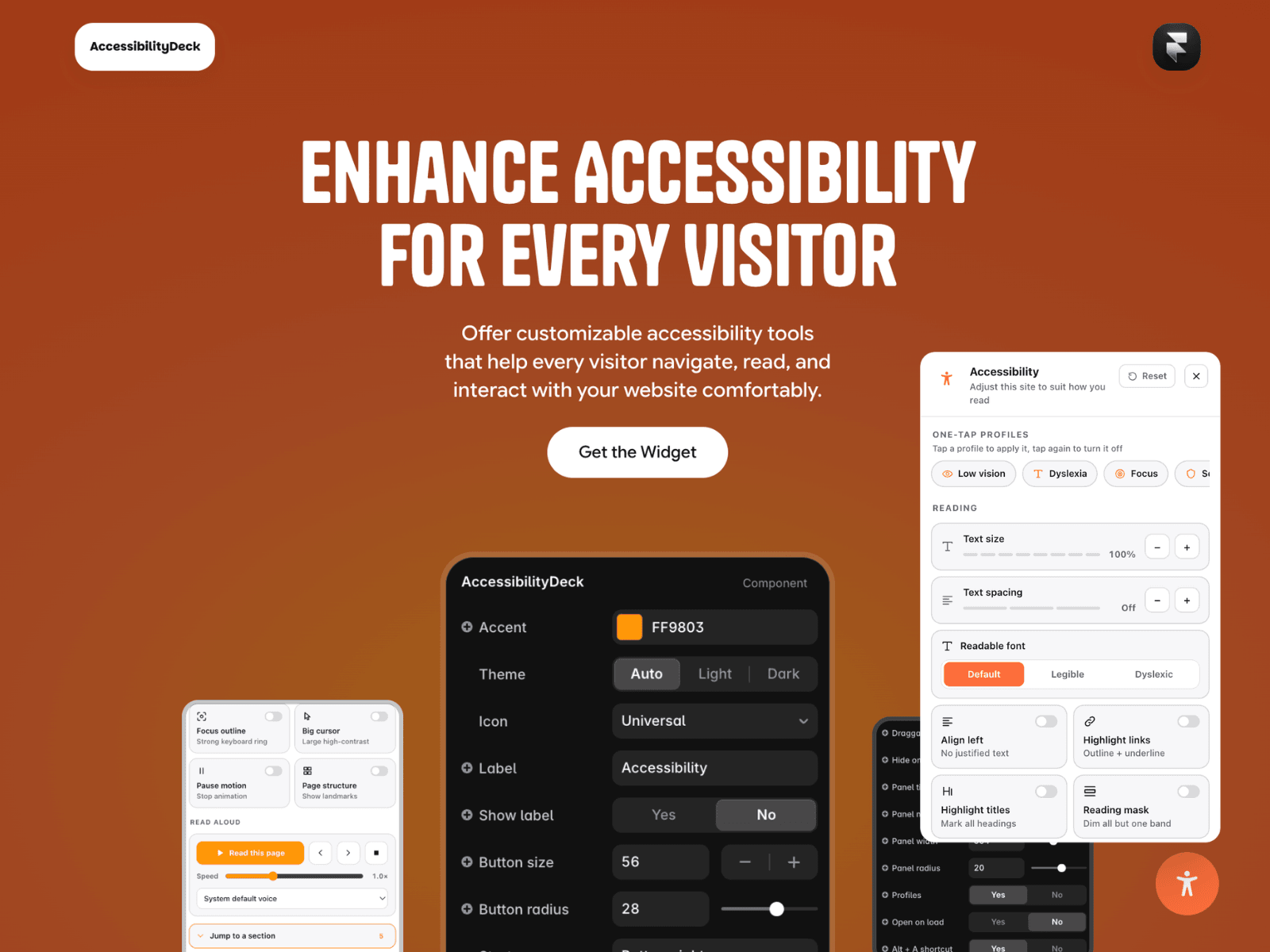
AccessibilityDeck adds a preference panel to your Framer site, giving visitors control over how they read your content. Most people don't browse in ideal conditions — sunlight, migraine, dyslexia, ageing eyesight. One button opens nineteen controls, remembered next visit.
No widget can make a site WCAG compliant on its own, but AccessibilityDeck supports WCAG-aligned usability by improving readability, operability and user control.
Reading: Text size (100–180%) · Text spacing (WCAG 1.4.12 metrics) · Atkinson Hyperlegible and OpenDyslexic fonts · Align left · Highlight links · Highlight headings · Reading mask · Reading guide
Colour: Contrast (dark, invert, boost) · Saturation · Low blue light · Colour vision filters · Hide images
Navigation and motion: Focus outline · Big cursor · Pause motion · Page structure overlay · Section jump · Read aloud with speed and voice control
Plus seven one-tap profiles: Low vision · Dyslexia · Focus · Seizure safe · Low glare · Motor · Senior
The panel renders outside <body>, so page-wide contrast filters can't wash out the controls. Text scaling reads each element's original size instead of assuming rem units, so it works on pixel-built Framer sites. It claims scroll gestures before smooth-scroll components can swallow them, where other panels stall. The panel itself meets WCAG 2.2 AA.
Around 45 property controls, including an on/off switch for each tool. Preferences stay in the visitor's browser — no server, no cookies, no analytics.
AccessibilityDeck is a user preference layer. Your site still needs accessible structure, link text, form labels, colour contrast and alt text. Screen reader users get little from a panel like this; correct markup is what helps them. Contrast filters make fixed headers scroll. Read aloud voices vary by device.
Full scope and limitations: https://accessibilitydeck.framer.website/details
Setup: one instance per page, layer set to Position → Absolute.

AccessibilityDeck adds a preference panel to your Framer site, giving visitors control over how they read your content. Most people don't browse in ideal conditions — sunlight, migraine, dyslexia, ageing eyesight. One button opens nineteen controls, remembered next visit.
No widget can make a site WCAG compliant on its own, but AccessibilityDeck supports WCAG-aligned usability by improving readability, operability and user control.
Reading: Text size (100–180%) · Text spacing (WCAG 1.4.12 metrics) · Atkinson Hyperlegible and OpenDyslexic fonts · Align left · Highlight links · Highlight headings · Reading mask · Reading guide
Colour: Contrast (dark, invert, boost) · Saturation · Low blue light · Colour vision filters · Hide images
Navigation and motion: Focus outline · Big cursor · Pause motion · Page structure overlay · Section jump · Read aloud with speed and voice control
Plus seven one-tap profiles: Low vision · Dyslexia · Focus · Seizure safe · Low glare · Motor · Senior
The panel renders outside <body>, so page-wide contrast filters can't wash out the controls. Text scaling reads each element's original size instead of assuming rem units, so it works on pixel-built Framer sites. It claims scroll gestures before smooth-scroll components can swallow them, where other panels stall. The panel itself meets WCAG 2.2 AA.
Around 45 property controls, including an on/off switch for each tool. Preferences stay in the visitor's browser — no server, no cookies, no analytics.
AccessibilityDeck is a user preference layer. Your site still needs accessible structure, link text, form labels, colour contrast and alt text. Screen reader users get little from a panel like this; correct markup is what helps them. Contrast filters make fixed headers scroll. Read aloud voices vary by device.
Full scope and limitations: https://accessibilitydeck.framer.website/details
Setup: one instance per page, layer set to Position → Absolute.