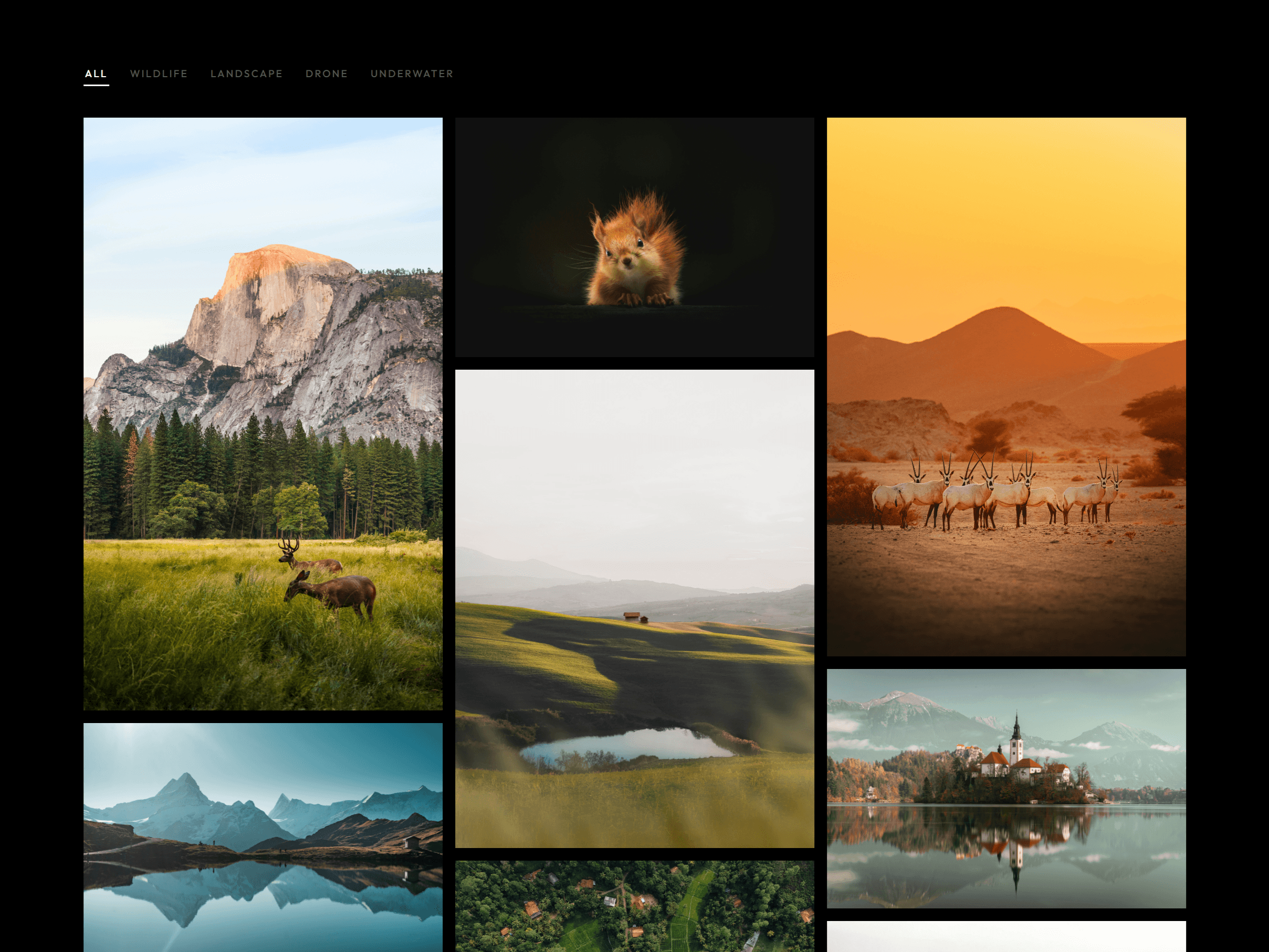
A filterable photo gallery with a fullscreen lightbox. Drop it on a page, add your images in the panel, and you have a working portfolio grid - no CMS, no custom code, no theme setup required.
The grid
Add photos in the panel: image, title, category, location
Filter bar with an "All" button - categories are fully renamable
3 layouts: uniform grid, masonry, or a shape preset per photo
Column count set separately for desktop and tablet, single column on mobile
Hover overlay with the photo title and an adjustable zoom
The lightbox
Opens fullscreen, scoped to the active category
Arrow-key navigation, Escape or click-outside to close
Optional caption under the image: location name, Google Maps link, Instagram link
Arrows and close button beside the image or at the screen edges
Optional page zoom-out and blur behind the overlay
Photo counter you can style or hide
Made to customize
Dark, Light, or Auto theme - Auto follows your site's theme toggle or the visitor's OS setting
Every color has a dark and light value
Type any Google Font name and it loads automatically
Full control over sizes, spacing, padding, and letter spacing
Scroll-reveal animation with adjustable stagger, speed, and delay
Panel controls grouped into Theme, Content, Colors, Typography, Layout, Lightbox, Caption, and Animation
Responsive across desktop, tablet, and mobile.
Built for the Exposure photography template - https://exposuretemplate.framer.website

A filterable photo gallery with a fullscreen lightbox. Drop it on a page, add your images in the panel, and you have a working portfolio grid - no CMS, no custom code, no theme setup required.
The grid
Add photos in the panel: image, title, category, location
Filter bar with an "All" button - categories are fully renamable
3 layouts: uniform grid, masonry, or a shape preset per photo
Column count set separately for desktop and tablet, single column on mobile
Hover overlay with the photo title and an adjustable zoom
The lightbox
Opens fullscreen, scoped to the active category
Arrow-key navigation, Escape or click-outside to close
Optional caption under the image: location name, Google Maps link, Instagram link
Arrows and close button beside the image or at the screen edges
Optional page zoom-out and blur behind the overlay
Photo counter you can style or hide
Made to customize
Dark, Light, or Auto theme - Auto follows your site's theme toggle or the visitor's OS setting
Every color has a dark and light value
Type any Google Font name and it loads automatically
Full control over sizes, spacing, padding, and letter spacing
Scroll-reveal animation with adjustable stagger, speed, and delay
Panel controls grouped into Theme, Content, Colors, Typography, Layout, Lightbox, Caption, and Animation
Responsive across desktop, tablet, and mobile.
Built for the Exposure photography template - https://exposuretemplate.framer.website
 Tamás Péter


