Framevia | The Visual Pratik

Framevia | The Visual Pratik

Crafting premium Framer templates and high-converting websites with bold design, clean interactions, and exceptional user experience.

Creator4 Listings
Framevia | The Visual Pratik
Framevia | The Visual Pratik42m

Teaser Part 2: Building High-Converting Pricing Cards in Framer 💎📊

Hey Fam! 💻

Today I wanted to break down the user-experience architecture behind the core pricing tier section of our upcoming luxury travel framework.

When presenting high-ticket tiers (ranging from $1,200 to $8,500+), your layout layout must immediately project absolute premium authority, structural trust, and scannability.

⚡ How the Pricing Matrix is Structured:

• The "Most Chosen" Scale Trick: The signature card features an independent layout size override, a crisp subtle border stroke, and a floating gold accent badge container to naturally lock user focus.

• Clean Multi-List Auto-Layouts: Feature list items use custom bullet icons aligned inside responsive flex stacks with uniform horizontal padding to prevent overlapping copy boundaries.

• Tactile Action Buttons: Primary call-to-action blocks use strict press-down compression physics transitions, transitioning from sleek bordered outlines to deep rich gradient fills on active hover states.

Everything hooks directly to external direct checkout paths, making it completely production-ready for commercial studio deployment out of the box.

Drop a comment below: Do you prefer centered focal-point layout highlights like this, or uniform cards with standard toggle grids? 👇

Framevia | The Visual Pratik
Framevia | The Visual Pratik
Framevia | The Visual Pratik3h

Teaser Part 1: Engineering Editorial Visual Rhythm in Framer 🗺️✨

Hey Framer Community! 👋

I'm quietly putting the finishing touches on our studio's next flagship multi-page template—a luxury travel and lifestyle concierge system built for bespoke agencies.

For the "Signature Journeys" dynamic grid, I wanted to step away from default rigid box containers to focus purely on high-end editorial spacing and fluid type scaling.

⚡ The Layout Framework:

• Aspect-Ratio Preserved Media: Image cards use a locked responsive aspect ratio container paired with smooth hover scale transforms to highlight visual depth.

• Fluid Meta Badging: Duration pills (e.g., "7 Nights") run on automated canvas layouts, scaling cleanly based on character lengths.

• Asymmetric Content Alignment: Typography headers, geo-tags, and bullet points follow a strict vertical baseline grid to maintain reading harmony across desktop, tablet, and mobile screens.

The entire grid links beautifully to a dynamic cross-referenced CMS database, letting clients or agency admins append entirely new destinations and travel logs in seconds.

Keeping the main landing page motion physics completely secret until launch day, but I'd love to hear your thoughts on this clean layout balance! 👊🔥

Framevia | The Visual Pratik

Framevia | The Visual Pratik
Framevia | The Visual Pratik1d

WIP Breakdown: Building a Fluid Cross-Referenced CMS Travel System

Hey Framer Community! 👋💻

I wanted to share a behind-the-scenes look at the responsive architecture layout I’ve been structuring for our studio's upcoming flagship travel framework.

When building deep editorial websites with heavy imagery, the biggest challenge is maintaining absolute layout rhythm across device viewports while keeping the backend entirely frictionless for clients.

⚡ How the Dynamic Index and Exclusion Filters are Engineered:

1. Multi-Column Grid Lists: The parent /destinations directory runs on a responsive grid wrapper set strictly to "Fill (100%)" width, mapping out 3 distinct columns with a premium 24px structural whitespace gap.

2. Automated Conditional Routing: Component variables are bound natively straight to the collection slug node. When a new item is typed into the database spreadsheet, the grid appends it automatically.

3. Intelligent Recommendation Filters: On individual detail pages, the footer carousel runs a static string exclusion filter set to target "Slug — Doesn't start with — current page handle." This guarantees users are served an automated stream of fresh destinations, completely omitting the page they are actively viewing.

We are pushing the final pages through our staging pipeline this week to lock down the multi-page template registry layers.

Keeping the core hero motion physics under wraps until official launch day, but I'd love to hear your thoughts on this editorial grid layout! 👊🔥

Framevia | The Visual Pratik.

Framevia | The Visual Pratik
Framevia | The Visual Pratik1w

Engineering a High-End Luxury Travel Framework in Framer

Hey Framer Community! 👋💼

I’ve been spending the last few days quietly designing my next flagship digital asset—a premium, highly editorial travel framework engineered specifically for luxury concierge agencies, boutique eco-resorts, and elite adventure planners.

Since high-ticket travel brands rely heavily on immersive visual authority and absolute layout structural trust, this framework moves away from generic boxy grids, focusing instead on asymmetric visual spacing and production-ready dynamic content databases.

⚡ What we are quietly cooking on the canvas right now:

• Multi-Layered Responsive Breakpoints: Pixel-perfect scaling across desktop, tablet, and mobile device viewports without losing fluid type scaling or line-height rhythm.

• Cross-Referenced CMS Architecture: Fully optimized backend collections (Destinations and Curated Voyages) built out with custom badges, location toggles, and metadata hooks for immediate, 5-second studio client staging.

• Premium Micro-Interactions: Clean, tactile canvas physics loops built cleanly with zero external code wrappers to ensure top-tier loading speeds and flawless SEO crawl parameters.

I am pushing the final sections through staging this week to lock down the multi-page template registry layers.

I’m keeping the core visual interaction hooks under wraps until the official launch day drops, but I would love to hear from other studio designers:

When building deep editorial sites with massive imagery, do you prefer linking items via a single massive CMS block or nesting multiple specialized collection grids? 👇

Framevia | The Visual Pratik. 👊🔥

Framevia | The Visual Pratik
Framevia | The Visual Pratikin Marketplace·1w

Hey Framer community 👋

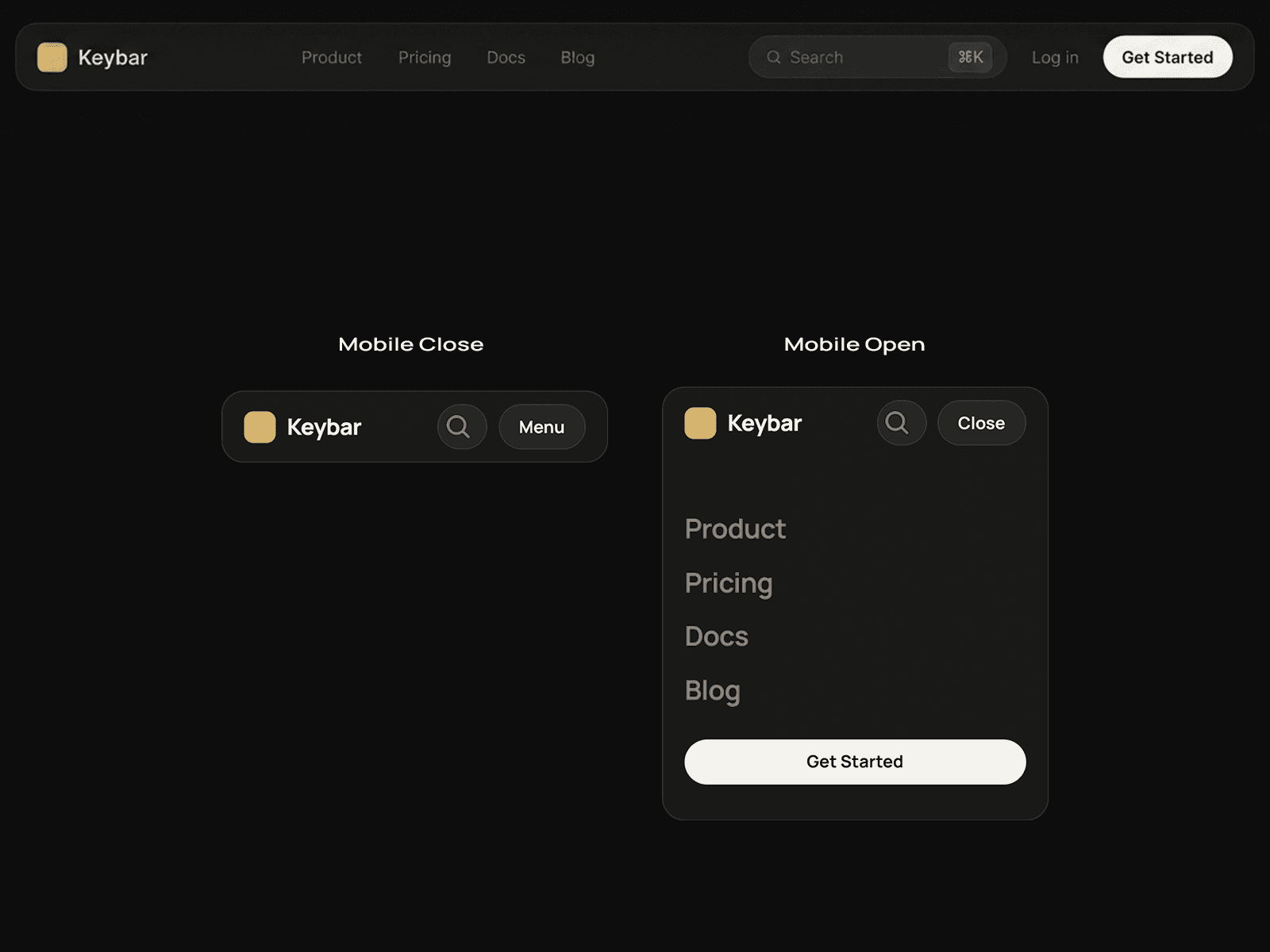
Meet Keybar Nav: a premium navigation component with a search pill and keycap hint, built entirely from native Framer layers. No code.

WHY I BUILT IT

Most navbars look the same. This one borrows a detail from modern software sites: a centered search pill with a small ⌘K keycap. It makes your site feel like a real product from the first scroll.

WHAT'S INSIDE

- Dark glass bar with logo, links, search pill, login and CTA

- Mobile layout with an open menu and a full-width CTA

- Search pill built to work with Framer's built-in Search component

- Hover and pressed states on the links, search pill and CTA

- Color and text styles included

- Clean, clearly named layers

GOOD TO KNOW

The ⌘K badge is a visual hint. For a working keyboard shortcut, pair it with a shortcut component such as Key Master. Framer's Search needs a published site with pages to index.

Great for SaaS, AI and developer-tool sites with product, pricing and docs pages.

GET IT

👉 Checkout: https://framevia.lemonsqueezy.com/checkout/buy/c0da07b9-1c2f-4af9-95c2-88995f44eeff

👀 Live preview: https://keybar-nav.framer.website/

I'd love your feedback: would you want a light version, a tablet layout, or a mega menu next? Tell me below!

Framevia | The Visual Pratik

Framevia | The Visual Pratik
Framevia | The Visual Pratik1w

🚨 FINAL HOURS: The Iron Core $49 Launch Special Ends Tonight! 🕒🏋️‍♂️

Framer Community!

This is the absolute final countdown window for the Framevia ecosystem launch event. In just a few hours, the launch special coupon code [ IRON49 ] will permanently expire before the automated billing system resets the framework to its standard premium value of $59 tomorrow, Saturday, October 10th! [context]

If you have been auditing our staging viewports or bookmarking the components this week to inject premium design system details into your studio's client pipeline, this is your last opportunity to save $10 instantly.

🏋️‍♂️ What you are installing:

• Full 13-Page Motion-Packed Static Framework

• Lightweight Canvas-Native Animated Counters & Visual Timelines

• Premium Desktop Fixed Footer Reveal Layout Pattern

• Fit-Content Auto-Sizing Flex Stacks for 5-Second Rebranding

Don't leave studio margin on the table for your upcoming client builds this October. Lock in your duplicate Remix link right now before the price shifts permanently!

📥 Secure the $49 Launch Deal (Apply code IRON49):

🔗 https://framevia.lemonsqueezy.com/checkout/buy/d3aa122b-f239-418f-b401-0311174a3e59

👀 Live Staging Preview: https://iron-core.framer.website/

Framevia | The Visual Pratik. 👊🔥

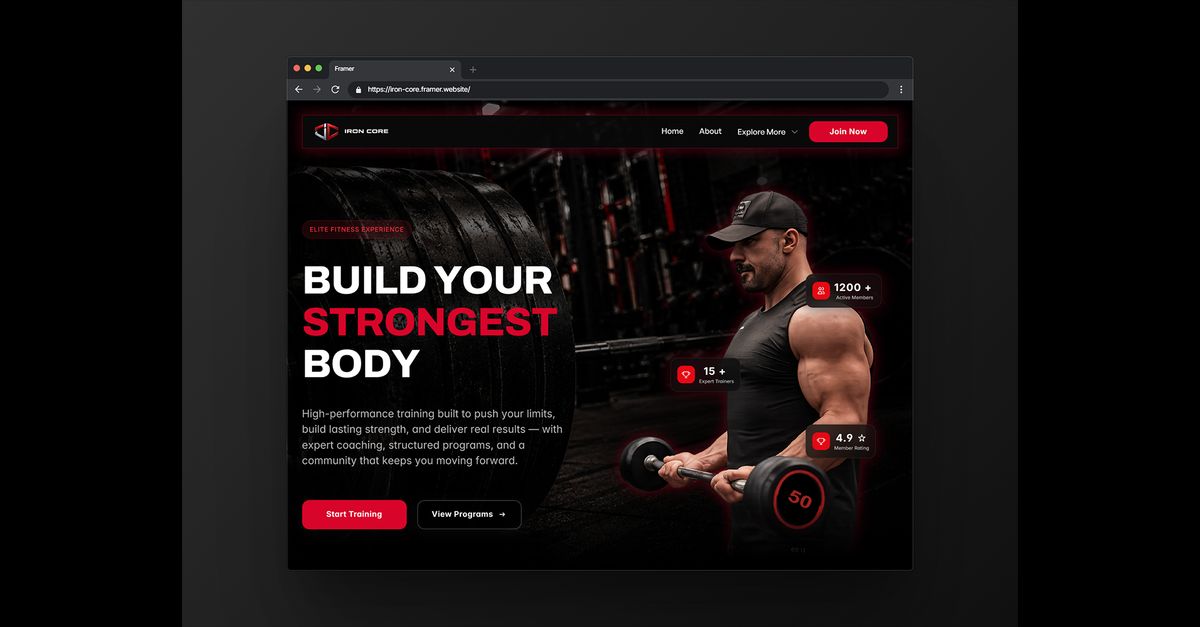
Iron Core | Premium Gym & Fitness Training
iron-core.framer.website · Build your strongest body with e…
Framevia | The Visual Pratik
Framevia | The Visual Pratik1w

Layout Breakdown: Engineering a Fixed Footer Reveal in Framer

Hey Framer Community! 👋💻

For anyone looking to add a highly premium, editorial feel to their landing pages without custom code, I wanted to break down how to build a clean Fixed Footer Reveal pattern natively on the canvas.

A standard footer just sits at the bottom of the page layout. A "Reveal" footer stays completely locked behind your main content sections, emerging beautifully as the user scrolls past your final call-to-action block.

⚡ The 3-Step Canvas Architecture:

1. Wrap your entire footer layout inside a master frame component. Set its Position strictly to "Sticky" or "Fixed" and anchor it to the Bottom edge.

2. Set the Z-index of your Footer frame to a low baseline number (e.g., Z-index: 1).

3. Ensure all your primary landing page body layout sections above it are packed inside a unified stack with a higher priority depth (e.g., Z-index: 2) and a solid background fill.

As the user scrolls, the high-priority body stack slides up smoothly, completely uncovering your fixed footer underneath!

I fully integrated this responsive design pattern across the 13-page system of our flagship performance framework, Iron Core.

⏳ TODAY IS YOUR LAST OPPORTUNITY: This marks the absolute final countdown window to lock in this full system at the $49 special. Apply coupon code [ IRON49 ] at checkout to save $10 instantly before the automated pricing system securely resets to $59 tomorrow, Saturday, October 10th! [context]

📥 Get It Instantly from Lemon Squeezy ($49 Launch Special):

🔗 https://framevia.lemonsqueezy.com/checkout/buy/d3aa122b-f239-418f-b401-0311174a3e59

👀 Test the Fixed Footer physics live on our staging canvas:

🔗 https://iron-core.framer.website/

Framevia | The Visual Pratik. 👊🔥

Framevia | The Visual Pratik
Framevia | The Visual Pratik1w

Hey Framer Community! 👋💻

To close out an intense week of shipping, I wanted to share a complete look at the Framevia design ecosystem—a collection of production-ready templates and standalone utility components engineered 100% natively on the canvas for freelance developers and digital studios.

If you are currently optimizing your client pipelines or building high-end tech layouts, you can install these premium systems directly into your active workspace panels:

🏋️‍♂️ 1. Iron Core — 13-Page Premium Fitness Framework [$49 Launch Special]

Our signature heavy-duty design framework has exactly 48 hours left on its launch special before the gateway coupon expires permanently this Saturday, October 10th! Built for maximum brand conversion with lightweight animated counters, responsive visual timelines, and a desktop Fixed Footer Reveal pattern.

🔗 Preview: https://iron-core.framer.website/

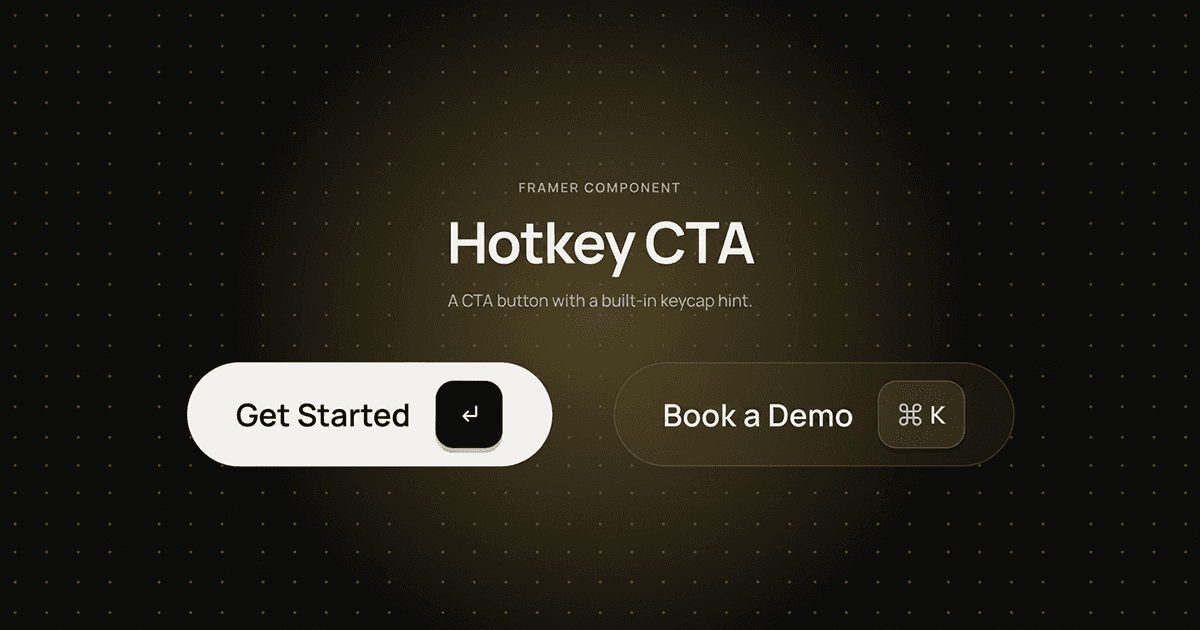
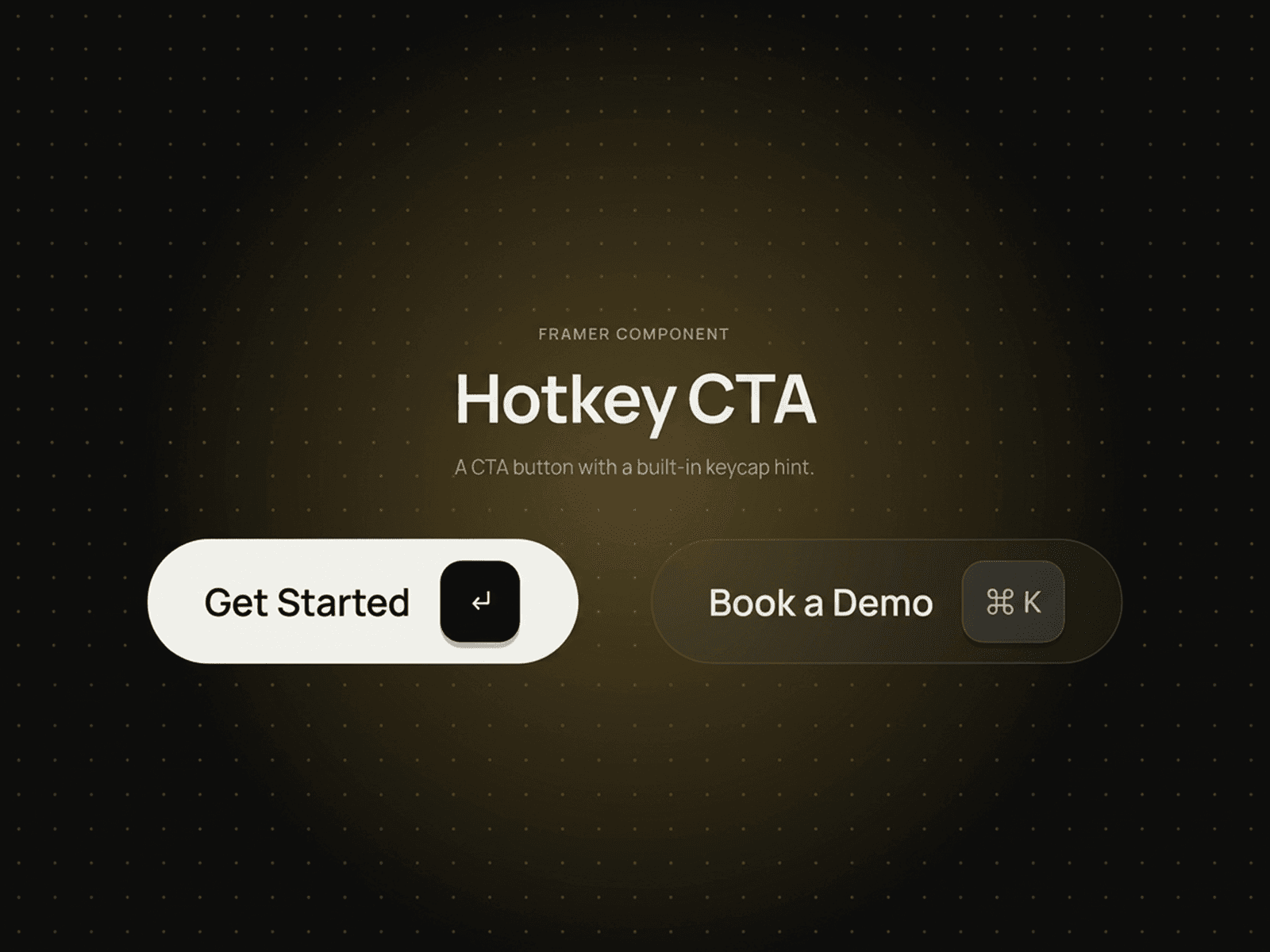
⌨️ 2. Hotkey CTA — Micro-Interaction SaaS Button Pack [$5]

The ultimate utility module for modern SaaS landing pages and AI workspaces. Features responsive, built-in keycap shortcut glyph hints (↵ and ⌘K) that lift beautifully on hover and press down dynamically on click states.

🔗 Preview: https://hotkey-cta.framer.website/

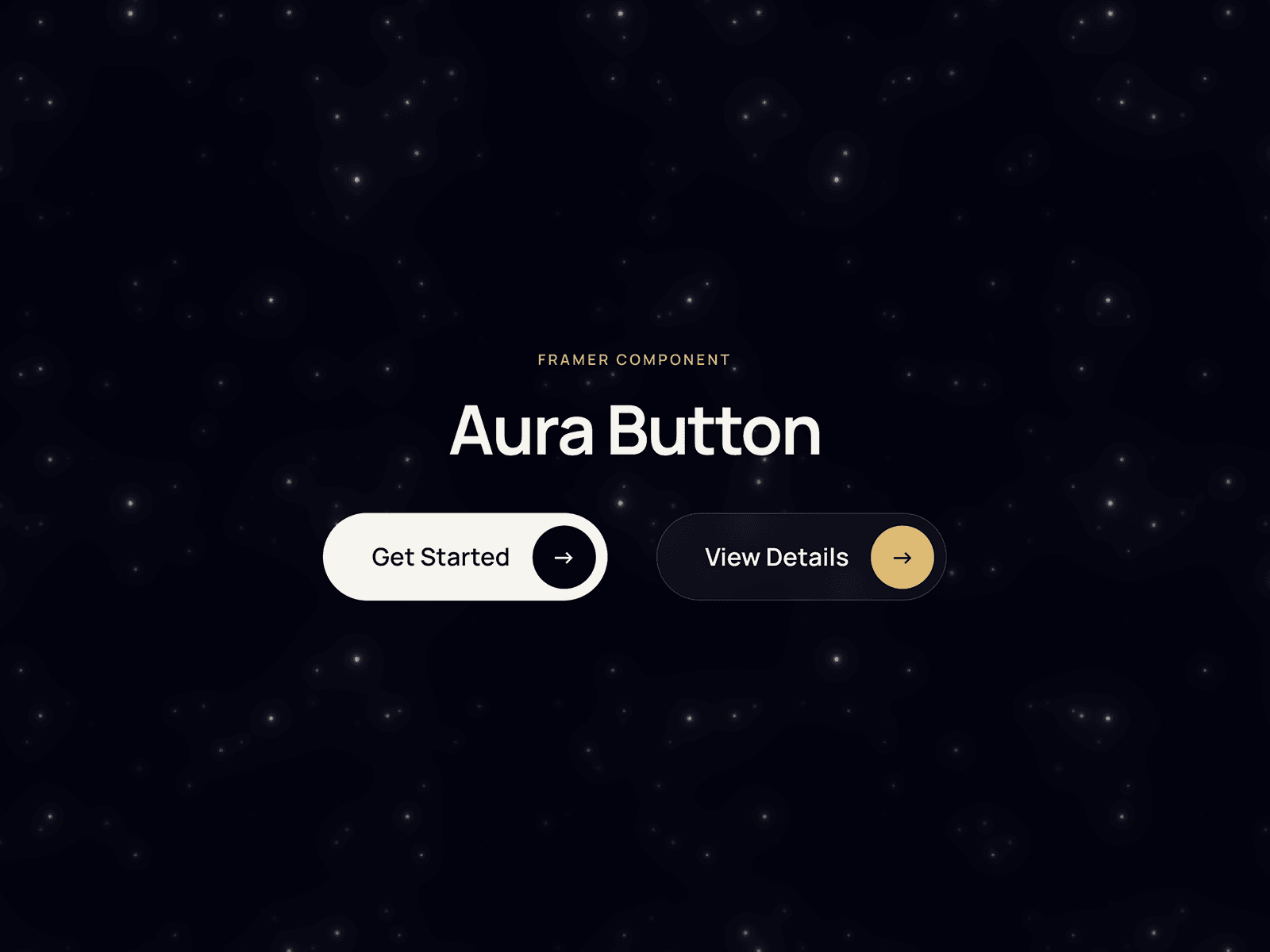
💎 3. Aura Glow CTA — Luxury Proximity Gradient Button Pack [$5]

Engineered to add deep visual luxury to dark UI viewports. Includes matte white primary and dark glass secondary variants with custom proximity glowing gradients, 0.97 tactile compression physics, and continuous floating mirror loops.

🔗 Preview: https://aura-button.framer.website/

⚡ Every asset follows strict studio standards: Dynamic auto-sizing via Flex Stacks ("Fit Content") and fully exposed global style controls for 5-second rebranding.

Explore the complete collection and grab the duplicate Remix links straight from our verified marketplace hub.

Always open to connecting with active creators. Drop your thoughts on the tactile compression curves below! 👊🔥

Framevia | The Visual Pratik.

Framevia | The Visual Pratik
Framevia | The Visual Pratik2w

Premium Canvas Systems: High-End Framer Assets for Studios

Hey Framer Community! 👋💻

If you are a freelance developer or digital studio owner shipping client sites this month, you already know the stakes: cookie-cutter layouts drop your brand value, while custom code overcomplicates client handoffs.

To bridge this gap, I’ve spent the last few weeks engineering a premium ecosystem of copy-paste utility assets built 100% natively on the canvas—zero custom code, zero rigid overrides, and complete breakpoint adaptability.

Before the high-traffic weekend windows hit your pipeline, you can install these premium systems directly into your active workspace panels:

🏋️‍♂️ 1. Iron Core — 13-Page Premium Fitness Framework [$49 Special]

Our signature performance theme is crossing its final countdown window! Get the massive 13-page static design system for $49 instead of $59 before the launch coupon expires permanently on Saturday, October 10th. Features smooth numerical counters, custom timelines, and a desktop Fixed Footer Reveal pattern.

🔗 Preview: https://iron-core.framer.website/

💎 2. Aura Glow CTA — Luxury Micro-Interaction Button Pack [$5]

Add immense visual depth to dark UI viewports. Includes matte white primary and dark glass secondary variants engineered with proximity glowing gradients, 0.97 tactile compression, and continuous floating mirror loops.

🔗 Preview: https://aura-button.framer.website/

⌨️ 3. Hotkey CTA — Utility SaaS Button Pack [$5]

The perfect interaction module for modern AI tools and developer landing pages. Features responsive, built-in keycap shortcut glyph hints (↵ and ⌘K) that lift on hover and press down on user click states.

🔗 Preview: https://hotkey-cta.framer.website/

Explore the full studio portfolio and grab your copy-paste duplicate Remix links straight from our verified dashboard hub.

Framevia | The Visual Pratik. 👊🔥

Hotkey CTA
hotkey-cta.framer.website · A premium Framer CTA button wit…
Framevia | The Visual Pratik
Framevia | The Visual Pratik2w

Production-Ready UI: Framer Assets Engineered for Scale

Hey Framer Community! 👋💻

To help studio owners and freelance web developers ship high-end layouts faster without rigid code overrides or layout breaking, I’ve engineered a premium ecosystem of copy-paste assets built 100% natively on the canvas.

If you are shipping client sites or SaaS platforms this month, you can drop these straight into your workspace right now:

🏋️‍♂️ 1. Iron Core — High-Performance Fitness Template [$49 Launch Special]

A massive 13-page, motion-packed design built for premium brand presence. Features lightweight animated counters, responsive timelines, and a custom Fixed Footer Reveal pattern. Fully optimized for local SEO speed.

🔗 Preview: https://iron-core.framer.website/

💎 2. Aura Glow CTA — Luxury Interactive Button Pack [$5]

Engineered to add incredible visual depth to dark UI layouts. Features matte white primary and dark glass secondary variants with proximity glowing gradients, 0.97 tactile compression, and continuous floating mirror loops.

🔗 Preview: https://aura-button.framer.website/

⌨️ 3. Hotkey CTA — SaaS Micro-Interaction Button Pack [$5]

Designed specifically for modern SaaS landing pages and AI interfaces. Features responsive, built-in keycap shortcut glyph hints (↵ and ⌘K) that lift on hover and press down dynamically on user clicks.

🔗 Preview: https://hotkey-cta.framer.website/

⚡ Core Architecture Standards:

• Dynamic Auto-Sizing: Every module uses Flex Stacks set strictly to "Fit Content." Type any text string length, and the layout expands natively without crushing padding borders.

• Exposed Controls: Color libraries and typography tokens are fully synced to the properties dashboard, letting you restyle everything to match your client's brand in 5 seconds.

Explore the full portfolio collection and grab the duplicate Remix links straight from my verified dashboard hub.

Framevia | The Visual Pratik. 👊🔥

Framevia | The Visual Pratik
Framevia | The Visual Pratik2w

💡 Design Pattern Tip: How to use Hotkey CTA with plain inputs

For everyone duplicate-remixing the component pack into their AI or SaaS landing pages today, here is a quick structural layout tip for maximizing conversion depth:

If you are pairing these hotkey buttons alongside a primary email newsletter form or an active global search wrapper bar, use the exposed canvas properties to toggle the secondary "Book a Demo" glass state to display [ ⌘ K ] or [ Ctrl K ].

This gives users an immediate visual cue that your platform runs on keyboard-driven commands, making your web layouts feel like a premium, production-ready software web app out of the box.

📥 Install Component Directly:

🔗 https://framevia.lemonsqueezy.com/checkout/buy/cc01cb06-7261-47c8-91de-084545979600

👀 Test the tactile physics live:

🔗 https://hotkey-cta.framer.website/

Framevia | The Visual Pratik
Framevia | The Visual Pratikin Marketplace·2w

Hey Framer community 👋

Meet Hotkey CTA: a premium call-to-action button with a built-in keycap hint. Two variants, Primary and Secondary, each with polished hover and pressed states, built entirely from native Framer layers. No code.

WHY IT'S DIFFERENT

Most CTA buttons look the same. This one borrows a detail from modern software interfaces: a small keycap that lifts on hover and presses down on click. It makes your button feel like part of a real product.

WHAT'S INSIDE

- Primary and Secondary variants

- Hover and pressed states on both

- Gold glow, plus a keycap that lifts and presses

- Editable label and key text (↵, ⌘K, Ctrl K, or a short badge)

- A switch to hide the key for a plain button

- Color and text styles included

GOOD TO KNOW

The keycap is a visual hint. For a working keyboard shortcut, pair it with a shortcut component such as Key Master.

Perfect for SaaS, AI and developer-tool sites: hero sections, pricing tables and sign-up forms.

GET IT

👉 Checkout: https://framevia.lemonsqueezy.com/checkout/buy/cc01cb06-7261-47c8-91de-084545979600

👀 Live preview: https://hotkey-cta.framer.website/

I'd love your feedback: what key or label would you put in the keycap? Tell me below!

Built by Framevia | The Visual Pratik.

Framevia | The Visual Pratik
Framevia | The Visual Pratikin Marketplace·2w

Aura Button: a premium native CTA component (Primary + Secondary)

Hey Framer community! 👋

I just submitted Aura Button to the Marketplace: a premium CTA button built entirely from native Framer layers. No code, no overrides.

WHY I BUILT IT

Many button components are code-based, which means you can't click into them. I wanted real polish that you can still edit like any other layer.

WHAT'S INSIDE

- Primary and Secondary variants

- Hover and pressed states on both

- Gold glow, label roll and arrow rotation, plus a soft sheen on the Primary

- Editable label text from the properties panel

- Color and text styles included

- Sizes itself to its label, so any text length works

TRY IT LIVE 👉 https://aura-button.framer.website/

Hover over both buttons to see every state.

Great for hero sections, pricing tables, product pages and forms.

I'D LOVE YOUR FEEDBACK

1. Do the hover animations feel smooth, or too quick?

2. What should come next: more sizes, an icon-only version, or new color themes?

Tell me what you think below, and I'll take it into account for future updates.

🚀 Get Instant Remix Access: https://framevia.lemonsqueezy.com/checkout/buy/8bf1b2cb-07c7-4935-8f4a-1e8e61dc3215

Framevia | The Visual Pratik

Framevia | The Visual Pratik
Framevia | The Visual Pratik2w

5 Days Left for the Iron Core Launch Discount

Hey Framer Community! 🏋️‍♂️🕒

Just a fast mid-week countdown alert for freelance web designers and digital studio owners: our honest 10-day creator launch special for Iron Core is officially crossing its halfway mark today!

From now until Saturday, October 10th, checkout coupon code IRON49 remains fully operational inside the gateway backend, dropping the price of the complete 13-page, motion-engineered static fitness template from $59 down to $49.

If you have a boutique gym storefront layout, high-end performance studio client, or an elite trainer portfolio build lined up on your project pipeline for this month, you can lock in a premium, production-ready system right now while saving on your asset margins.

⚡ The Architecture Checklist:

• Clean Static System: 100% front-end layout with zero database or CMS layer maintenance bloat. Max local SEO speed out of the box.

• Premium Interactive Details: Features lightweight animated numerical counters, responsive visual timelines, and an exclusive desktop Fixed Footer Reveal animation pattern.

• Ready to Ship: Breakpoint scaling, form layout inputs, and typography fully polished across all responsive viewports.

Once the clock hits October 10th, the discount script turns off permanently. You can test the interaction physics and check out the fluid layouts completely live on the staging canvas:

🔗 Live Interactive Canvas: iron-core.framer.website/

Check Out 👉 https://framevia.lemonsqueezy.com/checkout/buy/d3aa122b-f239-418f-b401-0311174a3e59

Appreciate the phenomenal support on this debut theme so far! 👊🔥

Iron Core — Premium Gym & Fitness Framer Template
framevia.lemonsqueezy.com · Build a stronger fitness brand …
Framevia | The Visual Pratik
Framevia | The Visual Pratik2w

Tip: 3-Layer Animated Proximity Gradient Glows

Hey Framer Community! ⚡🎨

Wanted to drop a quick layout blueprint to help other creators build an ultra-premium, interactive Proximity Gradient Glow Button completely native inside the canvas—without writing custom code or bloating your layers weight.

The secret to keeping animated neon text fully accessible and readable is a strict 3-layer depth matrix inside a single component wrapper.

⚡ The Master Structural Setup:

• 1. The Wrapper Frame: Set to your standard pill dimensions (e.g., 220px × 56px) with a 99px corner radius. Set the background color to a deep charcoal or dark blue (#0B1426) at 85% opacity, and add a 1px border gradient set to 15% opacity to trap the glass edge cleanly.

• 2. The Liquid Background Core: Draw a frame inside, scaled to 100% width and height. Set its Z-Index to 1. Apply a vibrant 3-stop linear gradient (e.g., Electric Cyan to Neon Sky Blue) at a 45° angle. Add a Loop Effect set to Rotate (360° over 4s on a Linear curve), and add a 12px Layer Blur graphic effect. This creates a moving liquid-aurora flow perfectly contained by the wrapper clip.

• 3. The Top Typography Layer: Place your text block directly over the center, and set its Z-Index strictly to 2 to pin it safely above the shifting gradient backgrounds.

🚀 Tuning Interactive Micro-Animations:

• Hover State: Add a variant layer and apply a soft outer Shadow Graphic Effect matching your primary neon hex tone. Set the blur to 24px and the spread to 2px. The button will immediately cast an ambient glow onto the canvas the exact millisecond the cursor approaches.

• Pressed State: Add a final variant with a global layout scale modification property set uniformly to 0.96 to give the user a tactile, responsive click physical response when tapped.

Would love to hear how you guys handle your high-conversion CTAs—do you prefer clean, solid-color interactive states or custom animated aura wrappers for your premium builds? 👇

Framevia | The Visual Pratik
Framevia | The Visual Pratik2w

Hey Framer Community! 💎

To kick off the weekend browsing sessions, I wanted to drop a curated visual breakdown of 5 premium Dark UI design layout patterns that instantly elevate standard websites into luxury-grade digital experiences.

When building premium themes or pitching high-ticket clients, achieving a clean, sophisticated dark mode requires balancing subtle visual depth rather than just tossing text onto a solid pitch-black #000000 background canvas.

⚡ 5 Core Dark UI Layout Rules to Implement:

• 1. Strict Layered Elevations: Use deep navy or dark slate backgrounds (#0B1526 / #0F172A) as your absolute baseline frame. Elevate your active cards and inner layout rows using slightly lighter hex values (#1E293B) to create natural visual depth.

• 2. Controlled Glassmorphic Borders: Instead of using harsh solid border strokes, utilize a 1px frame border with a dual-color linear gradient set to low transparency (10%–15% opacity). Pair this with a deep backdrop blur to create a premium glass look.

• 3. High-Contrast Focus CTAs: Keep 95% of your typography layout elements restricted to crisp white and muted greys, then isolate your primary action buttons using a single, intense energetic color burst (like neon cyan or rich crimson red).

• 4. Expansive Asymmetric Grid Spacing: Luxury web design is defined by whitespace. Increase your section paddings to 140px–160px on desktop to give large typography headings room to breathe.

• 5. Custom Staging Interactivity: Build lightweight, interactive timeline micro-animations or custom scroll reveals to reward users as they explore down the page columns.

Would love to hear your thoughts—do you prefer shipping clean, minimal deep blue/grey layouts, or do you always go for absolute pitch-black backdrops for your premium client builds? Drop your favorite setups below! 👇

Framevia | The Visual Pratik
Framevia | The Visual Pratik2w

Iron Core — 13-Page Fitness Dark UI System

Hey Framer Community! 🏋️‍♂️

Huge milestone update to close out the week! Thanks to the incredible feedback and design interactions from other creators over our launch, Iron Core has officially pushed past the 91 unique high-retention visitor pool milestone with over 224 total page views today!

The response to our clean motion details and performance optimization has been spectacular.

To celebrate our launch week traffic momentum, our honest 10-day creator special is officially active in the gateway backend. From now until October 10th, you can use the coupon code IRON49 at checkout to grab the full 13-page, zero-CMS static template system for $49 instead of $59.

⚡ Core Architecture Review:

• Clean Static System: 100% front-end layout with zero database or CMS layer maintenance bloat. Max local SEO speed out of the box.

• Premium Interactive Details: Features lightweight animated numerical counters, responsive visual timelines, and an exclusive desktop Fixed Footer Reveal animation pattern.

• Ready to Ship: Breakpoint scaling, form layout inputs, and typography fully polished across all responsive viewports.

If you have a boutique gym storefront, performance studio client, or an elite trainer portfolio build lined up for this month, you can check out the animations and fluid layout structure live on the staging canvas:

🔗 Live Interactive Canvas: https://iron-core.framer.website/

Appreciate the support from this group so far! 👊🔥

Framevia | The Visual Pratik
Framevia | The Visual Pratik2w

Iron Core — 13-Page Fitness Dark UI System

Hey Framer Community! 🏋️‍♂️

Huge milestone update to close out the week! Thanks to the incredible feedback and interactions from other creators over our launch, Iron Core has officially pushed past the 89 unique high-retention visitor pool milestone today!

The response to our clean motion details and performance optimization has been spectacular.

To celebrate our launch week traffic momentum, our honest 10-day creator special is officially active in the gateway backend. From now until October 10th, you can use the coupon code IRON49 at checkout to grab the full 13-page, zero-CMS static template system for $49 instead of $59 [context].

⚡ Core Architecture Review:

• Clean Static System: 100% front-end layout with zero database or CMS layer maintenance bloat. Max local SEO speed out of the box.

• Premium Interactive Details: Features lightweight animated numerical counters, responsive visual timelines, and an exclusive desktop Fixed Footer Reveal animation pattern.

• Ready to Ship: Breakpoint scaling, form layout inputs, and typography fully polished across all responsive viewports.

If you have a boutique gym storefront, performance studio client, or an elite trainer portfolio build lined up for this month, you can check out the animations and fluid layout structure live on the staging canvas:

🔗 Live Interactive Canvas: iron-core.framer.website/

Appreciate the support from this group so far! 👊🔥

Iron Core | Premium Gym & Fitness Training
iron-core.framer.website · Build your strongest body with e…
Framevia | The Visual Pratik
Framevia | The Visual Pratik2w

Backdrop Blur (Glassmorphism) Breaking in Browser Preview When Navigation Is Turned Into a Layout Template

Hey guys! 👋

I have built a custom responsive navigation component inside Framer. Visually, it looks beautiful on the canvas—it uses a dual-color gradient with transparency and a 24px Backdrop Blur to create a premium glassmorphic effect.

Everything works perfectly on a standalone frame. However, the second I turn this navigation component into a "Layout Template" (to ensure persistent, seamless animation transitions across different page routes), the Backdrop Blur completely breaks in the browser preview mode and live site.

The dual-color gradient and transparency are rendering correctly, but the 24px background blur effect completely drops out as elements scroll underneath the bar.

It seems like turning the navigation frame into a Layout Template introduces an automatic parent container or motion wrapper that breaks the backdrop-filter rendering context in the browser.

Has anyone encountered this specific bug when converting a glass nav bar into a Layout Template? Are there any specific frame layer overrides or code snippets I can apply to make sure the browser preserves the backdrop blur during persistent transitions?

Would appreciate any tips or engineering workarounds to fix this drop! Thank you! 🛠️🎨

Framevia | The Visual Pratik
Framevia | The Visual Pratik3w

Iron Core — Top 14 Fitness Theme Launch ($49)

Hey Framer Community! 🏋️‍♂️

Huge milestone update to kick off October! Thanks to your incredible design feedback and interactions over our first week, Iron Core has officially broken deep into the Top 14 (#14) Fitness themes globally on the marketplace!

To celebrate our entry into the Top 15 rows, our 10-day launch celebration discount is officially LIVE starting today.

From now until October 10th, you can use the coupon code IRON49 at checkout to grab the full 13-page, motion-engineered static system for $49 instead of $59.

⚡ Why Iron Core?

• Clean Static Architecture: 100% front-end layout with zero database or CMS layer maintenance bloat.

• Custom Motion Details: Integrated .tsx modules and an exclusive desktop Fixed Footer Reveal animation pattern.

• Pure Speed: Stripped of backend weight to preserve maximum local SEO performance out of the box.

If you have a boutique gym client, performance studio storefront, or an elite personal trainer portfolio project lined up for this month, you can test out the fluid breakpoint responsive scaling live on the staging canvas:

🔗 Live Interactive Canvas:

Iron Core | Premium Gym & Fitness Training
iron-core.framer.website · Build your strongest body with e…