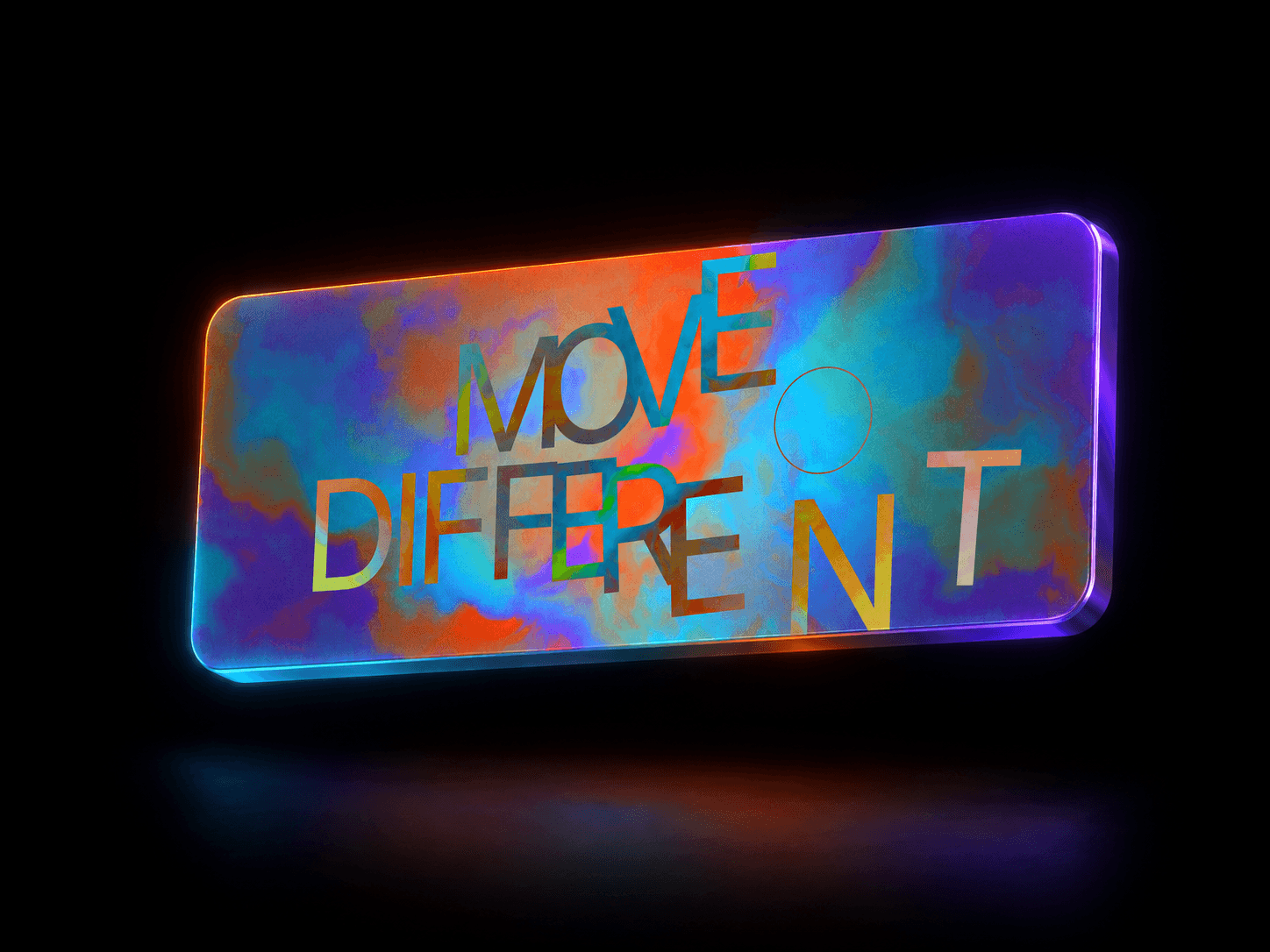
FluxType turns oversized typography into an immersive, responsive visual experience. Characters react individually to cursor movement while a fluid WebGL shader generates evolving color and texture behind the type.
Designed for experimental portfolios, creative studios, campaign pages, product launches, and Awwwards hero sections. FluxType is responsive, performance-conscious, and fully customizable through Framer’s visual property controls—no coding required.
Typography
Custom text
Full Framer font controls
Font size, weight, line height, and letter spacing
Text color
Left, center, or right alignment
Maximum text width
Interaction
Magnet, repel, and wave effects
Interaction strength
Cursor influence radius
Character lift and scaling
Optional idle animation
Idle drift amount
Animation speed
WebGL shader
Aurora, plasma, and monochrome modes
Three customizable shader colors
Shader speed
Pattern scale
Grain intensity
Shader on/off toggle
Surface
Background color
Internal padding
Corner radius
Border width and color
Text glow intensity
Cursor
Custom cursor on/off toggle
Cursor size
Cursor color
Blending
Normal
Difference
Screen
Overlay

FluxType turns oversized typography into an immersive, responsive visual experience. Characters react individually to cursor movement while a fluid WebGL shader generates evolving color and texture behind the type.
Designed for experimental portfolios, creative studios, campaign pages, product launches, and Awwwards hero sections. FluxType is responsive, performance-conscious, and fully customizable through Framer’s visual property controls—no coding required.
Typography
Custom text
Full Framer font controls
Font size, weight, line height, and letter spacing
Text color
Left, center, or right alignment
Maximum text width
Interaction
Magnet, repel, and wave effects
Interaction strength
Cursor influence radius
Character lift and scaling
Optional idle animation
Idle drift amount
Animation speed
WebGL shader
Aurora, plasma, and monochrome modes
Three customizable shader colors
Shader speed
Pattern scale
Grain intensity
Shader on/off toggle
Surface
Background color
Internal padding
Corner radius
Border width and color
Text glow intensity
Cursor
Custom cursor on/off toggle
Cursor size
Cursor color
Blending
Normal
Difference
Screen
Overlay
 Artem Kireev