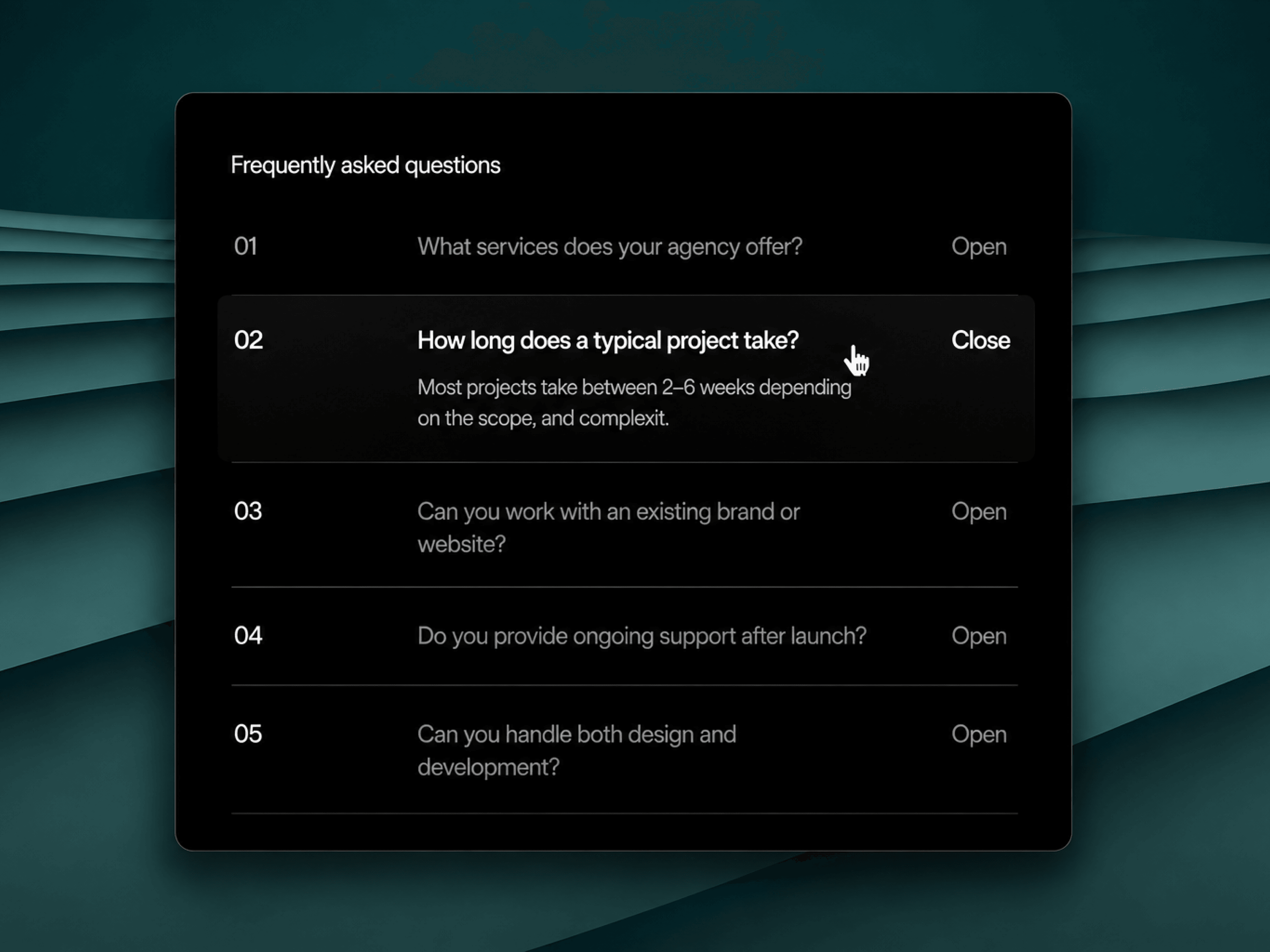
FAQ Accordion is a fully customizable, single-open accordion component for Framer, built to replace static FAQ sections with a real, production-ready code component.
Transition control (spring stiffness/damping/mass or tween) for the expand/collapse animation.
Row layout: number / question / open-close label sit in one row, with the question + answer forming a left-aligned stack.
Below the "breakpoint" width the row switches to a stacked
Mobile layout (number + label on top, question below), with its own spacing controls and no hover states.
Content — an editable array of question/answer pairs, title, and a default-open index.
Typography — separate Framer Font controls for the title, number, question, answer, and label, plus an uppercase toggle.
Colors — background, divider, hover, and per-state text colors (active/inactive question, answer, label).
Sizing & container — max content width, padding, corner radius, border, and optional background blur.
Spacing — independent gap and row-padding controls for the desktop row layout and the mobile stacked layout.
Transition — Framer's built-in Transition control (spring stiffness/damping/mass or tween), driving the expand/collapse height animation via framer-motion.
It's also render-context aware: using useIsStaticRenderer, it detects when it's being drawn as a canvas thumbnail or during export and disables all animation and every continuous effect (resize/intersection observers, hover listeners) in that case, falling back to a plain, non-animated snapshot — so it stays fast in the editor and clean in exports.

FAQ Accordion is a fully customizable, single-open accordion component for Framer, built to replace static FAQ sections with a real, production-ready code component.
Transition control (spring stiffness/damping/mass or tween) for the expand/collapse animation.
Row layout: number / question / open-close label sit in one row, with the question + answer forming a left-aligned stack.
Below the "breakpoint" width the row switches to a stacked
Mobile layout (number + label on top, question below), with its own spacing controls and no hover states.
Content — an editable array of question/answer pairs, title, and a default-open index.
Typography — separate Framer Font controls for the title, number, question, answer, and label, plus an uppercase toggle.
Colors — background, divider, hover, and per-state text colors (active/inactive question, answer, label).
Sizing & container — max content width, padding, corner radius, border, and optional background blur.
Spacing — independent gap and row-padding controls for the desktop row layout and the mobile stacked layout.
Transition — Framer's built-in Transition control (spring stiffness/damping/mass or tween), driving the expand/collapse height animation via framer-motion.
It's also render-context aware: using useIsStaticRenderer, it detects when it's being drawn as a canvas thumbnail or during export and disables all animation and every continuous effect (resize/intersection observers, hover listeners) in that case, falling back to a plain, non-animated snapshot — so it stays fast in the editor and clean in exports.
 Zeeshan Ahmed