
PDF Export for Framer — Export Framer Designs as PDF in Seconds
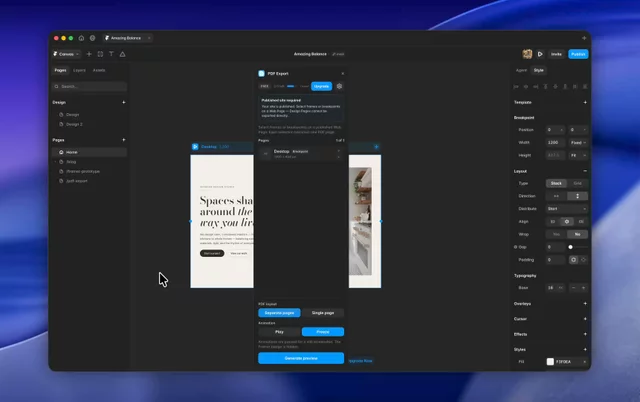
The easiest way to export any Framer frame as a professional PDF. Select a frame, preview the output, download your PDF. No screenshots, no stitching, no third-party tools required.
What is PDF Export for Framer? PDF Export is a Framer plugin that converts any Framer frame directly into a downloadable PDF file. If you've ever searched for "how to export Framer as PDF" or "Framer to PDF" — this is the answer. No workarounds, no manual steps, just a clean PDF straight from your Framer canvas.
Why PDF Export for Framer? Exporting Framer designs as PDF used to mean screenshotting section by section and stitching files together manually. PDF Export for Framer replaces that entire workflow with a single click — directly inside Framer.
Perfect for: → Client proposals & project pitches → Invoices & bills → Style guides & moodboards → Manuals & documentation → Design handoffs for developers & stakeholders → Portfolio exports & case studies → Print-ready flyers & one-pagers
How to export Framer as PDF:
Open PDF Export on your Framer canvas
Complete the one-time setup in under a minute
Select your frame, preview the output, download your PDF
Free vs Pro The free tier lets you test PDF Export for Framer on real projects before committing. Pro unlocks 300 exports per month for a Monthly Subscription.
Requirements Your Framer site must be published for the plugin to work.

PDF Export for Framer — Export Framer Designs as PDF in Seconds
The easiest way to export any Framer frame as a professional PDF. Select a frame, preview the output, download your PDF. No screenshots, no stitching, no third-party tools required.
What is PDF Export for Framer? PDF Export is a Framer plugin that converts any Framer frame directly into a downloadable PDF file. If you've ever searched for "how to export Framer as PDF" or "Framer to PDF" — this is the answer. No workarounds, no manual steps, just a clean PDF straight from your Framer canvas.
Why PDF Export for Framer? Exporting Framer designs as PDF used to mean screenshotting section by section and stitching files together manually. PDF Export for Framer replaces that entire workflow with a single click — directly inside Framer.
Perfect for: → Client proposals & project pitches → Invoices & bills → Style guides & moodboards → Manuals & documentation → Design handoffs for developers & stakeholders → Portfolio exports & case studies → Print-ready flyers & one-pagers
How to export Framer as PDF:
Open PDF Export on your Framer canvas
Complete the one-time setup in under a minute
Select your frame, preview the output, download your PDF
Free vs Pro The free tier lets you test PDF Export for Framer on real projects before committing. Pro unlocks 300 exports per month for a Monthly Subscription.
Requirements Your Framer site must be published for the plugin to work.