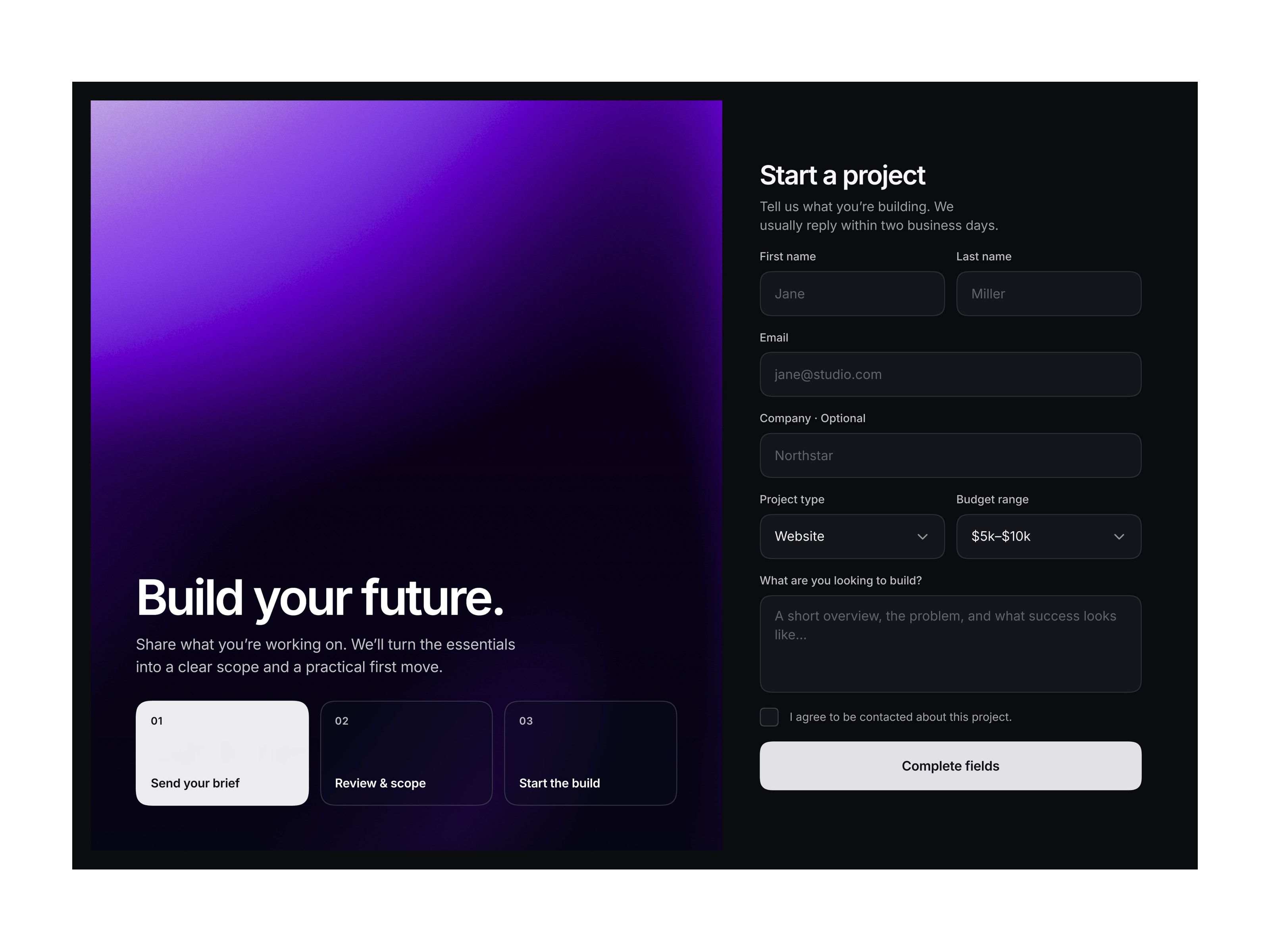
Shader Form is a full-viewport, two-column section pairing a flowing Liquid shader with a focused native Framer form. The default setup is made for project intake, giving studios and freelancers a polished way to collect structured briefs.
Project intake is only the default. Adapt the copy and fields for contact, quotes, consultations, lead capture, onboarding, or applications.
The left panel combines a tonal purple shader, subtle noise, supporting copy, and three frosted process cards. The right collects contact details, project information, budget, consent, and a written brief, with clear form states.
Framer handles submissions natively, with notifications sent to registered email address.
Inter typography, precise spacing, squircle corners, translucent cards, and a fluid shader create a refined technical feel. The component uses native Framer stacks, form elements, and Shader.
Desktop uses a side-by-side layout. Tablet stacks the visual panel above the form, while Phone shifts fields and dropdowns into a touch-friendly single column.
Framer variables cover:
Main copy: Headline, supporting copy, three process-step labels, form heading, and form supporting copy
Field labels: First name, last name, email, company, project type, budget range, and project brief
Placeholders: First name, last name, email, company, and project brief
Form options: Company-field visibility, budget-field visibility, and consent copy
CTA labels: Default, loading, incomplete, success, and error states
Shader controls: Seed, speed, loop, scale, amplitude, frequency, definition, bands, bias, Jellify, noise amount, exposure, contrast, and saturation
Creative studios, agencies, freelancers, SaaS teams, consultants, portfolio sites, lead-generation pages, onboarding flows, and Framer templates needing a distinctive, adaptable form section.
Reach out any time via x.com or email at contact@omermirza.com

Shader Form is a full-viewport, two-column section pairing a flowing Liquid shader with a focused native Framer form. The default setup is made for project intake, giving studios and freelancers a polished way to collect structured briefs.
Project intake is only the default. Adapt the copy and fields for contact, quotes, consultations, lead capture, onboarding, or applications.
The left panel combines a tonal purple shader, subtle noise, supporting copy, and three frosted process cards. The right collects contact details, project information, budget, consent, and a written brief, with clear form states.
Framer handles submissions natively, with notifications sent to registered email address.
Inter typography, precise spacing, squircle corners, translucent cards, and a fluid shader create a refined technical feel. The component uses native Framer stacks, form elements, and Shader.
Desktop uses a side-by-side layout. Tablet stacks the visual panel above the form, while Phone shifts fields and dropdowns into a touch-friendly single column.
Framer variables cover:
Main copy: Headline, supporting copy, three process-step labels, form heading, and form supporting copy
Field labels: First name, last name, email, company, project type, budget range, and project brief
Placeholders: First name, last name, email, company, and project brief
Form options: Company-field visibility, budget-field visibility, and consent copy
CTA labels: Default, loading, incomplete, success, and error states
Shader controls: Seed, speed, loop, scale, amplitude, frequency, definition, bands, bias, Jellify, noise amount, exposure, contrast, and saturation
Creative studios, agencies, freelancers, SaaS teams, consultants, portfolio sites, lead-generation pages, onboarding flows, and Framer templates needing a distinctive, adaptable form section.
Reach out any time via x.com or email at contact@omermirza.com


