Hover Name List is a flexible interaction component designed to showcase people, teams, or contributors with a clean hover or tap experience.
Built to work seamlessly across desktop and mobile, the component lets you switch between hover and tap interactions with a simple toggle, making it ideal for responsive layouts.
What you can customize:
- Interaction type: Hover or Tap
- Text alignment
- Name, title, and location fonts
- Text colors and hover states
- Background color
- Animation duration
- Image width and height
- Horizontal and vertical spacing
- Image offset positioning
- Editable people list with images, names, titles, and locations
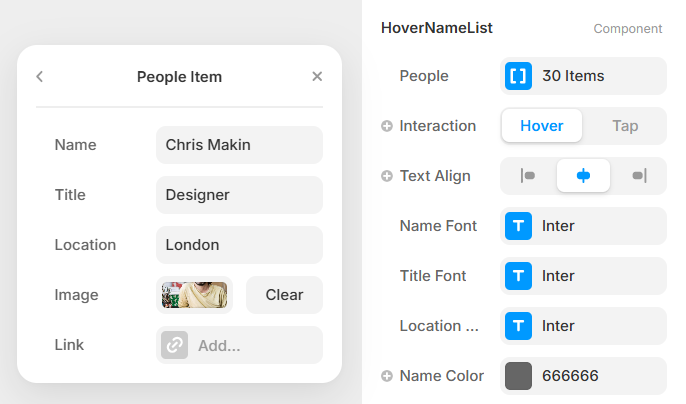
How to Add Profile Images
- Select the HoverNameList component on your canvas.
- In the right properties panel, find the People control.
- Click “30 Items” to open the list of people.
- Select any person from the list (for example Chris Makin).
- Inside the People Item panel:
- Scroll to the Image field.
- Click the image area or Add button.
- Upload or select a portrait image.
- The image will now appear in the hover card when that name is hovered.
Repeat these steps for any other people in the list to customize the component.

 Nirmiti Kale


