- Cmd/Ctrl+K shortcut
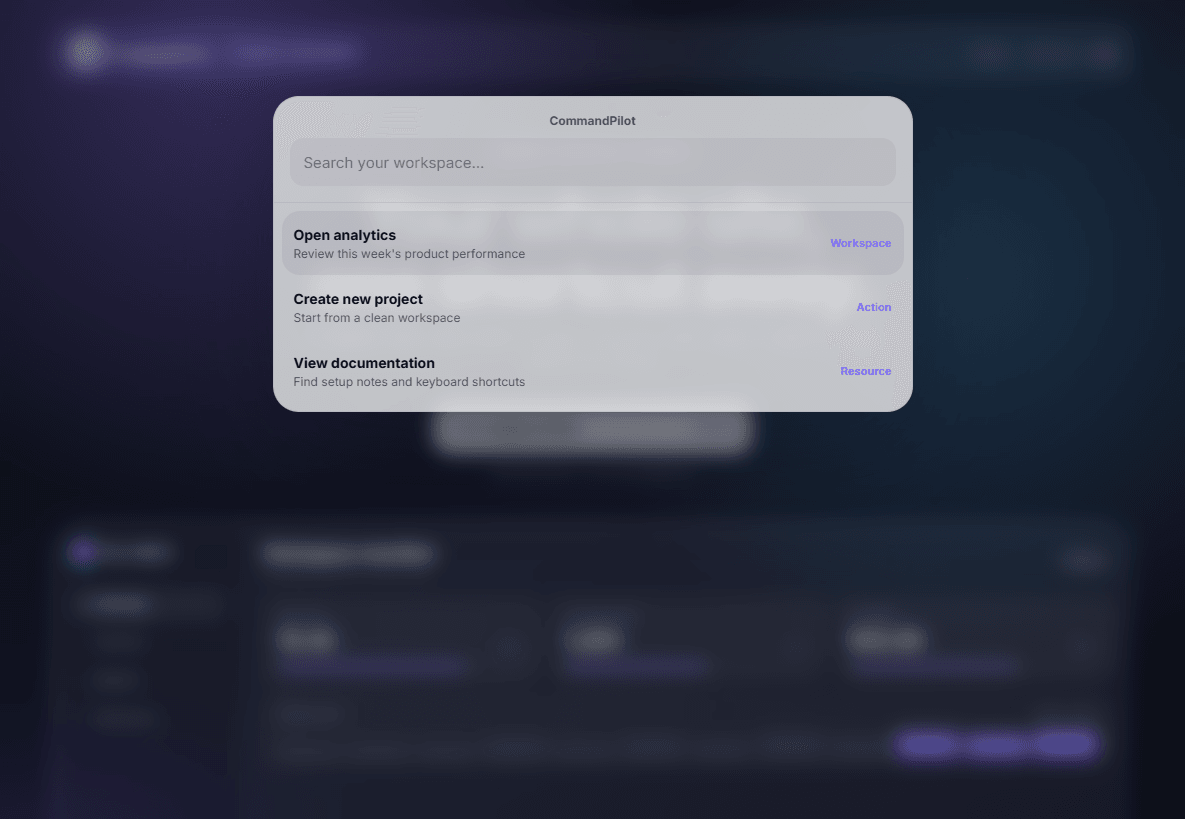
- Searchable command list
- Arrow-key navigation
- Enter to open the selected command
- Escape and outside-click close
- Anchor, internal, and external URL support
- Optional new-tab behavior per command
- iOS-style glass effect toggle
- Static-renderer safe behavior for Framer Canvas and export
- SaaS landing pages
- Documentation sites
- Product templates
- Resource hubs
- Portfolio sites with many sections
CommandPilot adds the kind of fast navigation users expect from polished software products, without asking the site owner to wire keyboard events, modal state, accessible list navigation, and link handling by hand.
1. Add CommandPilot to your Framer project.
2. Edit the Items control with your pages, anchors, or URLs.
3. Set your Shortcut and Design options.
4. Preview the page and test Cmd+K or Ctrl+K.
$10 one-time purchase.
Personal and single-business use. Redistribution or resale as a standalone component is not allowed.

- Cmd/Ctrl+K shortcut
- Searchable command list
- Arrow-key navigation
- Enter to open the selected command
- Escape and outside-click close
- Anchor, internal, and external URL support
- Optional new-tab behavior per command
- iOS-style glass effect toggle
- Static-renderer safe behavior for Framer Canvas and export
- SaaS landing pages
- Documentation sites
- Product templates
- Resource hubs
- Portfolio sites with many sections
CommandPilot adds the kind of fast navigation users expect from polished software products, without asking the site owner to wire keyboard events, modal state, accessible list navigation, and link handling by hand.
1. Add CommandPilot to your Framer project.
2. Edit the Items control with your pages, anchors, or URLs.
3. Set your Shortcut and Design options.
4. Preview the page and test Cmd+K or Ctrl+K.
$10 one-time purchase.
Personal and single-business use. Redistribution or resale as a standalone component is not allowed.