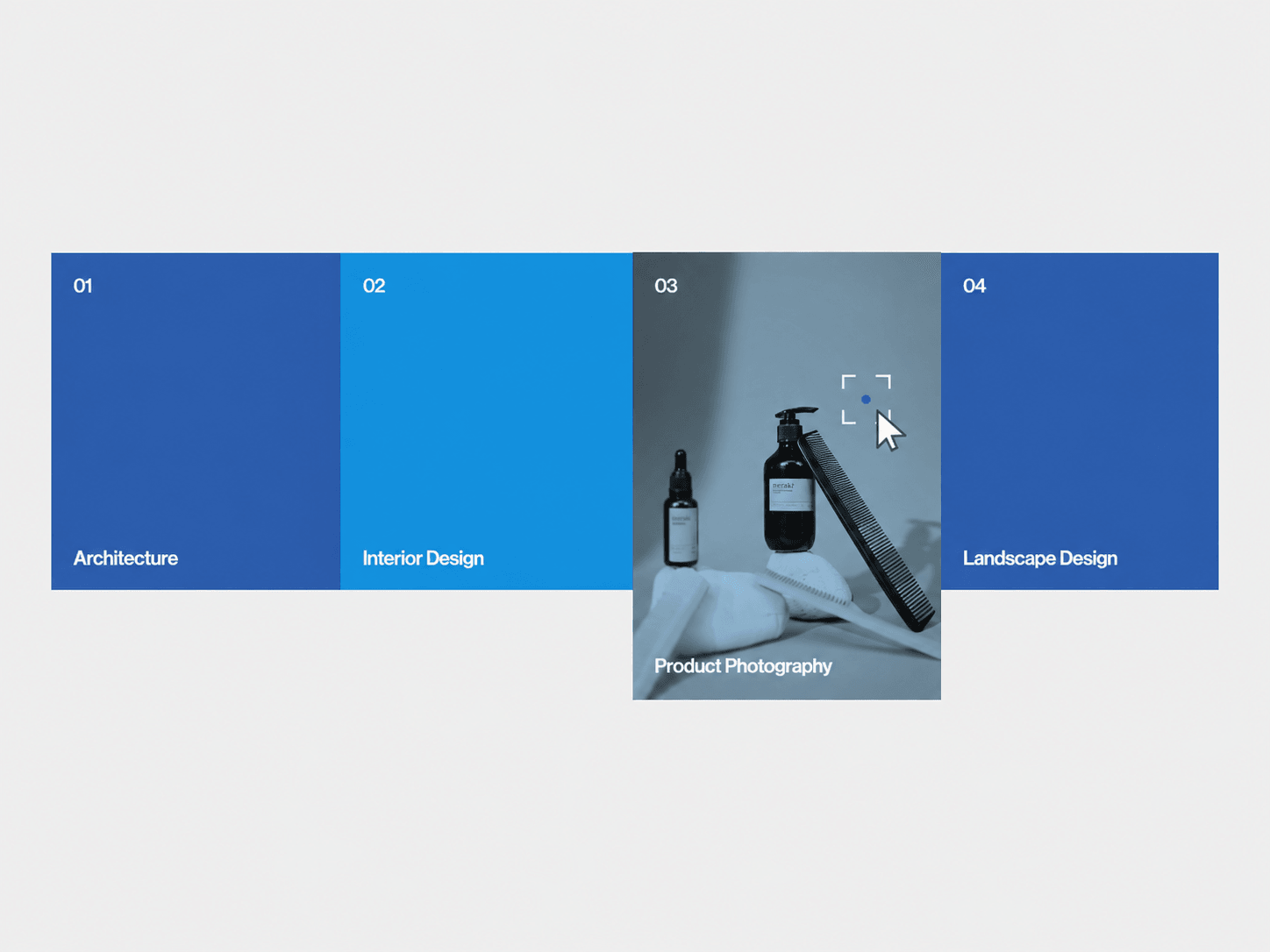
Services Showcase is an interactive Framer component for presenting services, capabilities, or offerings through expandable panels. On desktop, hovering over a panel expands it from the bottom and reveals an image or looping video with a cursor-following reticle. On mobile, the panels stack vertically and open their media preview with a tap instead.
Hover to expand panels on desktop.
Tap to reveal media on mobile.
Reveal images or looping MP4 videos inside each panel.
Optional cursor-tracking reticle on desktop.
Duotone media treatment with customizable tint.
Smooth spring-based expansion and media transitions.
Optional links for individual services.
Responsive desktop and mobile layouts.
Services Showcase includes detailed Framer property controls for content, layout, animation, typography, colors, media effects, reticle styling, video behavior, and links.
Panels — Add, remove, reorder, and customize each service panel.
Content — Edit titles and numbers.
Media — Choose between no media, image, or MP4 video.
Links — Add a custom destination to each panel and choose whether it opens in a new tab.
Layout — Switch between Desktop (Hover) and Mobile (Tap).
Size & Spacing — Control base height, expansion amount, gap, radius, and background color.
Motion — Choose Smooth, Snappy, Bouncy, or Custom spring animation.
Custom Spring — Adjust stiffness, damping, and mass.
Number — Show/hide the number and customize its font, color, and padding.
Name — Show/hide the title and customize its font, color, and padding.
Duotone — Enable the duotone effect and control tint opacity and custom tint color.
Text Scrim — Add a gradient behind the service name and control its color and opacity.
Reticle — Show/hide the cursor reticle and customize its color, dot color, and size.
Video — Control mute, looping, and whether the video resets when closed.

Services Showcase is an interactive Framer component for presenting services, capabilities, or offerings through expandable panels. On desktop, hovering over a panel expands it from the bottom and reveals an image or looping video with a cursor-following reticle. On mobile, the panels stack vertically and open their media preview with a tap instead.
Hover to expand panels on desktop.
Tap to reveal media on mobile.
Reveal images or looping MP4 videos inside each panel.
Optional cursor-tracking reticle on desktop.
Duotone media treatment with customizable tint.
Smooth spring-based expansion and media transitions.
Optional links for individual services.
Responsive desktop and mobile layouts.
Services Showcase includes detailed Framer property controls for content, layout, animation, typography, colors, media effects, reticle styling, video behavior, and links.
Panels — Add, remove, reorder, and customize each service panel.
Content — Edit titles and numbers.
Media — Choose between no media, image, or MP4 video.
Links — Add a custom destination to each panel and choose whether it opens in a new tab.
Layout — Switch between Desktop (Hover) and Mobile (Tap).
Size & Spacing — Control base height, expansion amount, gap, radius, and background color.
Motion — Choose Smooth, Snappy, Bouncy, or Custom spring animation.
Custom Spring — Adjust stiffness, damping, and mass.
Number — Show/hide the number and customize its font, color, and padding.
Name — Show/hide the title and customize its font, color, and padding.
Duotone — Enable the duotone effect and control tint opacity and custom tint color.
Text Scrim — Add a gradient behind the service name and control its color and opacity.
Reticle — Show/hide the cursor reticle and customize its color, dot color, and size.
Video — Control mute, looping, and whether the video resets when closed.