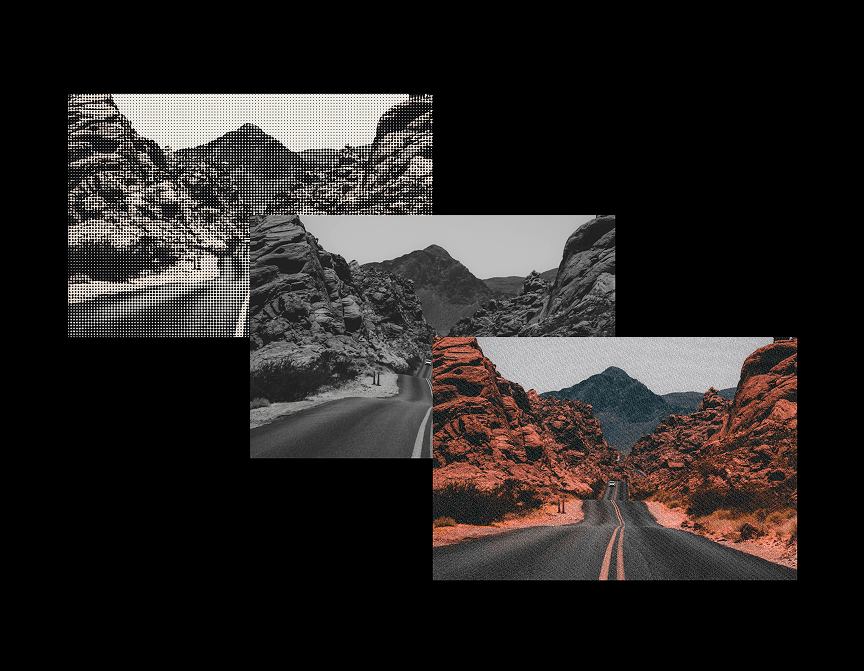
ShaderShift is a WebGL shader wrapper for any image: instead of shipping one locked-in visual, it bundles five real fragment-shader effects — Bayer-ordered Dithering, luminance-driven Halftone, Pixelation, animated film Grain, and a Liquid Warp distortion — behind a single "Effect" dropdown, so one component can cover a whole site's worth of image treatments.
It also ships three trigger modes: Ambient (loops continuously), Hover (ramps the effect in on pointer-over and eases it back out), and Scroll Reveal (starts fully stylized and dissolves into the plain photo once the frame scrolls into view). That combination is what makes it a building block rather than a one-off demo — a designer can drop it into a hero image, a portfolio grid, or an editorial photo essay and get a different result each time just by changing dropdowns and colors, with no code edits.
Image — the source photo (any Framer image, including CMS-bound fields).
Effect — Dithering, Halftone, Pixelation, Grain, or Liquid Warp.
Trigger — Ambient (continuous loop), On Hover, or On Scroll Into View.
Intensity — how strongly the effect is mixed over the source image (0–1).
Pattern Scale — dot/pixel/grid density for Dithering, Halftone, and Pixelation; wave frequency for Liquid Warp.
Speed — animation speed for Grain and Liquid Warp; 0 freezes on a still frame. Automatically disabled for visitors with reduced-motion enabled.
Grayscale Base — converts the source image to luminance before applying the duotone colors (Dithering/Halftone).
Color A / Color B — the duotone palette used by Dithering and Halftone.
Reveal Duration — seconds the Scroll Reveal fade takes (only shown when Trigger is set to On Scroll Into View).

ShaderShift is a WebGL shader wrapper for any image: instead of shipping one locked-in visual, it bundles five real fragment-shader effects — Bayer-ordered Dithering, luminance-driven Halftone, Pixelation, animated film Grain, and a Liquid Warp distortion — behind a single "Effect" dropdown, so one component can cover a whole site's worth of image treatments.
It also ships three trigger modes: Ambient (loops continuously), Hover (ramps the effect in on pointer-over and eases it back out), and Scroll Reveal (starts fully stylized and dissolves into the plain photo once the frame scrolls into view). That combination is what makes it a building block rather than a one-off demo — a designer can drop it into a hero image, a portfolio grid, or an editorial photo essay and get a different result each time just by changing dropdowns and colors, with no code edits.
Image — the source photo (any Framer image, including CMS-bound fields).
Effect — Dithering, Halftone, Pixelation, Grain, or Liquid Warp.
Trigger — Ambient (continuous loop), On Hover, or On Scroll Into View.
Intensity — how strongly the effect is mixed over the source image (0–1).
Pattern Scale — dot/pixel/grid density for Dithering, Halftone, and Pixelation; wave frequency for Liquid Warp.
Speed — animation speed for Grain and Liquid Warp; 0 freezes on a still frame. Automatically disabled for visitors with reduced-motion enabled.
Grayscale Base — converts the source image to luminance before applying the duotone colors (Dithering/Halftone).
Color A / Color B — the duotone palette used by Dithering and Halftone.
Reveal Duration — seconds the Scroll Reveal fade takes (only shown when Trigger is set to On Scroll Into View).
 Artem Kireev