How to use Multi Site with rewrite rules
Multi Site allows you to combine multiple websites under a single domain using rewrite rules. Manage rewrites directly in Framer instead of setting up a custom reverse proxy like using Cloudflare or Vercel.
What are Multi Site rewrites?
Muti Site rewrites display content from different Framer sites or external sources while keeping the original URL visible in the browser, letting you host multiple sites under a single domain. Redirects, in contrast, change the URL in the browser. See Rewrite Rules.
For example:
Your main site is at
example.comYour blog (a separate Framer project) can appear at
example.com/blogYour documentation (hosted externally) can appear at
example.com/docs
All of this happens seamlessly, and visitors see a single, unified domain.
Use cases
Migrating from another platform – Move your existing site to Framer step by step by redirecting selected pages or sections, while keeping the rest of your site active on its current platform. Find our migration guide here.
Organizing large websites – Split your site into smaller, manageable projects that are easier to develop and maintain independently.
Combining Framer with external tools – Serve your main site from Framer while integrating external services like a shop, documentation site, or custom application. If you want to migrate from another proxy host, find our step-by-step guide here.
Team collaboration – Allow different teams to work individually on different sections of your website without conflicts.
How to set up rewrite rules
Go to the Framer dashboard, select your domain in the sidebar, and navigate to the Multi Site tab.
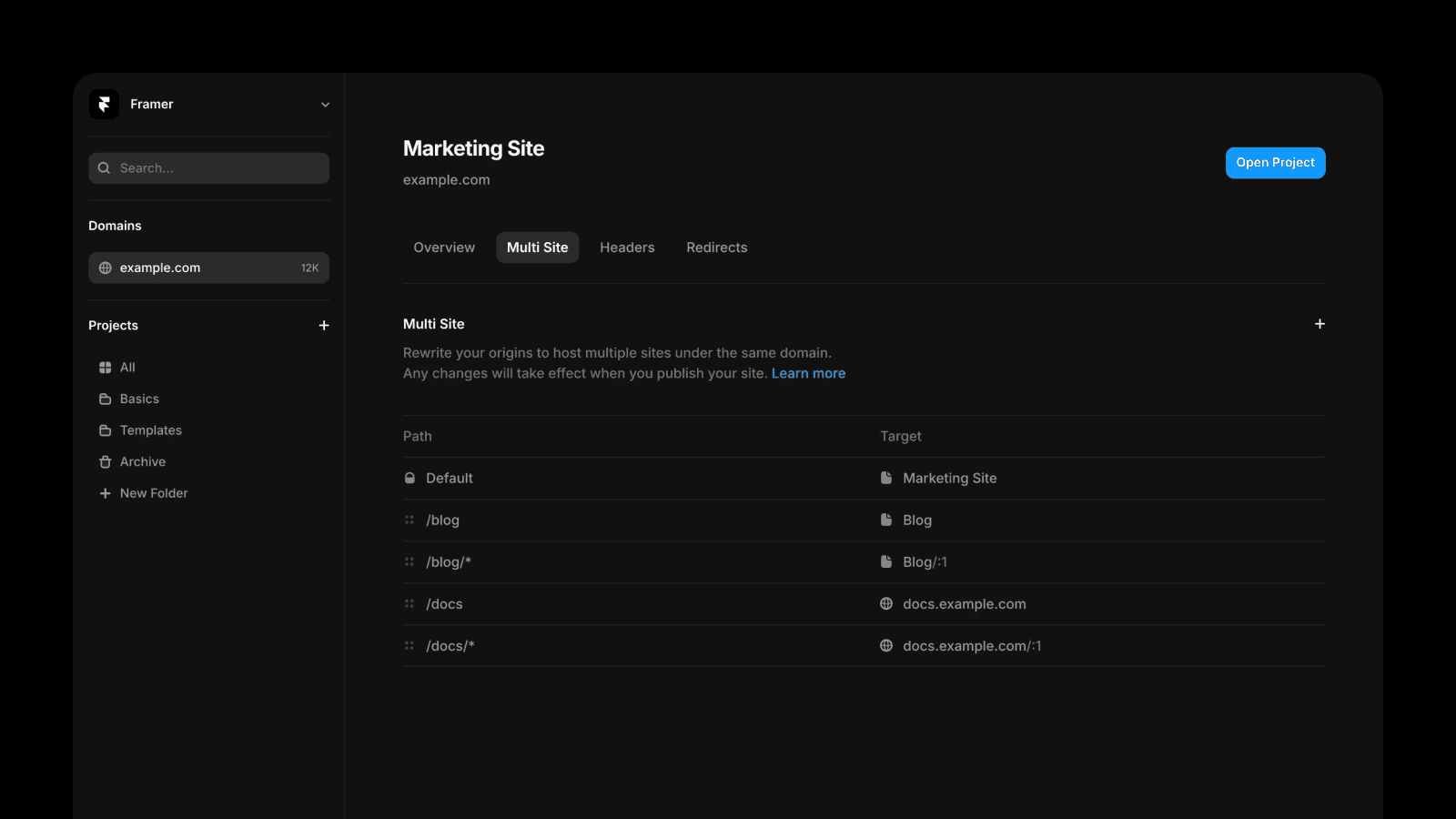
Adding a rewrite rule
Click the Plus icon on the right
Enter the path where you want the content to appear (e.g.,
/blogor/blog/*)Choose the rewrite type:
Project: Route to another Framer project
External: Route to an external website
Enter the target:
For projects: Select your Framer project and specify the path
(The target project must be published with a custom domain)For external: Enter the full URL of the external site
Click Add to save the rule
Publish your project for the changes to take effect
Path patterns
Wildcard matching
Use * to match any path segment
/blog/* matches /blog/my-post, /blog/2024/update, etc.
Dynamic parameters
Use :parameter for dynamic segments
/blog/:slug matches /blog/my-post and captures "my-post" as the slug
Capture groups
Use :1, :2, etc. in the target to reference matched groups captured by wildcards in the path
/article/:1/entry/:2 matches /blog/*/post/* (Learn more here)
Managing rules
Reorder rules: Drag and drop to change priority (rules are evaluated in order)
Edit & delete rules: Click the ··· menu or right click to edit or remove rules
Applying changes: Open and publish your project for the changes to take effect
Localization
Locale expansion is an option that automatically prefixes your path with all enabled locale codes (for example /nl, /de) at publish time so one rule can match every locale.
Note: Automatic Locale expansion only prefixes the path with the country code. It doesn't support localized paths and slugs. If your rule explicitly references a path that is localized, you have to manually add one additional rule for each locale.
Important considerations
CMS collections: For CMS-powered pages, the collection path must match between your rewrite rule and the origin project. For example, if your blog uses /blog/:slug in the origin project, your rewrite path should also use /blog/:slug (and not /posts/:slug for example).
Project targets: To use another Framer project as target, it must have a paid plan and be published with a custom domain (either a domain you own or a Framer free subdomain - e.g. example.framer.website).
Cookies: When using rewrites to external destinations, cookies will be forwarded from your site to the destination. The external site can also set cookies. Only rewrite to destinations you trust.
Canonical URLs: Set canonical URLs in each project to point to the final domain where they'll be served.
Sitemaps: Framer automatically generates and merges sitemaps from all your rewrite sources.
Password protection: Password protection only applies to the main project.
Rewrite/Page Conflict: If both a Framer page and a rewrite rule exist for the same path the rewrite rule shadows that page and the external origin is served instead.
A/B tests and funnels: Analytics and A/B testing currently track only the main page and do not include visits or events from proxied pages.
Request methods and non HTML content: The proxy supports all request methods and can pass through non-HTML content without inspecting or rewriting it.
HTTP origins: Only HTTPS origins are supported; plain HTTP cannot be proxied.
CSP interaction: The browser enforces your CSP, and proxied HTML is not modified.
DOS protection: Attacks trigger a challenge page.
What are rewrites in Framer Multi Site and how do they work?
Rewrites display content from different Framer sites or external sources while keeping the original URL visible in the browser, letting you host multiple sites under a single domain. For example, your main site could be at designer.com, your blog (a separate Framer project) could appear at designer.com/blog, and your documentation (hosted externally) could appear at designer.com/docs. All of this happens seamlessly, and visitors see a single, unified domain.
How do I set up a rewrite rule in Framer?
Go to the Framer dashboard, select your domain in the sidebar, and navigate to the Multi Site tab. Click the + icon to add a rule, choose the rewrite type (Project to route to another Framer project, or External to route to an external website), enter the path where you want the content to appear (e.g., /blog or /blog/*), and enter the target (select your Framer project and specify the path, or enter the full URL of the external site). Click Add to save the rule, and publish your project for the changes to go live.
What are some important considerations when using rewrites with Framer Multi Site?
For CMS-powered pages, the collection path must match between your rewrite rule and the origin project. To use another Framer project as a target, it must be published with a custom domain and have a paid plan. When using localized projects, ensure the locale path structure is consistent between the rewrite path and target. Set canonical URLs in each project to point to the final domain where they'll be served. Framer automatically generates and merges sitemaps from all your rewrite sources. Password protection only applies to the main project; enabling it on target projects won't protect content served through rewrites.
Updated