Breakpoint preview disabled in your project
Learn why a breakpoint preview is unavailable and what’s required to enable it.
When previewing your site, a breakpoint such as Desktop may appear greyed out and unavailable. This article explains what’s causing this behavior and what needs to change before the breakpoint can be previewed.
What’s causing this
A breakpoint becomes unavailable when its width exceeds your current browser window or monitor resolution. Framer disables the option automatically to prevent inaccurate previews when there isn’t enough horizontal space to display that breakpoint correctly.
This is expected behavior and doesn’t indicate an issue with your project.
How this shows up in the editor
You may notice the following:
In the Preview toolbar, a breakpoint like Desktop appears greyed out.
Smaller breakpoints, such as Tablet or Mobile, remain selectable.
Increasing the browser width is the only way to make the option available again.
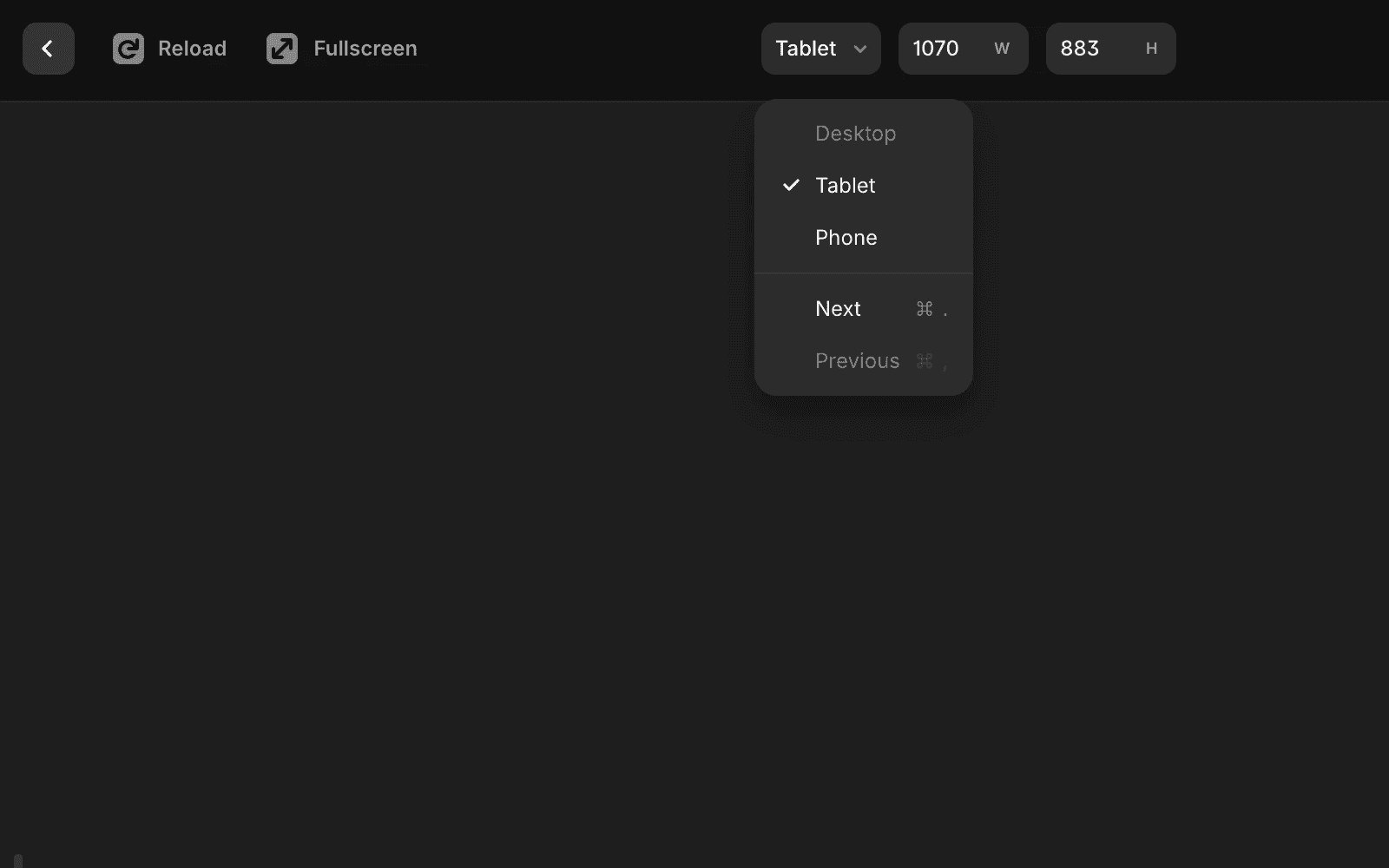
How to re-enable the breakpoint
To preview the disabled breakpoint, try one of these options:
Expand your browser window or move Framer to a larger monitor so the viewport meets the breakpoint’s width.
Reduce the Desktop breakpoint width so it fits within your current screen.
Publish the site and preview the breakpoint on the live URL, then zoom the browser out if needed.
Once the viewport is wide enough to match the breakpoint’s minimum width, the option becomes active and can be selected normally.
Updated