
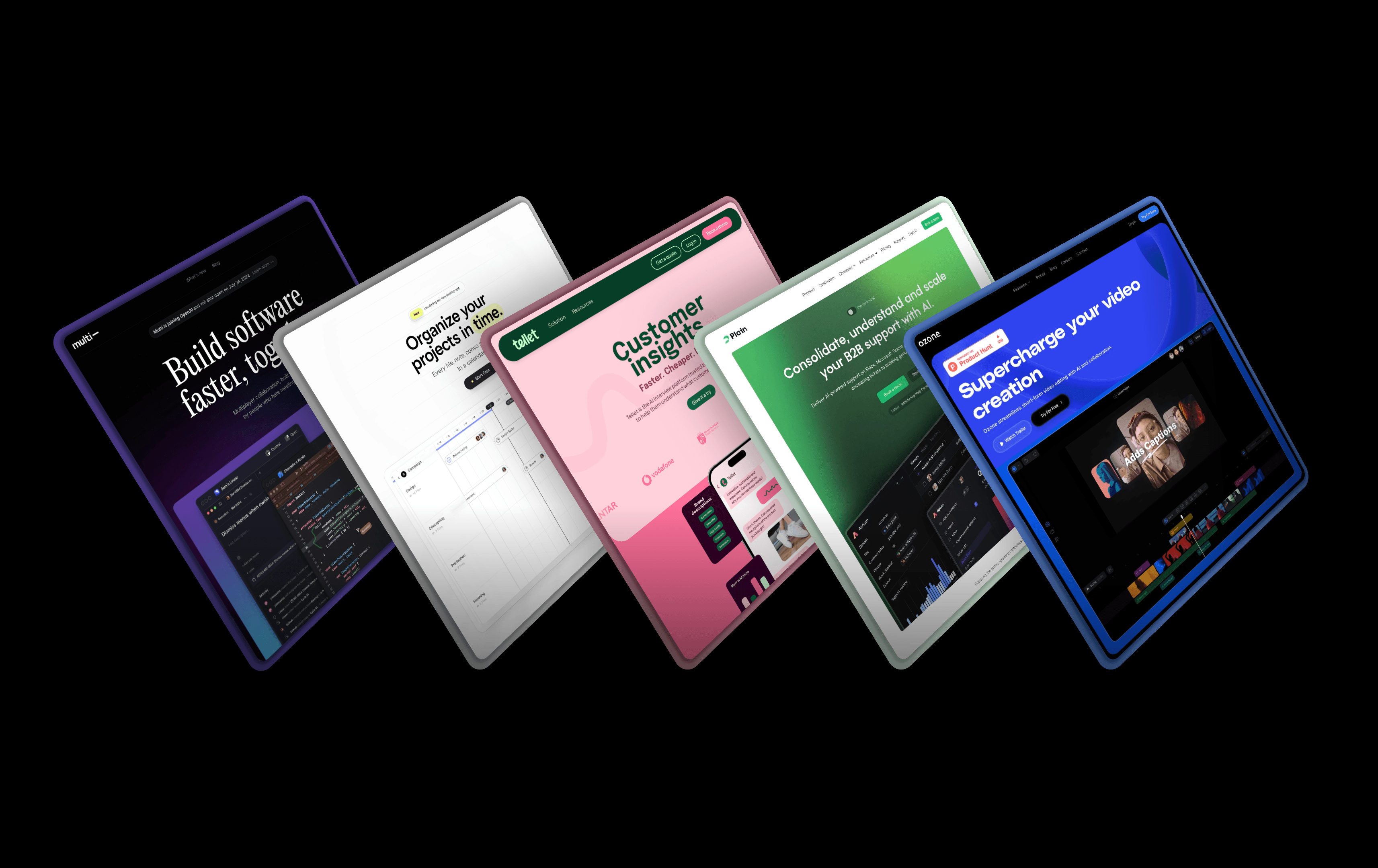
13 best SaaS websites with stunning design

0 min read

Share

Share

With tens of thousands of SaaS products on the market, your marketing website needs to cut through the noise to stand out.  A well-crafted SaaS website goes beyond simply showcasing features; it should reflect the quality of your product experience, build trust via a seamless browsing experience, and build conversion intent through social proof.

Explore more than a dozen examples of standout SaaS websites to derive inspiration for your own web design strategy. 

Features of successful SaaS websites

What truly separates the best SaaS websites from the mundane are elements that blend visual storytelling with functional design to foster both emotional and rational justifications for a subscription purchase. The best SaaS websites have in common:  

  • A clear list of features. While it seems basic, clearly showcasing a SaaS product’s standard and unique features (without overwhelming users with promotional language) is key to demonstrating value. 

  • High-quality screenshots or GIFs. The more quickly you can demonstrate how well your product works, the more quickly potential customers can move from having questions to signing up for a demo.

  • Interactive demo experiences. Beyond screenshots and GIFs, these interactive demos provide an immersive experience for potential users.

  • Well-organized social proof. Social proof entails spotlighting customer testimonials, professional reviews, and positive user-generated content (UGC) to build trust among potential users. Many impactful websites feature client logos above the fold to immediately demonstrate legitimacy.

  • Intuitive user experience. Good sites have all the information you need; great sites make navigating that information quick, easy, and intuitive. Users expect to find access to product details, pricing, resources, company information, and access to a log-in portal or set-up page in the top nav, while elements like privacy policies, terms, and contact links should be available in the footer.

13 best SaaS websites with stunning design

Read on to explore 13 examples of best-in-class SaaS website design that can inspire your own building process. 

1. Copilot
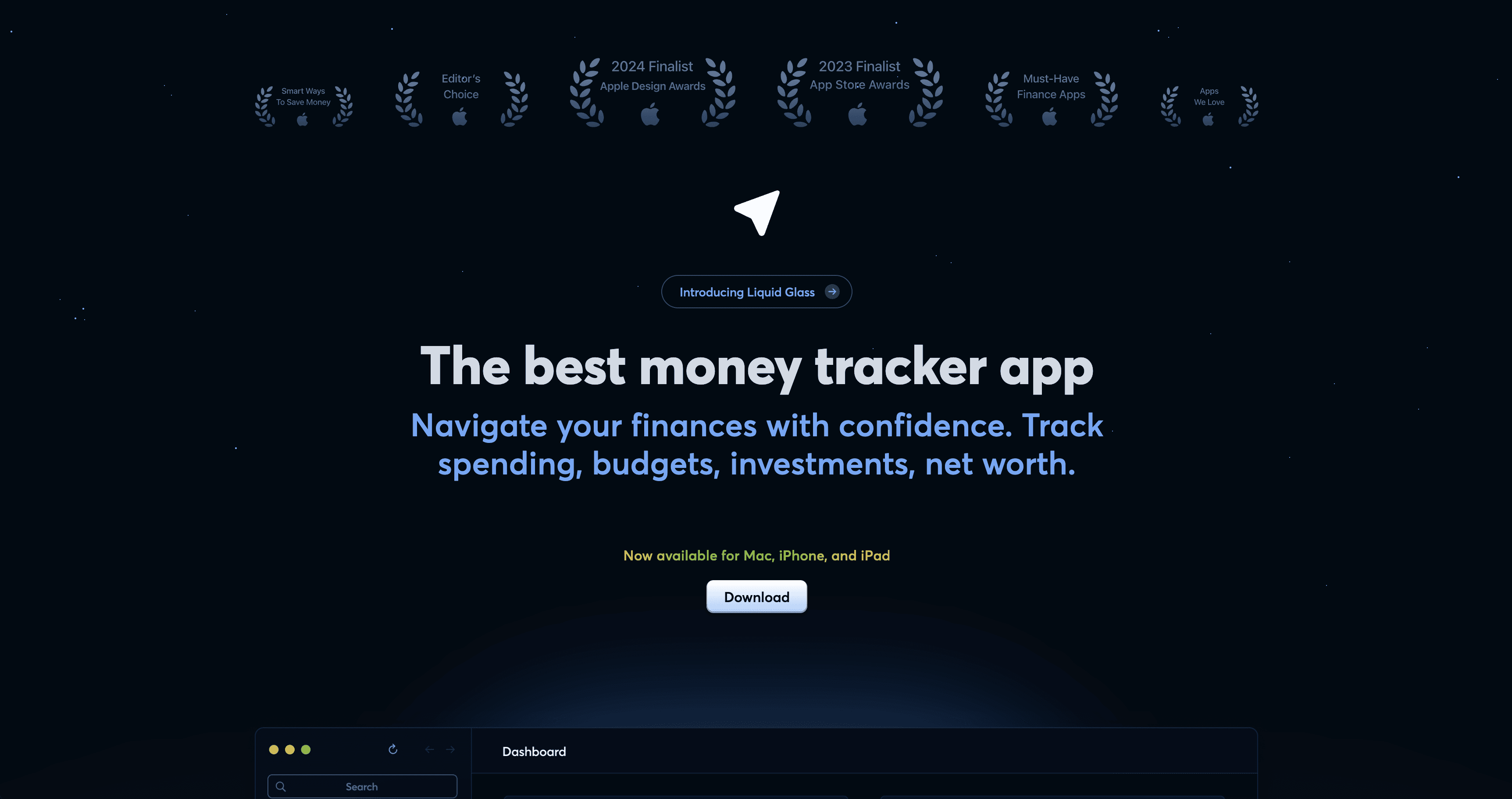
Budgeting app Copilot Money’s homepage leans into the power of social proof, with awards and accolades from Apple’s app store at the very top of the page, followed by a block of media logos, additional awards, and user reviews just beneath the hero. Logos from the New York Times, The Verge, and Tech Crunch link to published editorial reviews, while testimonials pulled from real users on X and the Apple App Store comprise the grid.

To demonstrate the app’s functionality, the landing page highlights the product’s AI-powered capabilities through an animated visualization of spending categories laid over playful 8-bit artwork of storefronts. The storefronts bear logos of recognizable financial institutions, subtly building more credibility by showcasing the array of platforms that users can connect to their Copilot account. 

The sticky navigation bar at the top keeps the “Download” CTA ever-present.

2. Rainbow
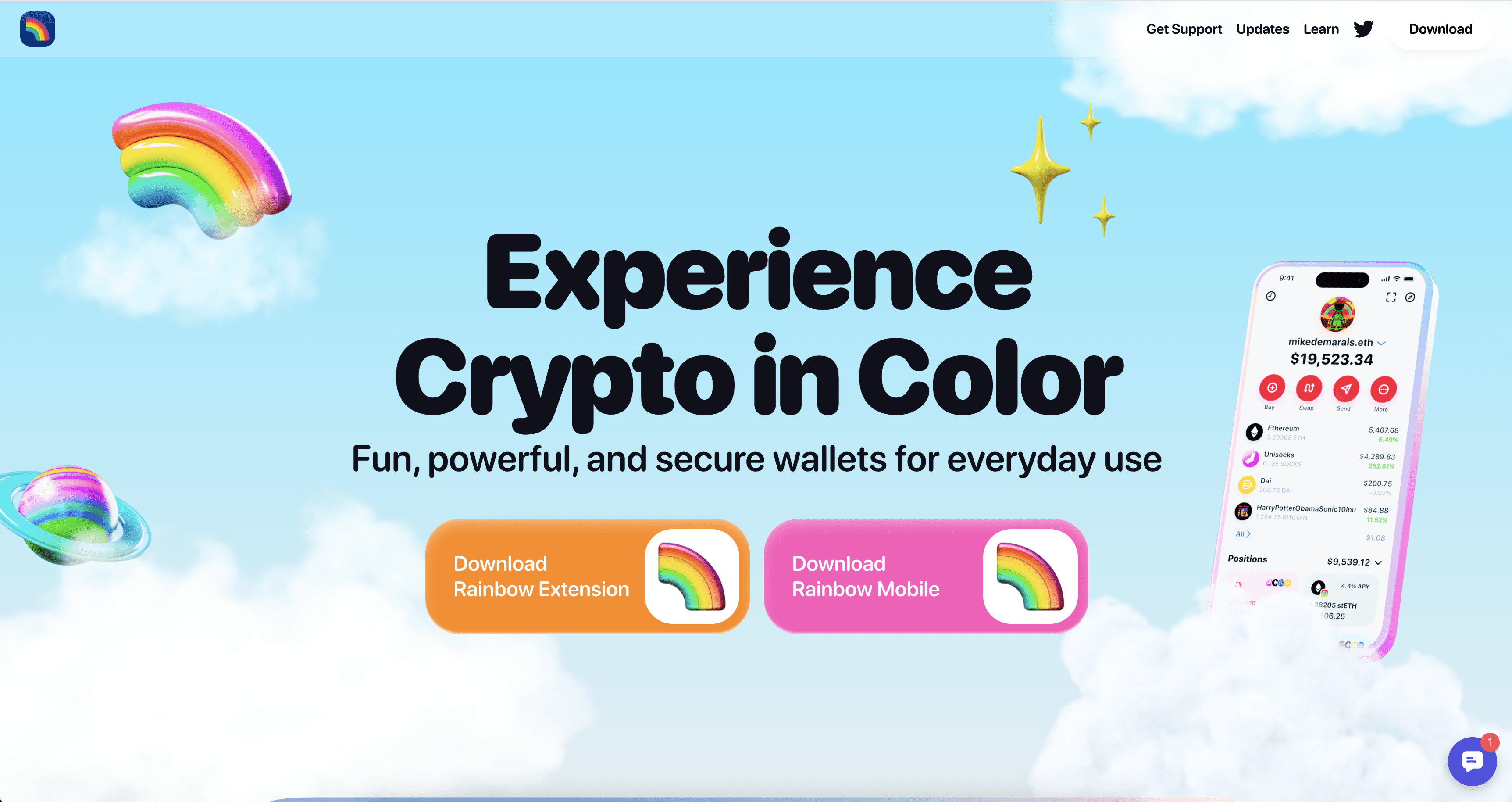
Rainbow, a secure cryptocurrency wallet for individual consumers, breaks conventional crypto website design norms with its vibrant, surreal visual aesthetic. While blockchain SaaS platforms typically opt for more corporate blues and grays, Rainbow embraces bright oranges and electric pink that immediately distinguish it from competitors. This is especially noticeable in its bright CTA buttons and rainbow-emblazoned sticky navigation bar. 

The homepage features a dynamic carousel of product screenshots and GIFs that demonstrate wallet functionality without overwhelming users. An interactive keyboard element—complete with rainbows that explode from the keyboard when clicked—invites exploration, transforming passive browsing into active engagement. This playful approach to SaaS design proves that even technical products can embrace personality while maintaining credibility through clear feature demonstrations. 

3. Assemble
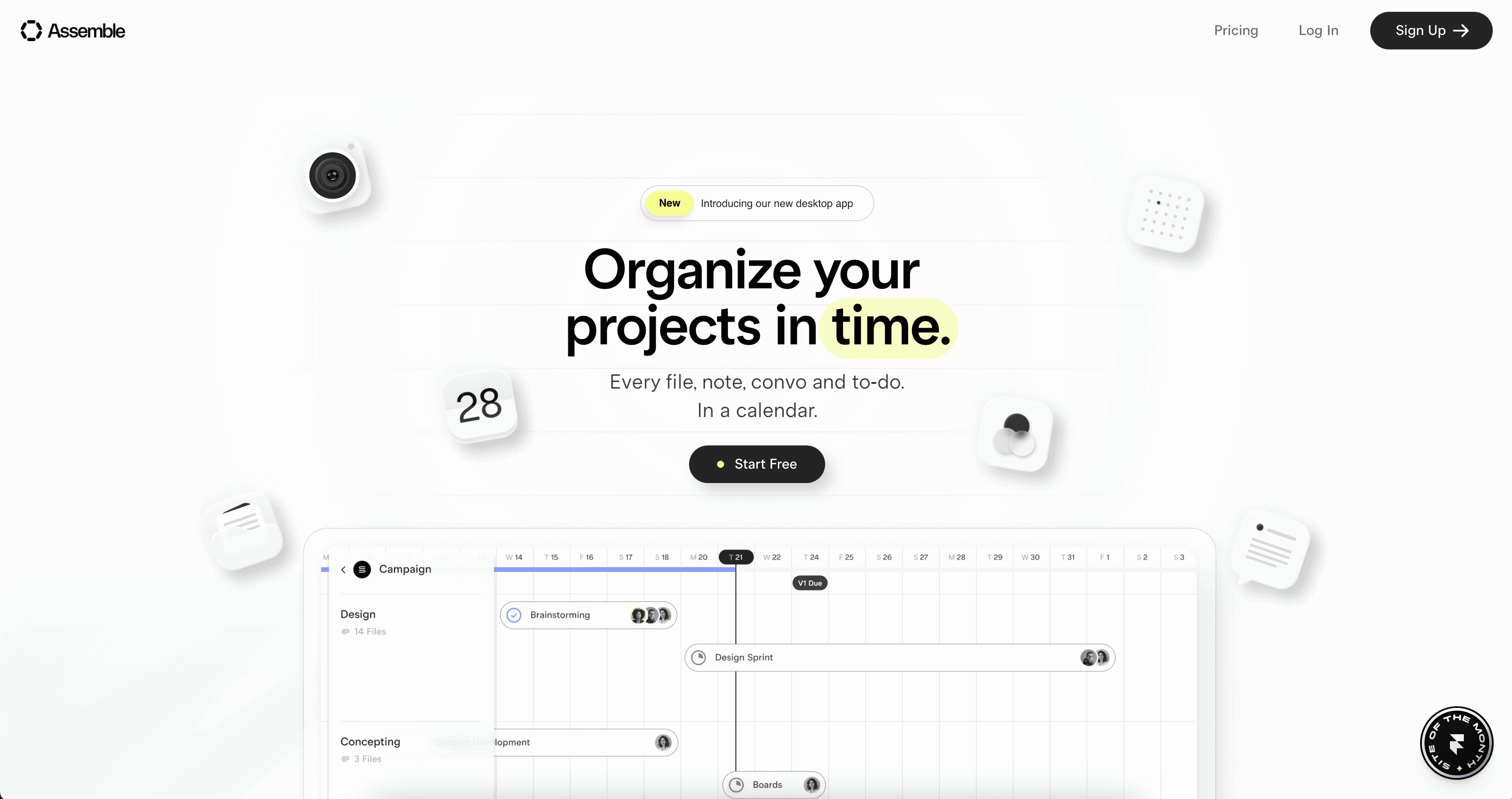
Assemble is a product management tool designed for teams and businesses tackling complex projects. Its website design leans on a clean aesthetic and parallax effects to clearly tell its product story and reinforce its core value proposition, which is its calendar-centric UX. Visually, the brand and website are designed to evoke a feeling of zen

Meanwhile, interactive demos, rather than static screenshots, provide a functional preview of its interface, allowing users to get a feel for the product’s core workflows (with creative flourishes). Assemble’s designers created these interactive, visual animations to help customers quickly understand complex features. 

4. Zazu
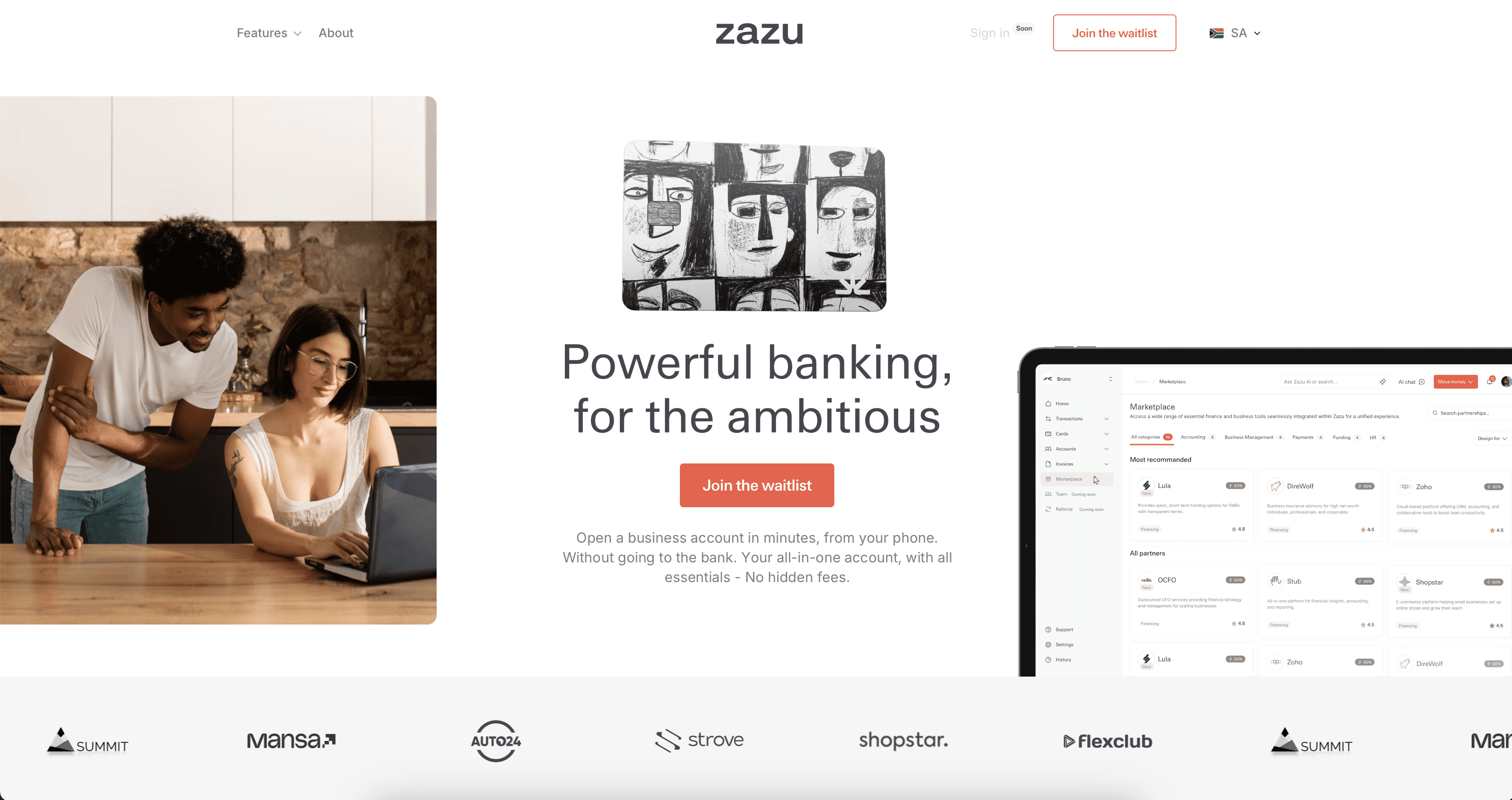
Zazu is a South African digital banking platform that provides various services for small businesses, entrepreneurs, and freelancers. Zazu’s website design effectively balances product screenshots with social validation, understanding that B2B financial software requires both functional demonstration and trust-building. It weaves the two together in an impactful credibility-building flow.

A scrolling ticker of client logos separate the hero section from the product-oriented sections that follow. Then, a testimonial carousel with a contrasting color scheme creates a natural break in the page flow. It features client photos, company logos, and direct quotes from entrepreneurs that glide across the page as the user interacts with arrow buttons, reinforcing the platform’s credibility. 

5. Scribe
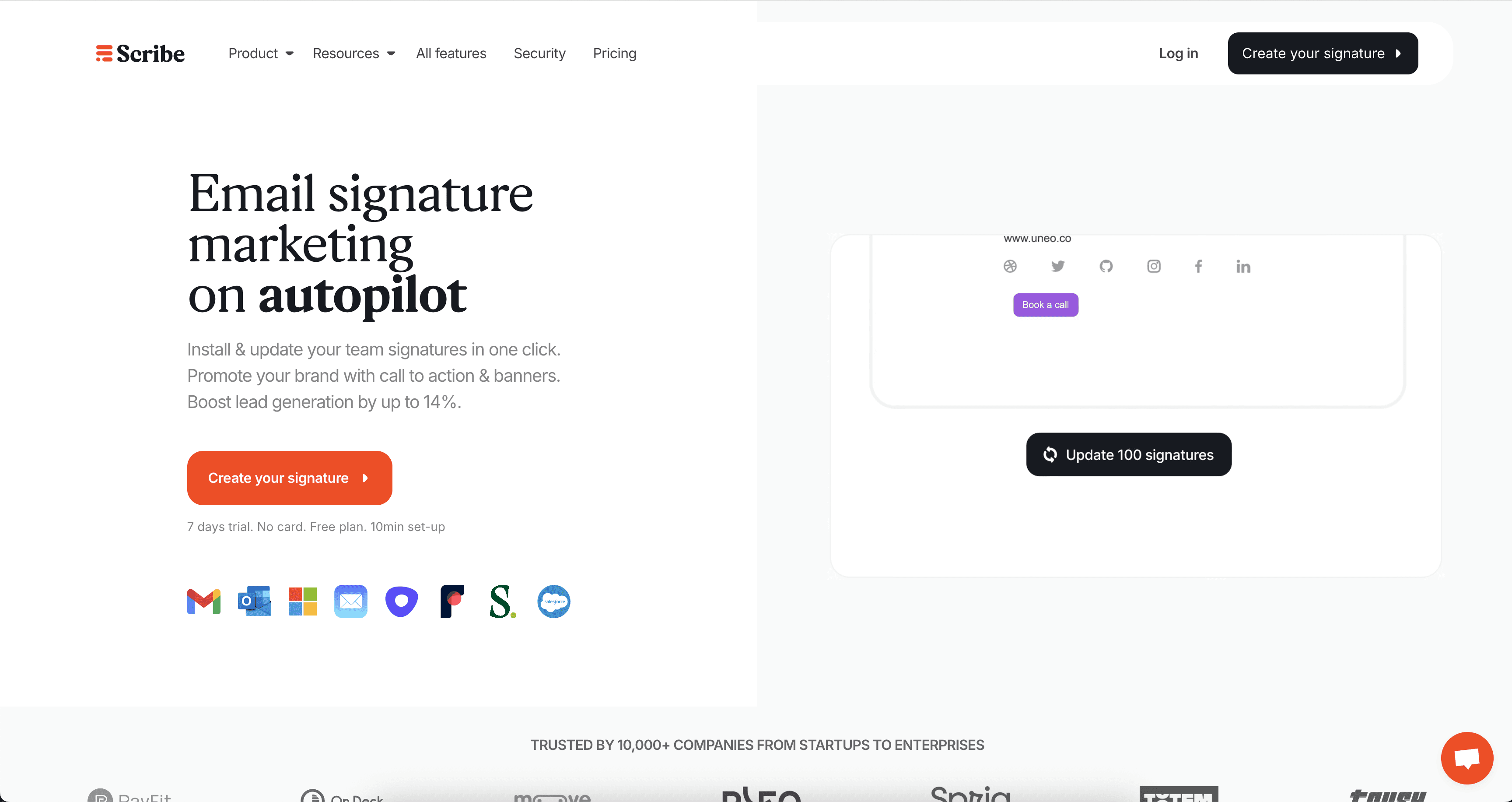
Paris-based Scribe is an automated email signature platform, which allows its users to craft beautiful, on-brand email signatures and deploy them across a team or entire organization. Their site uses several multimedia features to engage users and demonstrate the product’s value.

On the homepage, an above-the-fold GIF demonstrates its core functionality. Further down, the site offers visitors an interactive ROI calculator, which transforms static value propositions into a personalized demonstration of value. The calculator updates in real-time as users input team size, daily outreach volume, and average customer value—providing concrete business justification. 

Under the resources tab, the top option offers a concise, 1-minute video to explain what the product is and how it delivers value.

6. Play
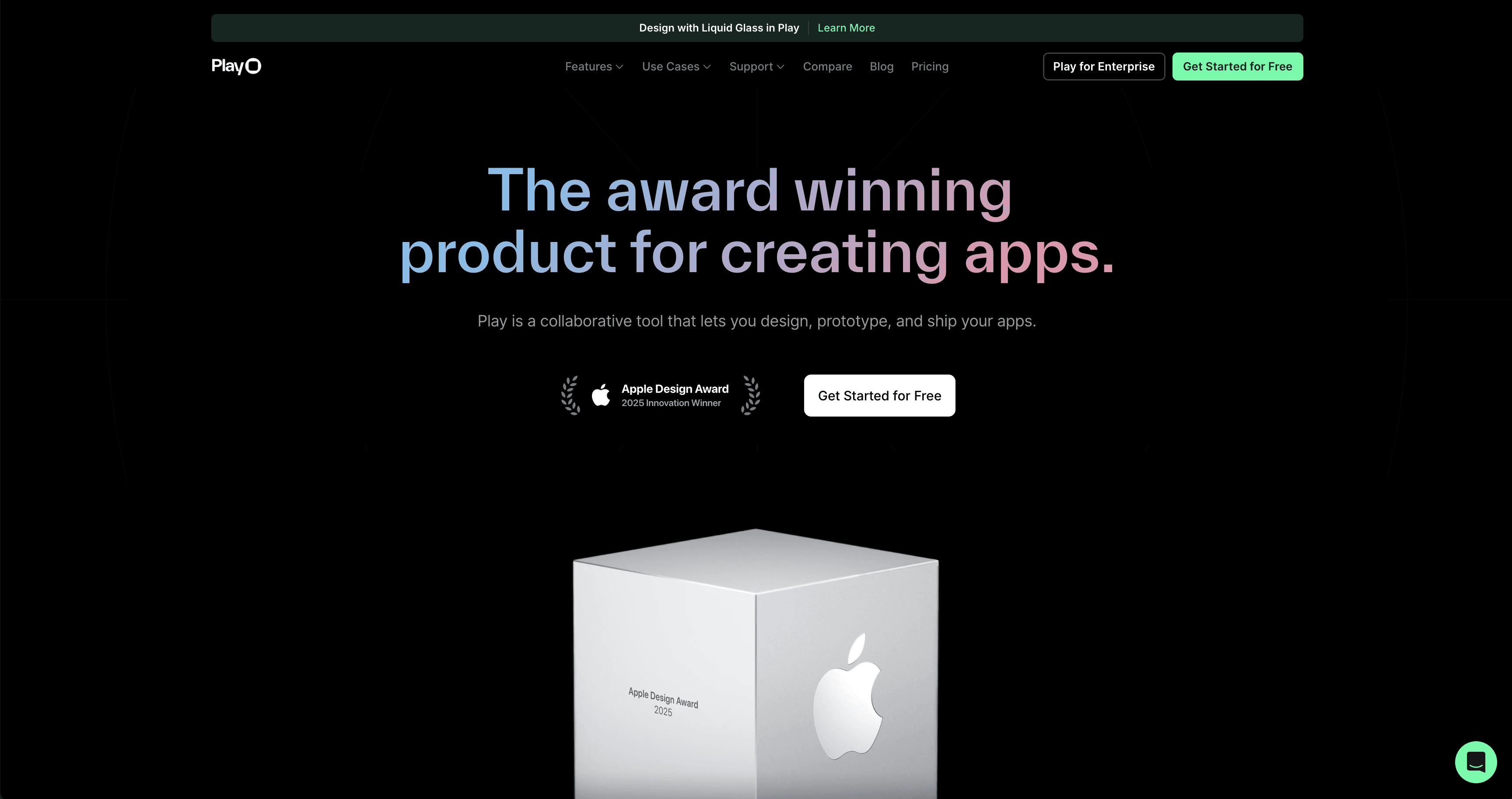
Play—a collaborative design tool that enables teams to design and ship iOS mobile apps—highlights its external credibility with an above-the-fold display of its Apple Design Award. The site’s tabbed interface with embedded GIFs creates an organized container for showcasing its freeform design canvas, prototyping capabilities, Apple App Clip sharing, and Play to Xcode shipping functionality.  

The website’s user experience benefits from a grid layout featuring user-generated content (tagged with #MadewithPlay), which provides authentic social proof. This community-driven website design is a strong example of trust building through accolades and customer success. 

7. Tellet
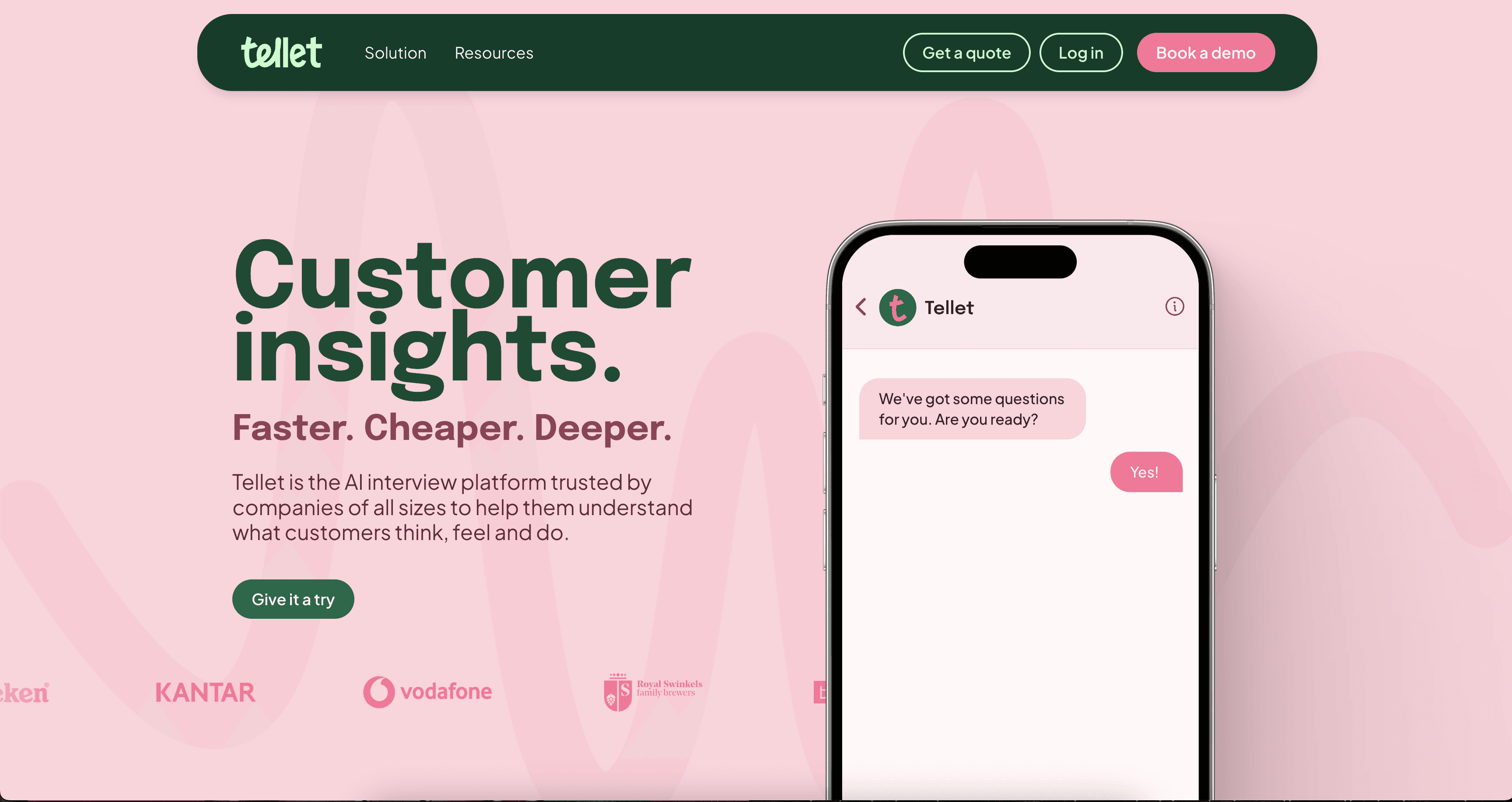
Amsterdam-based Tellet is a customer research platform that conducts user interviews through AI-powered conversations. With a distinctive pink-and-green color palette, Tellet’s website uses scroll-triggered animations that progressively reveal interface screenshots of example user interviews (and product insights from those conversations) as users navigate their way down the page.

A bold typographic hierarchy, combined with clear copy, guides users through the platform’s step-by-step functionality. The website’s information architecture breaks Tellet’s features into digestible, colorful cards featuring templates of each step. 

8. Multi
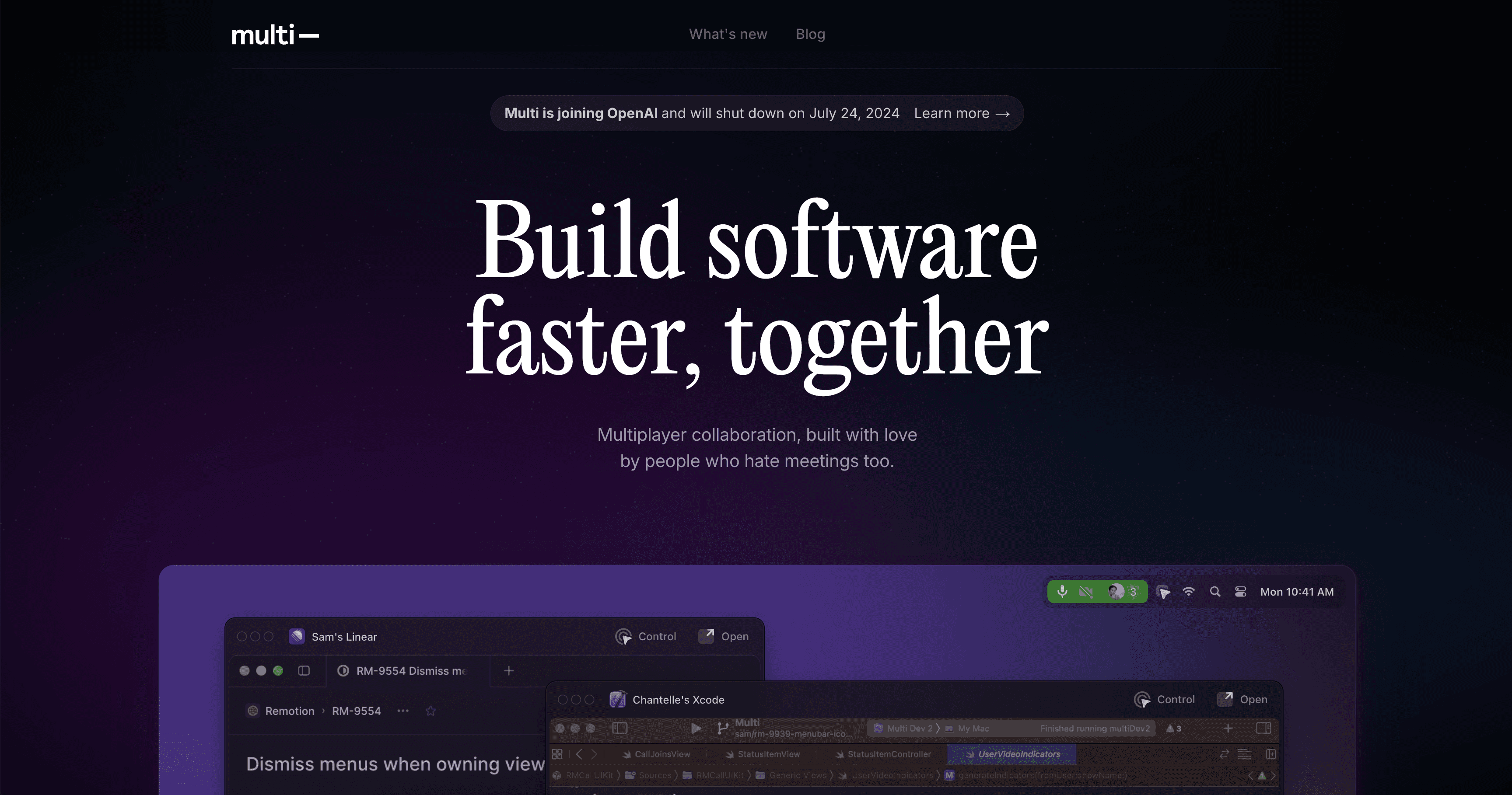
Before being acquired by OpenAI in 2024, Multi was a multiplayer collaboration platform for macOS that aimed to enable real-time screensharing and AI-powered meeting documentation. Its website embraces a dark color scheme that appeals to developer audiences while highlighting key features through contrasting elements. A standout feature is an interactive screenshare demo with moving cursors that highlight the collaborative features of the platform. 

The homepage also features practical elements, including an updated changelog that provides a detailed record of product updates, bug fixes, and new features. This feature demonstrates transparency—a crucial trust signal for technical audiences. The straightforward grid layout also makes it easy for developers to quickly scan capabilities without unnecessary design flourishes like flashy animations or overly complex graphics. 

9. Bird
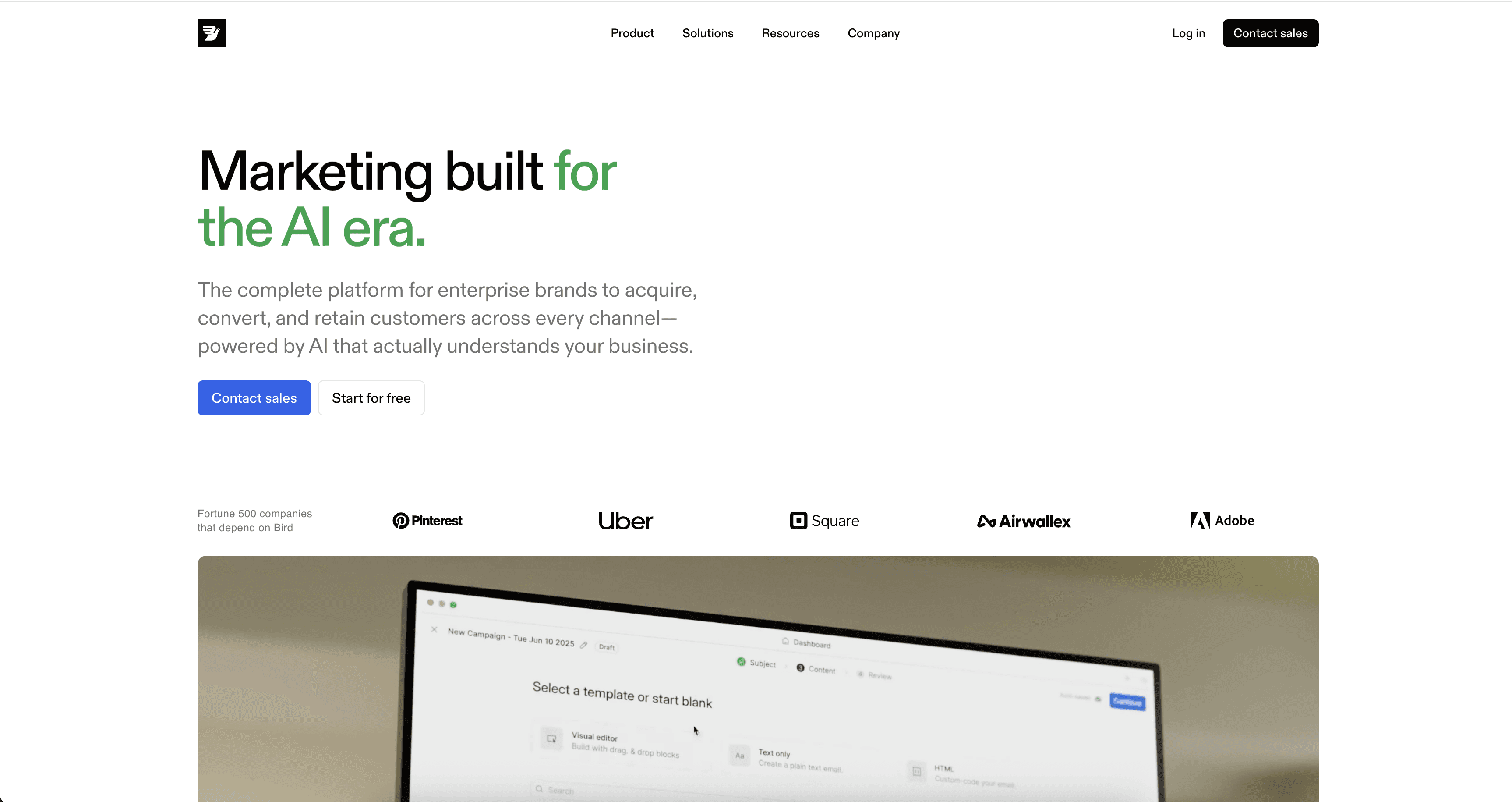
A customer lifecycle management platform that helps B2C brands automate their campaigns, Bird’s website design centers around a high-quality looping video that serves as the focal point of the entire homepage. This full-width video demonstrates the product in action, providing a dynamic preview of complex CRM capabilities (like creating custom workflows and communication drip campaigns) that static screenshots can’t muster.

The vertical module structure below the hero creates a scannable layout where each feature receives dedicated space with supporting descriptions and interface previews. A module with tabs allows users to toggle between use cases, gliding between GIFs demonstrating customer flows specific to ecommerce and retail (an ecommerce cart), fintech and finance (a fintech verification flow), or SaaS (an automated lifecycle campaign triggered by a travel booking), depending on the users’ needs—as the users’ clients would see the tool’s flows in action.   

10. Plain
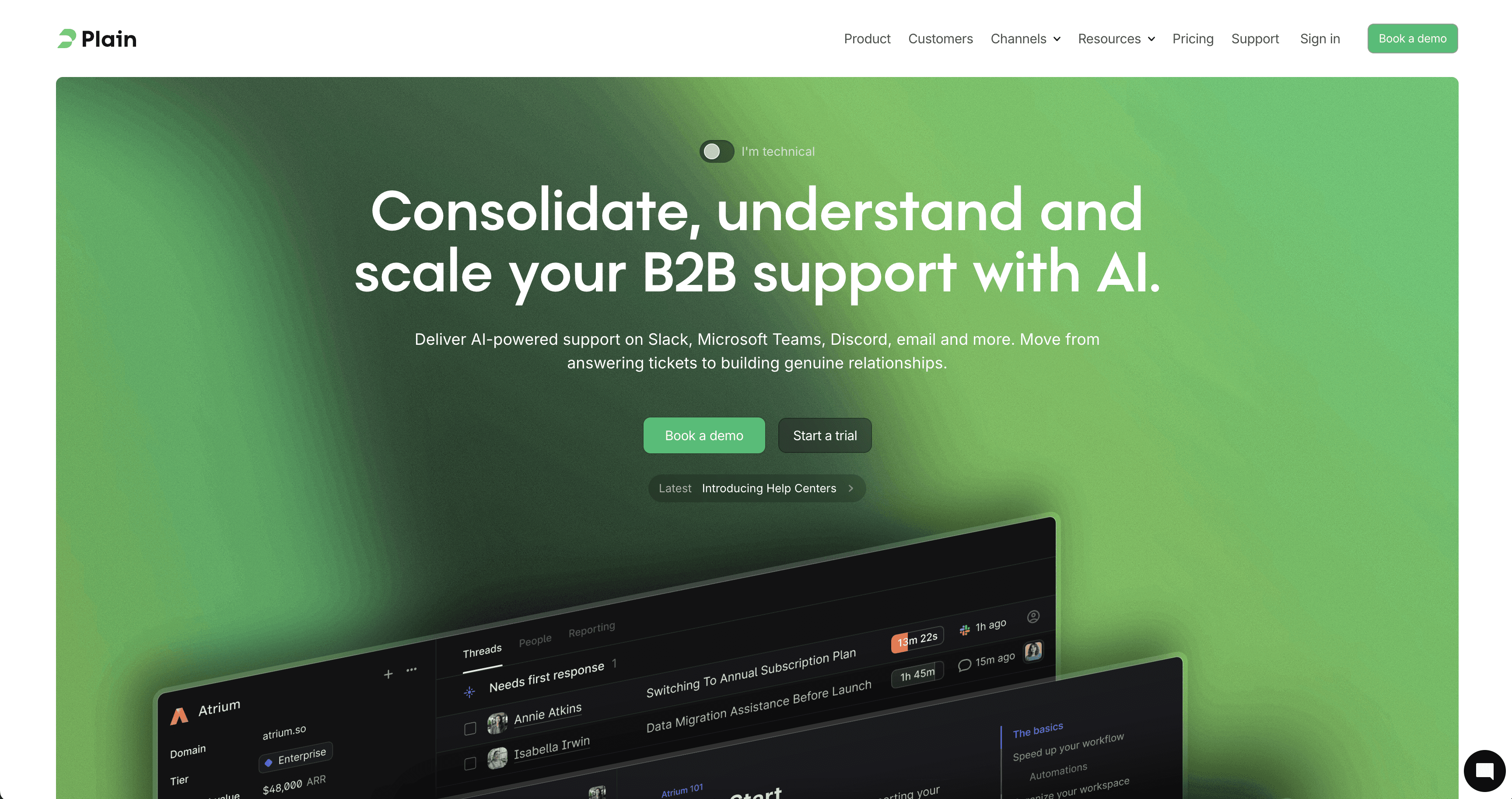
As an AI-supported customer support platform, Plain’s website uses contrasting full-width modules to create a visual rhythm while highlighting its suite of features—including issue tracking, a native Slack integration, and automated workflows—with visually distinct modules. One module, for example, displays a scrolling loop of its queue features surrounded by ample white space. This deceptively simple layout evokes the sense of calm that Plain strives to provide with its all-in-one support interface. 

While it appears to be a standard hero, the green, above-the-fold banner has a unique feature: a small toggle button that allows the user to toggle between a technical and non-technical POV. When clicked, the “I’m technical” button instantly adjusts the headline and subsequent copy, providing a unique opportunity for Plain to appeal to both technical and non-technical users—while making each feel considered by the designer. 

11. Vibrant
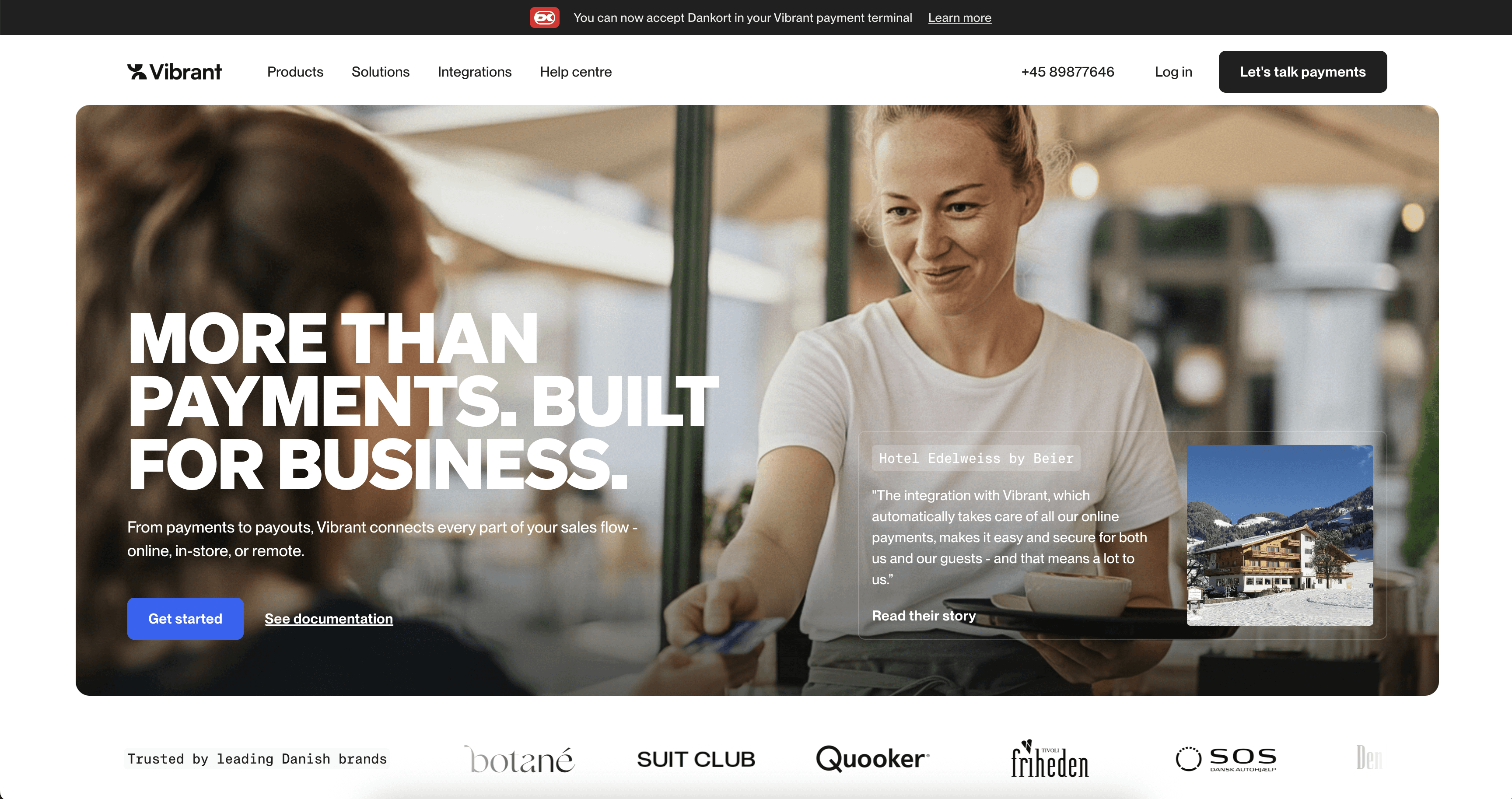
Vibrant is a Danish online payment platform that combines in-store and online payment processing into one system. Its website creates visual interest using scroll-triggered animations—that fill white space with an on-trend buttery yellow—creating a natural section divider. A basic testimonial grid offers social proof through diverse customer voices, while polished product screenshots and GIFs show the software in real-life usage scenarios. 

12. Musicfy
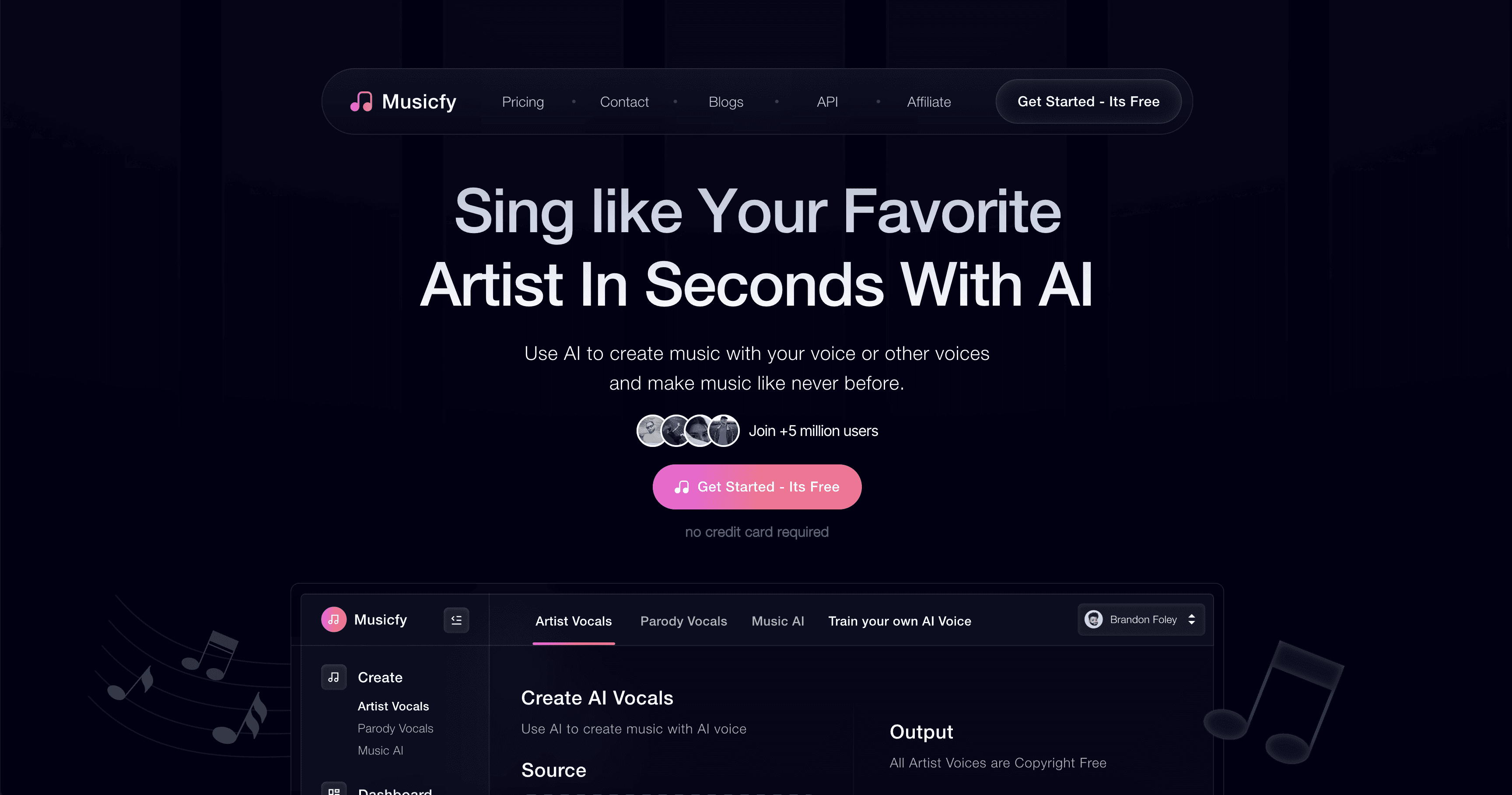
Musicfy’s AI music-generation platform employs stacking, full-width modules that create clear separation between features and maintain visual flow. The generous white space (in name only—the color palette is dark) makes complex AI capabilities feel approachable and easy to understand. The website design successfully balances the creativity that’s appropriate for a music tool with the clarity that’s essential for SaaS conversion. 

13. Ozone
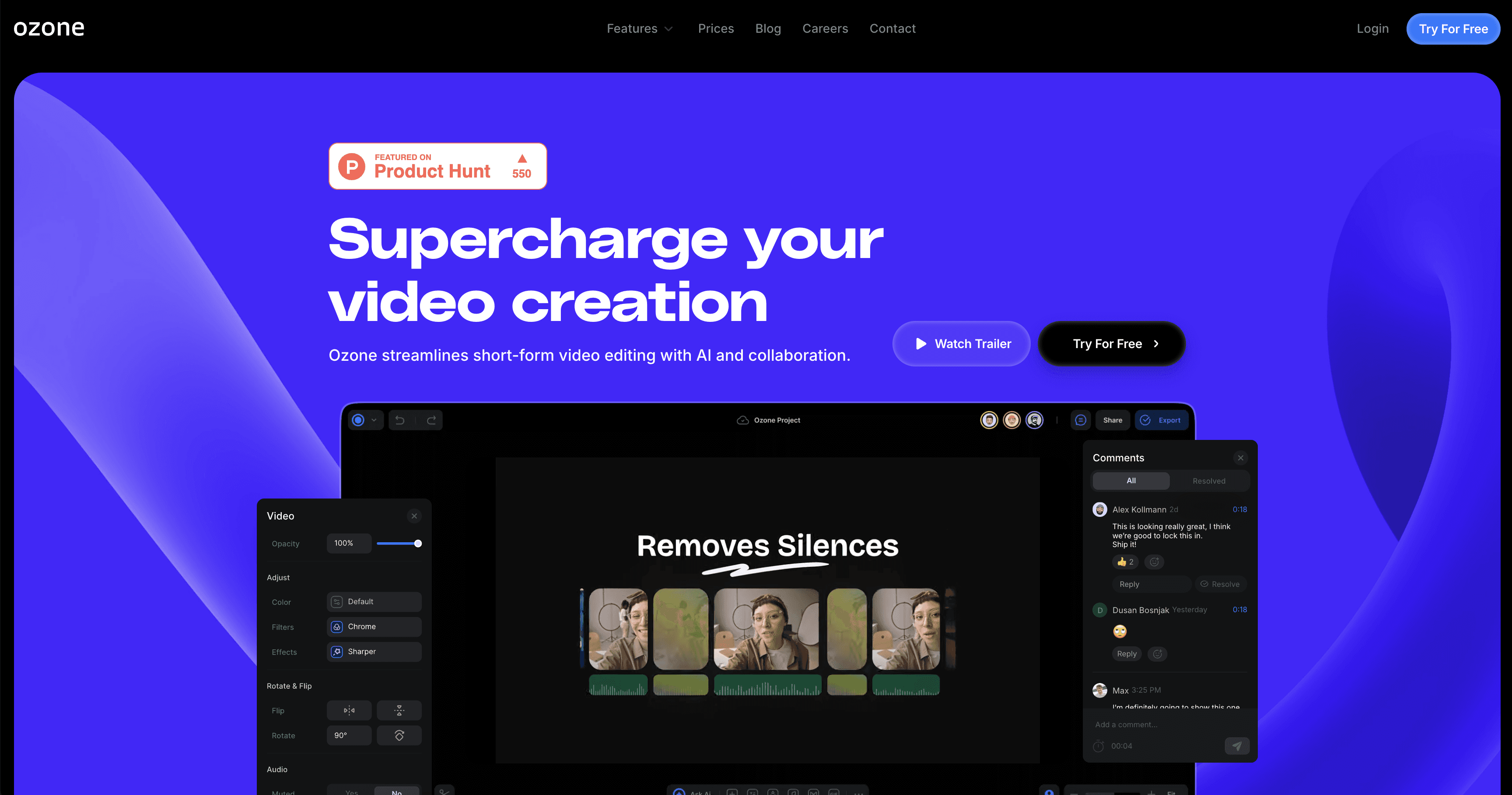
An AI-powered, cloud-based video editing platform, Ozone’s website uses a black background with striking purple and blue accents to highlight its creative interface. The website features a frame that mimics their software interface and demonstrates collaboration capabilities like real-time chat, depicts some of its editing sliders, and highlights its draggable timeline view. The card-based layout efficiently organizes features through a combination of GIFs, screenshots, and descriptions. An oversized “Try for Free” CTA and sticky navigation bar create strong conversion points. 

Design and build your SaaS website with Framer

Framer has all the functionality software startups need to manage and scale their websites—and a generous startups program that includes a free year of Framer Launch. 

To get started, browse Framer’s Marketplace, featuring over 2000 professionally-designed website templates and modular components that are essential for software websites, like hero sections, pricing tables, and testimonial carousels.

Once set up, use the integrated CMS to quickly deploy new pages, like blog posts, landing pages, and case studies—no engineering support needed. 

Explore more than a dozen examples of standout SaaS websites to derive inspiration for your own web design strategy. 

Features of successful SaaS websites

What truly separates the best SaaS websites from the mundane are elements that blend visual storytelling with functional design to foster both emotional and rational justifications for a subscription purchase. The best SaaS websites have in common:  

  • A clear list of features. While it seems basic, clearly showcasing a SaaS product’s standard and unique features (without overwhelming users with promotional language) is key to demonstrating value. 

  • High-quality screenshots or GIFs. The more quickly you can demonstrate how well your product works, the more quickly potential customers can move from having questions to signing up for a demo.

  • Interactive demo experiences. Beyond screenshots and GIFs, these interactive demos provide an immersive experience for potential users.

  • Well-organized social proof. Social proof entails spotlighting customer testimonials, professional reviews, and positive user-generated content (UGC) to build trust among potential users. Many impactful websites feature client logos above the fold to immediately demonstrate legitimacy.

  • Intuitive user experience. Good sites have all the information you need; great sites make navigating that information quick, easy, and intuitive. Users expect to find access to product details, pricing, resources, company information, and access to a log-in portal or set-up page in the top nav, while elements like privacy policies, terms, and contact links should be available in the footer.

13 best SaaS websites with stunning design

Read on to explore 13 examples of best-in-class SaaS website design that can inspire your own building process. 

1. Copilot

Budgeting app Copilot Money’s homepage leans into the power of social proof, with awards and accolades from Apple’s app store at the very top of the page, followed by a block of media logos, additional awards, and user reviews just beneath the hero. Logos from the New York Times, The Verge, and Tech Crunch link to published editorial reviews, while testimonials pulled from real users on X and the Apple App Store comprise the grid.

To demonstrate the app’s functionality, the landing page highlights the product’s AI-powered capabilities through an animated visualization of spending categories laid over playful 8-bit artwork of storefronts. The storefronts bear logos of recognizable financial institutions, subtly building more credibility by showcasing the array of platforms that users can connect to their Copilot account. 

The sticky navigation bar at the top keeps the “Download” CTA ever-present.

2. Rainbow

Rainbow, a secure cryptocurrency wallet for individual consumers, breaks conventional crypto website design norms with its vibrant, surreal visual aesthetic. While blockchain SaaS platforms typically opt for more corporate blues and grays, Rainbow embraces bright oranges and electric pink that immediately distinguish it from competitors. This is especially noticeable in its bright CTA buttons and rainbow-emblazoned sticky navigation bar. 

The homepage features a dynamic carousel of product screenshots and GIFs that demonstrate wallet functionality without overwhelming users. An interactive keyboard element—complete with rainbows that explode from the keyboard when clicked—invites exploration, transforming passive browsing into active engagement. This playful approach to SaaS design proves that even technical products can embrace personality while maintaining credibility through clear feature demonstrations. 

3. Assemble

Assemble is a product management tool designed for teams and businesses tackling complex projects. Its website design leans on a clean aesthetic and parallax effects to clearly tell its product story and reinforce its core value proposition, which is its calendar-centric UX. Visually, the brand and website are designed to evoke a feeling of zen

Meanwhile, interactive demos, rather than static screenshots, provide a functional preview of its interface, allowing users to get a feel for the product’s core workflows (with creative flourishes). Assemble’s designers created these interactive, visual animations to help customers quickly understand complex features. 

4. Zazu

Zazu is a South African digital banking platform that provides various services for small businesses, entrepreneurs, and freelancers. Zazu’s website design effectively balances product screenshots with social validation, understanding that B2B financial software requires both functional demonstration and trust-building. It weaves the two together in an impactful credibility-building flow.

A scrolling ticker of client logos separate the hero section from the product-oriented sections that follow. Then, a testimonial carousel with a contrasting color scheme creates a natural break in the page flow. It features client photos, company logos, and direct quotes from entrepreneurs that glide across the page as the user interacts with arrow buttons, reinforcing the platform’s credibility. 

5. Scribe

Paris-based Scribe is an automated email signature platform, which allows its users to craft beautiful, on-brand email signatures and deploy them across a team or entire organization. Their site uses several multimedia features to engage users and demonstrate the product’s value.

On the homepage, an above-the-fold GIF demonstrates its core functionality. Further down, the site offers visitors an interactive ROI calculator, which transforms static value propositions into a personalized demonstration of value. The calculator updates in real-time as users input team size, daily outreach volume, and average customer value—providing concrete business justification. 

Under the resources tab, the top option offers a concise, 1-minute video to explain what the product is and how it delivers value.

6. Play

Play—a collaborative design tool that enables teams to design and ship iOS mobile apps—highlights its external credibility with an above-the-fold display of its Apple Design Award. The site’s tabbed interface with embedded GIFs creates an organized container for showcasing its freeform design canvas, prototyping capabilities, Apple App Clip sharing, and Play to Xcode shipping functionality.  

The website’s user experience benefits from a grid layout featuring user-generated content (tagged with #MadewithPlay), which provides authentic social proof. This community-driven website design is a strong example of trust building through accolades and customer success. 

7. Tellet

Amsterdam-based Tellet is a customer research platform that conducts user interviews through AI-powered conversations. With a distinctive pink-and-green color palette, Tellet’s website uses scroll-triggered animations that progressively reveal interface screenshots of example user interviews (and product insights from those conversations) as users navigate their way down the page.

A bold typographic hierarchy, combined with clear copy, guides users through the platform’s step-by-step functionality. The website’s information architecture breaks Tellet’s features into digestible, colorful cards featuring templates of each step. 

8. Multi

Before being acquired by OpenAI in 2024, Multi was a multiplayer collaboration platform for macOS that aimed to enable real-time screensharing and AI-powered meeting documentation. Its website embraces a dark color scheme that appeals to developer audiences while highlighting key features through contrasting elements. A standout feature is an interactive screenshare demo with moving cursors that highlight the collaborative features of the platform. 

The homepage also features practical elements, including an updated changelog that provides a detailed record of product updates, bug fixes, and new features. This feature demonstrates transparency—a crucial trust signal for technical audiences. The straightforward grid layout also makes it easy for developers to quickly scan capabilities without unnecessary design flourishes like flashy animations or overly complex graphics. 

9. Bird

A customer lifecycle management platform that helps B2C brands automate their campaigns, Bird’s website design centers around a high-quality looping video that serves as the focal point of the entire homepage. This full-width video demonstrates the product in action, providing a dynamic preview of complex CRM capabilities (like creating custom workflows and communication drip campaigns) that static screenshots can’t muster.

The vertical module structure below the hero creates a scannable layout where each feature receives dedicated space with supporting descriptions and interface previews. A module with tabs allows users to toggle between use cases, gliding between GIFs demonstrating customer flows specific to ecommerce and retail (an ecommerce cart), fintech and finance (a fintech verification flow), or SaaS (an automated lifecycle campaign triggered by a travel booking), depending on the users’ needs—as the users’ clients would see the tool’s flows in action.   

10. Plain

As an AI-supported customer support platform, Plain’s website uses contrasting full-width modules to create a visual rhythm while highlighting its suite of features—including issue tracking, a native Slack integration, and automated workflows—with visually distinct modules. One module, for example, displays a scrolling loop of its queue features surrounded by ample white space. This deceptively simple layout evokes the sense of calm that Plain strives to provide with its all-in-one support interface. 

While it appears to be a standard hero, the green, above-the-fold banner has a unique feature: a small toggle button that allows the user to toggle between a technical and non-technical POV. When clicked, the “I’m technical” button instantly adjusts the headline and subsequent copy, providing a unique opportunity for Plain to appeal to both technical and non-technical users—while making each feel considered by the designer. 

11. Vibrant

Vibrant is a Danish online payment platform that combines in-store and online payment processing into one system. Its website creates visual interest using scroll-triggered animations—that fill white space with an on-trend buttery yellow—creating a natural section divider. A basic testimonial grid offers social proof through diverse customer voices, while polished product screenshots and GIFs show the software in real-life usage scenarios. 

12. Musicfy

Musicfy’s AI music-generation platform employs stacking, full-width modules that create clear separation between features and maintain visual flow. The generous white space (in name only—the color palette is dark) makes complex AI capabilities feel approachable and easy to understand. The website design successfully balances the creativity that’s appropriate for a music tool with the clarity that’s essential for SaaS conversion. 

13. Ozone

An AI-powered, cloud-based video editing platform, Ozone’s website uses a black background with striking purple and blue accents to highlight its creative interface. The website features a frame that mimics their software interface and demonstrates collaboration capabilities like real-time chat, depicts some of its editing sliders, and highlights its draggable timeline view. The card-based layout efficiently organizes features through a combination of GIFs, screenshots, and descriptions. An oversized “Try for Free” CTA and sticky navigation bar create strong conversion points. 

Design and build your SaaS website with Framer

Framer has all the functionality software startups need to manage and scale their websites—and a generous startups program that includes a free year of Framer Launch. 

To get started, browse Framer’s Marketplace, featuring over 2000 professionally-designed website templates and modular components that are essential for software websites, like hero sections, pricing tables, and testimonial carousels.

Once set up, use the integrated CMS to quickly deploy new pages, like blog posts, landing pages, and case studies—no engineering support needed. 

Explore more than a dozen examples of standout SaaS websites to derive inspiration for your own web design strategy. 

Features of successful SaaS websites

What truly separates the best SaaS websites from the mundane are elements that blend visual storytelling with functional design to foster both emotional and rational justifications for a subscription purchase. The best SaaS websites have in common:  

  • A clear list of features. While it seems basic, clearly showcasing a SaaS product’s standard and unique features (without overwhelming users with promotional language) is key to demonstrating value. 

  • High-quality screenshots or GIFs. The more quickly you can demonstrate how well your product works, the more quickly potential customers can move from having questions to signing up for a demo.

  • Interactive demo experiences. Beyond screenshots and GIFs, these interactive demos provide an immersive experience for potential users.

  • Well-organized social proof. Social proof entails spotlighting customer testimonials, professional reviews, and positive user-generated content (UGC) to build trust among potential users. Many impactful websites feature client logos above the fold to immediately demonstrate legitimacy.

  • Intuitive user experience. Good sites have all the information you need; great sites make navigating that information quick, easy, and intuitive. Users expect to find access to product details, pricing, resources, company information, and access to a log-in portal or set-up page in the top nav, while elements like privacy policies, terms, and contact links should be available in the footer.

13 best SaaS websites with stunning design

Read on to explore 13 examples of best-in-class SaaS website design that can inspire your own building process. 

1. Copilot

Budgeting app Copilot Money’s homepage leans into the power of social proof, with awards and accolades from Apple’s app store at the very top of the page, followed by a block of media logos, additional awards, and user reviews just beneath the hero. Logos from the New York Times, The Verge, and Tech Crunch link to published editorial reviews, while testimonials pulled from real users on X and the Apple App Store comprise the grid.

To demonstrate the app’s functionality, the landing page highlights the product’s AI-powered capabilities through an animated visualization of spending categories laid over playful 8-bit artwork of storefronts. The storefronts bear logos of recognizable financial institutions, subtly building more credibility by showcasing the array of platforms that users can connect to their Copilot account. 

The sticky navigation bar at the top keeps the “Download” CTA ever-present.

2. Rainbow

Rainbow, a secure cryptocurrency wallet for individual consumers, breaks conventional crypto website design norms with its vibrant, surreal visual aesthetic. While blockchain SaaS platforms typically opt for more corporate blues and grays, Rainbow embraces bright oranges and electric pink that immediately distinguish it from competitors. This is especially noticeable in its bright CTA buttons and rainbow-emblazoned sticky navigation bar. 

The homepage features a dynamic carousel of product screenshots and GIFs that demonstrate wallet functionality without overwhelming users. An interactive keyboard element—complete with rainbows that explode from the keyboard when clicked—invites exploration, transforming passive browsing into active engagement. This playful approach to SaaS design proves that even technical products can embrace personality while maintaining credibility through clear feature demonstrations. 

3. Assemble

Assemble is a product management tool designed for teams and businesses tackling complex projects. Its website design leans on a clean aesthetic and parallax effects to clearly tell its product story and reinforce its core value proposition, which is its calendar-centric UX. Visually, the brand and website are designed to evoke a feeling of zen

Meanwhile, interactive demos, rather than static screenshots, provide a functional preview of its interface, allowing users to get a feel for the product’s core workflows (with creative flourishes). Assemble’s designers created these interactive, visual animations to help customers quickly understand complex features. 

4. Zazu

Zazu is a South African digital banking platform that provides various services for small businesses, entrepreneurs, and freelancers. Zazu’s website design effectively balances product screenshots with social validation, understanding that B2B financial software requires both functional demonstration and trust-building. It weaves the two together in an impactful credibility-building flow.

A scrolling ticker of client logos separate the hero section from the product-oriented sections that follow. Then, a testimonial carousel with a contrasting color scheme creates a natural break in the page flow. It features client photos, company logos, and direct quotes from entrepreneurs that glide across the page as the user interacts with arrow buttons, reinforcing the platform’s credibility. 

5. Scribe

Paris-based Scribe is an automated email signature platform, which allows its users to craft beautiful, on-brand email signatures and deploy them across a team or entire organization. Their site uses several multimedia features to engage users and demonstrate the product’s value.

On the homepage, an above-the-fold GIF demonstrates its core functionality. Further down, the site offers visitors an interactive ROI calculator, which transforms static value propositions into a personalized demonstration of value. The calculator updates in real-time as users input team size, daily outreach volume, and average customer value—providing concrete business justification. 

Under the resources tab, the top option offers a concise, 1-minute video to explain what the product is and how it delivers value.

6. Play

Play—a collaborative design tool that enables teams to design and ship iOS mobile apps—highlights its external credibility with an above-the-fold display of its Apple Design Award. The site’s tabbed interface with embedded GIFs creates an organized container for showcasing its freeform design canvas, prototyping capabilities, Apple App Clip sharing, and Play to Xcode shipping functionality.  

The website’s user experience benefits from a grid layout featuring user-generated content (tagged with #MadewithPlay), which provides authentic social proof. This community-driven website design is a strong example of trust building through accolades and customer success. 

7. Tellet

Amsterdam-based Tellet is a customer research platform that conducts user interviews through AI-powered conversations. With a distinctive pink-and-green color palette, Tellet’s website uses scroll-triggered animations that progressively reveal interface screenshots of example user interviews (and product insights from those conversations) as users navigate their way down the page.

A bold typographic hierarchy, combined with clear copy, guides users through the platform’s step-by-step functionality. The website’s information architecture breaks Tellet’s features into digestible, colorful cards featuring templates of each step. 

8. Multi

Before being acquired by OpenAI in 2024, Multi was a multiplayer collaboration platform for macOS that aimed to enable real-time screensharing and AI-powered meeting documentation. Its website embraces a dark color scheme that appeals to developer audiences while highlighting key features through contrasting elements. A standout feature is an interactive screenshare demo with moving cursors that highlight the collaborative features of the platform. 

The homepage also features practical elements, including an updated changelog that provides a detailed record of product updates, bug fixes, and new features. This feature demonstrates transparency—a crucial trust signal for technical audiences. The straightforward grid layout also makes it easy for developers to quickly scan capabilities without unnecessary design flourishes like flashy animations or overly complex graphics. 

9. Bird

A customer lifecycle management platform that helps B2C brands automate their campaigns, Bird’s website design centers around a high-quality looping video that serves as the focal point of the entire homepage. This full-width video demonstrates the product in action, providing a dynamic preview of complex CRM capabilities (like creating custom workflows and communication drip campaigns) that static screenshots can’t muster.

The vertical module structure below the hero creates a scannable layout where each feature receives dedicated space with supporting descriptions and interface previews. A module with tabs allows users to toggle between use cases, gliding between GIFs demonstrating customer flows specific to ecommerce and retail (an ecommerce cart), fintech and finance (a fintech verification flow), or SaaS (an automated lifecycle campaign triggered by a travel booking), depending on the users’ needs—as the users’ clients would see the tool’s flows in action.   

10. Plain

As an AI-supported customer support platform, Plain’s website uses contrasting full-width modules to create a visual rhythm while highlighting its suite of features—including issue tracking, a native Slack integration, and automated workflows—with visually distinct modules. One module, for example, displays a scrolling loop of its queue features surrounded by ample white space. This deceptively simple layout evokes the sense of calm that Plain strives to provide with its all-in-one support interface. 

While it appears to be a standard hero, the green, above-the-fold banner has a unique feature: a small toggle button that allows the user to toggle between a technical and non-technical POV. When clicked, the “I’m technical” button instantly adjusts the headline and subsequent copy, providing a unique opportunity for Plain to appeal to both technical and non-technical users—while making each feel considered by the designer. 

11. Vibrant

Vibrant is a Danish online payment platform that combines in-store and online payment processing into one system. Its website creates visual interest using scroll-triggered animations—that fill white space with an on-trend buttery yellow—creating a natural section divider. A basic testimonial grid offers social proof through diverse customer voices, while polished product screenshots and GIFs show the software in real-life usage scenarios. 

12. Musicfy

Musicfy’s AI music-generation platform employs stacking, full-width modules that create clear separation between features and maintain visual flow. The generous white space (in name only—the color palette is dark) makes complex AI capabilities feel approachable and easy to understand. The website design successfully balances the creativity that’s appropriate for a music tool with the clarity that’s essential for SaaS conversion. 

13. Ozone

An AI-powered, cloud-based video editing platform, Ozone’s website uses a black background with striking purple and blue accents to highlight its creative interface. The website features a frame that mimics their software interface and demonstrates collaboration capabilities like real-time chat, depicts some of its editing sliders, and highlights its draggable timeline view. The card-based layout efficiently organizes features through a combination of GIFs, screenshots, and descriptions. An oversized “Try for Free” CTA and sticky navigation bar create strong conversion points. 

Design and build your SaaS website with Framer

Framer has all the functionality software startups need to manage and scale their websites—and a generous startups program that includes a free year of Framer Launch. 

To get started, browse Framer’s Marketplace, featuring over 2000 professionally-designed website templates and modular components that are essential for software websites, like hero sections, pricing tables, and testimonial carousels.

Once set up, use the integrated CMS to quickly deploy new pages, like blog posts, landing pages, and case studies—no engineering support needed. 

Design bold. Launch fast.