
20 artist website examples for 2025

0 min read

Share

Share

It’s no secret your online presence is tied to making a living as a full-time artist. Think of it as your personal digital studio, open to the world and accepting commissions.

It’s also essential to have an online artist portfolio in a time when clients, gallery visitors, collaborators – even curious browsers – expect a peek behind the creative curtain to commission work. That holds true across artistic mediums: from painters and traditional fine artists to commercial graphic designers, mixed-media creatives, and local tattoo artists. 

Your artist website needs to feel as unforgettable and emotive as the work you create. The right artist-specific template makes that simple, allowing your aesthetic, process, and artistic lens to speak.

20 beautiful artist website examples

These inspiring artist website designs fall into five categories: fine art/painting, illustration/animation, photography/videography, physical media, and digital media/graphic design.

Explore these templates and get inspired to create your portfolio. 

Fine art and painting website templates

Useful design elements for painters and fine artists to include on their websites include:

  • Generous white space and framing, to let textures, brush strokes, and color depth breathe.

  • Page formatting that mirrors a gallery space or museum.

  • High-resolution image galleries, with minimal cropping or unwanted scaling distortion.

  • Clean navigation that highlights your best series, exhibitions, and catalogues, past and present. 

  • A strong color experience (color mode toggles, dark/light theme) so the presentation of your work stays true to your fingerprint.

1. Strida
By Nick Stepuk

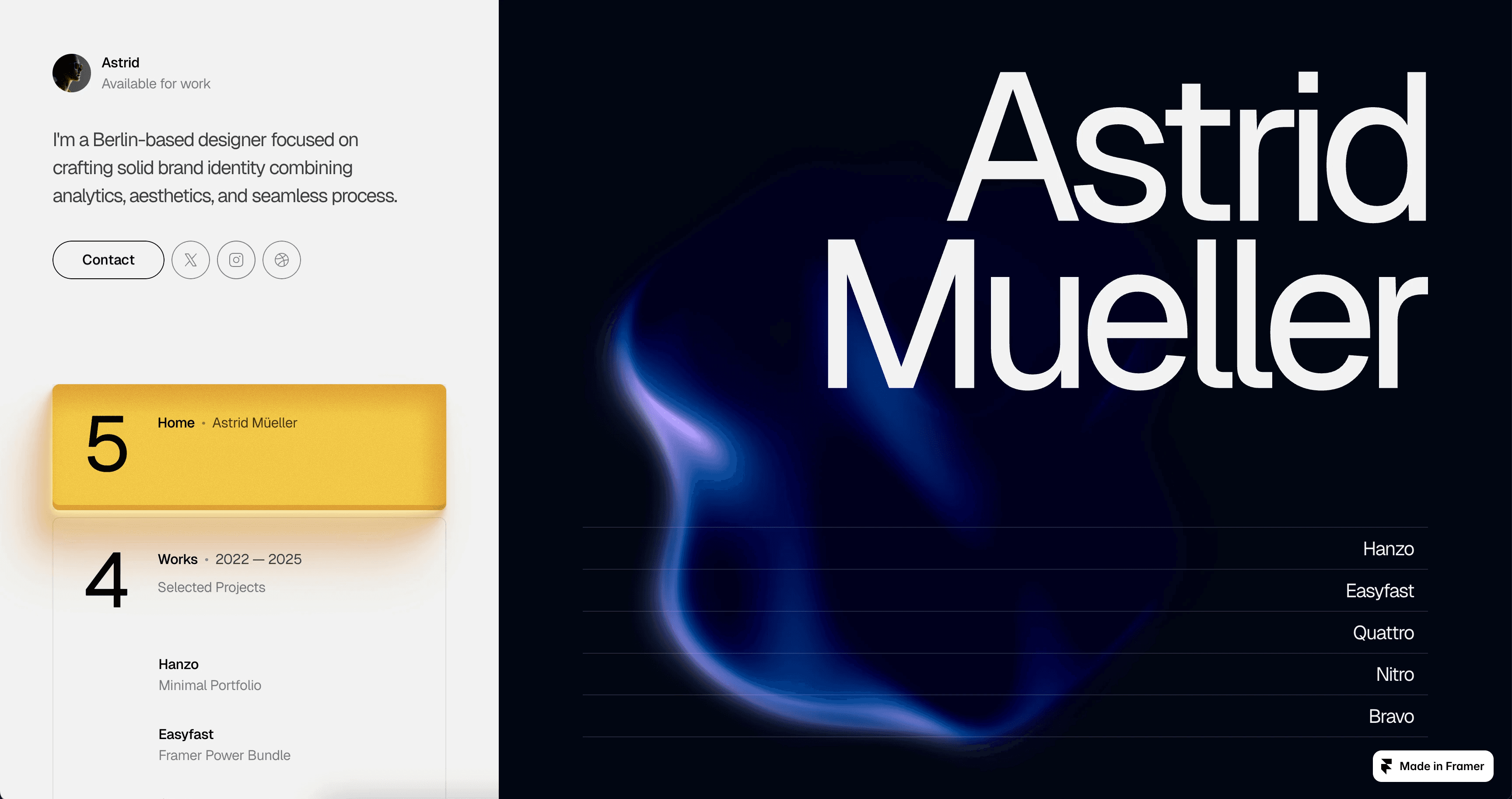
Strida is especially good for painters whose work contains rich texture and experimental forms. The template’s central design features large, canvas-style image blocks on each of its 8 templated pages, paired with an editorial sidebar for easy navigation. It also supports fullscreen slide transitions, and load time-reducing optimization even for your high-resolution uploads.

2. Artboard 

By Essa Donzo

If you want to showcase your art in an intuitive gallery-style portfolio, Artboard is your template. It contains a core “Project” page ideal for artists’ looking to re-create a gallery visit online. Its additional touches include thoughtful typography, soft page and scroll transitions, and solid categorizing so painters can group works by color, theme, or period.  

3. Makeup
By Blush Creative

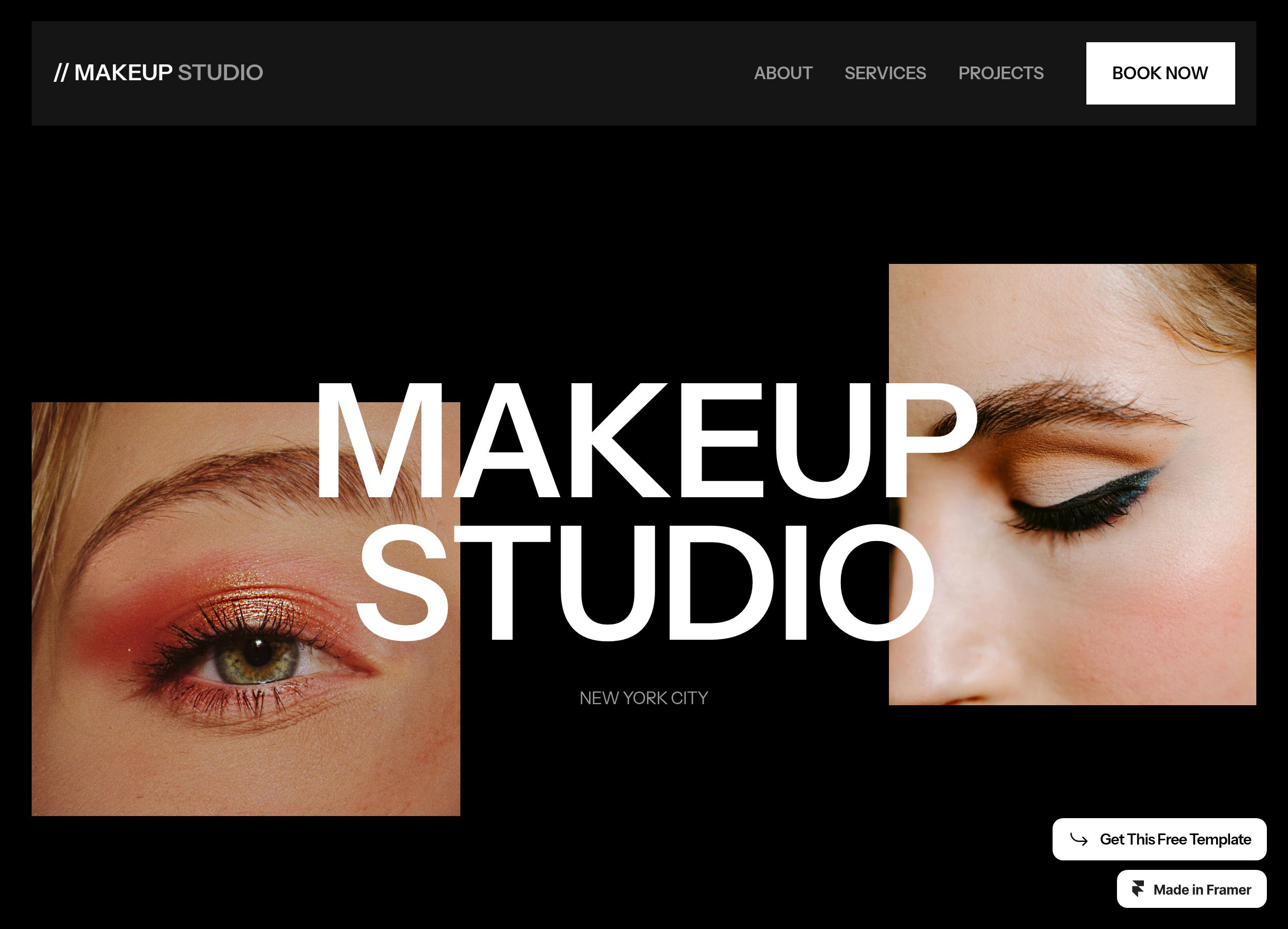
Don’t let the name fool you. Makeup doubles as an expressive structured portfolio particularly well-suited for painters, tattoo artists, and fine artists who need to organize pages by theme. It carries a softer visual mood, a unique asymmetrical layout, and overlapping page elements mimicking actual brush strokes. 

On the functional side, it provides visual breakpoints for different screen sizes and supports both dark and light themes so color consistency remains intact.

4. Haze
By Nick Stepuk

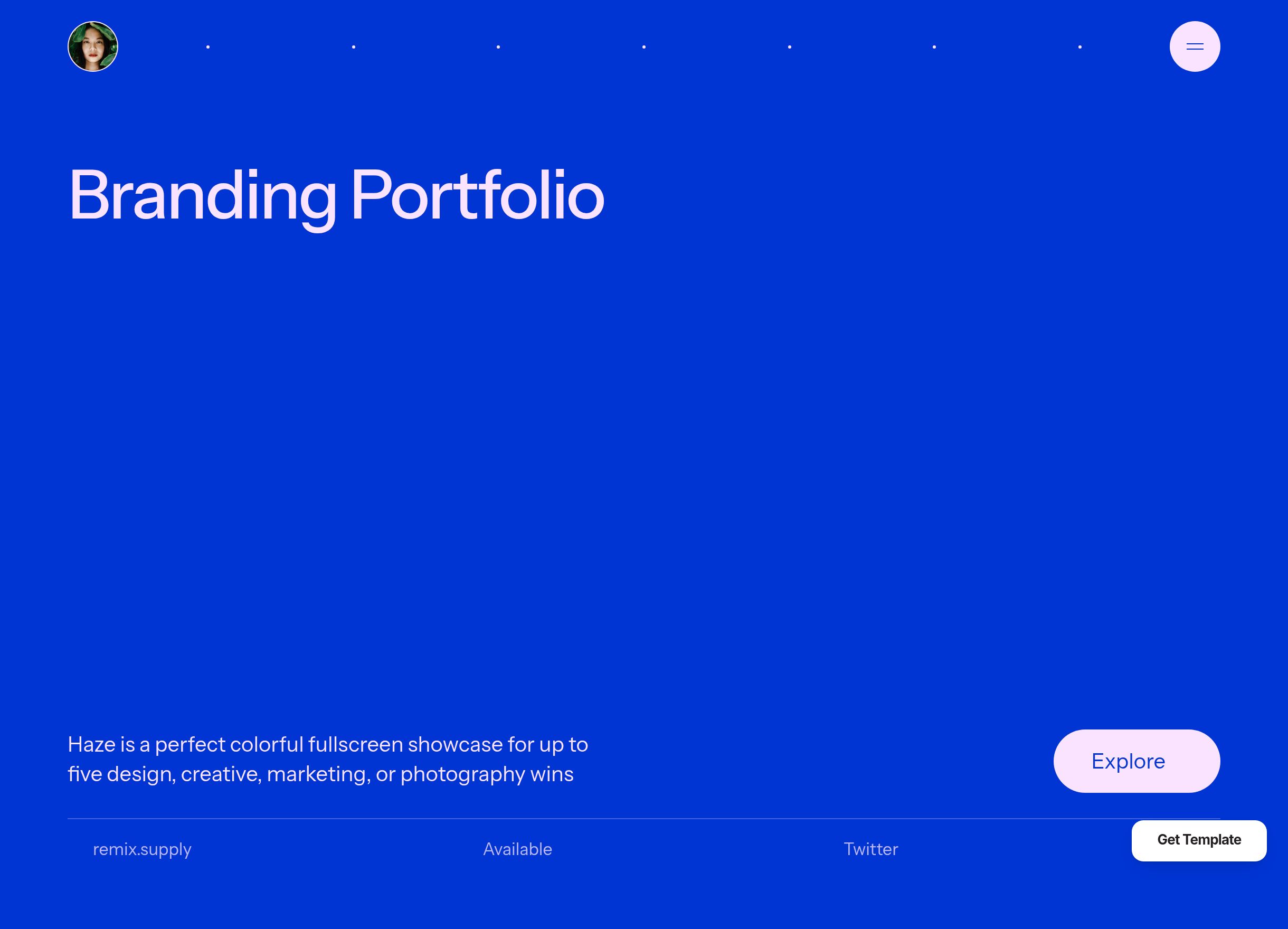
Haze allows artists to pick their five best pieces, then features each on its own dedicated page “slide.” That approach offers a straightforward but strategic way for artists to communicate their portfolio without overwhelming clients. L

Likewise, Haze keeps on-page text to a minimum so attention stays locked on the art. Its strict alignment and cohesive page grid stays consistent across all five pages.   

Illustrators / Animators

Top features for illustrators and animators to keep in mind picking a website include:

  • Support for embedded video displays

  • Animated previews or looping GIFs

  • Bold headlines and playful motion effects

  • Dedicated pages for things like character sheets, storyboards, or concept work

  • Templates making it easy to show the process of your work (from sketch to final)

5. Artemis
By Joe Liu

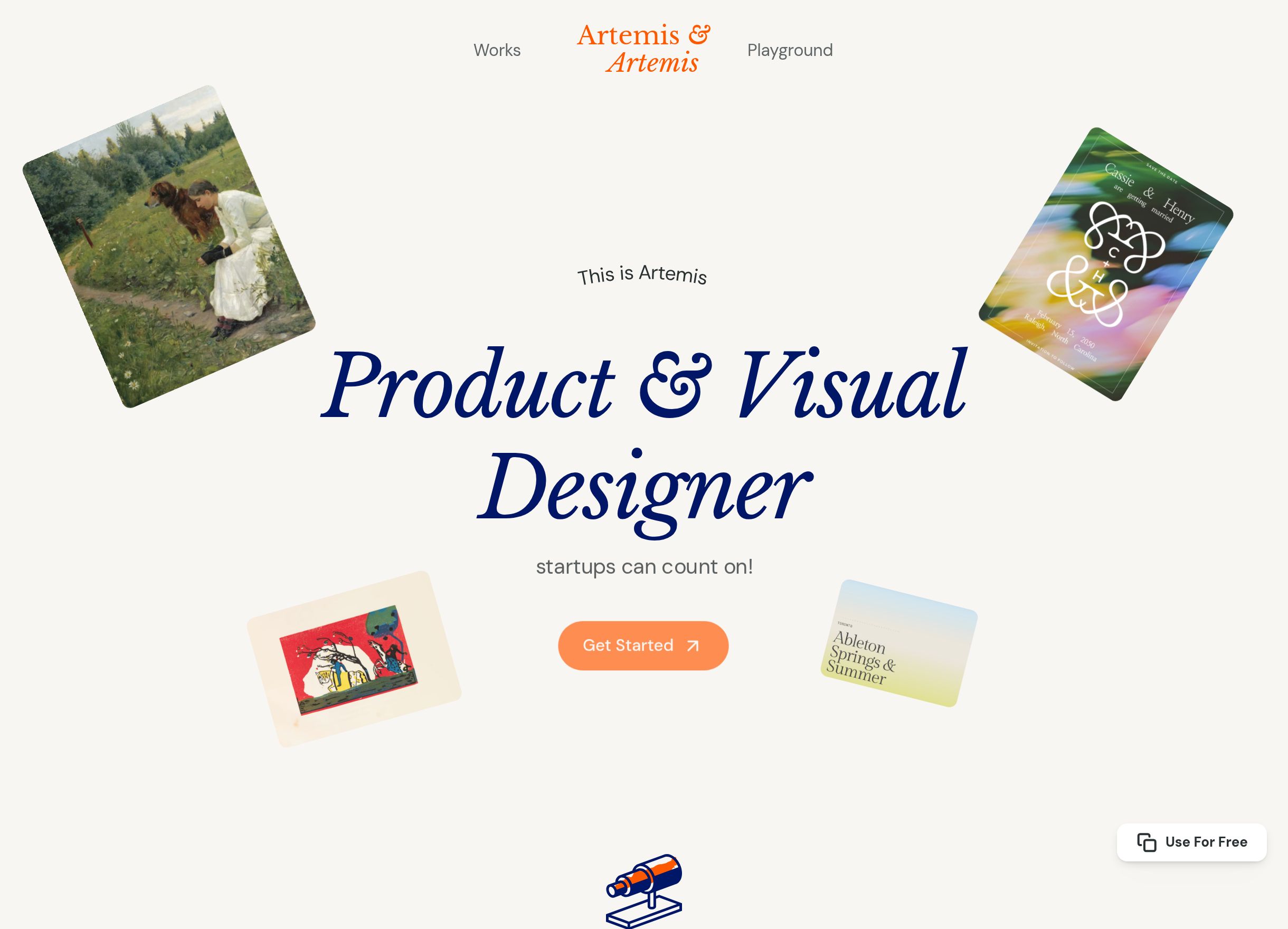
Artemis’ stands out as an animator-friendly website thanks to its simple-to-build “Work Detail” page. This allows animators and illustrators to feature several of your career-spanning best projects, then add brief but relevant descriptions behind the full creation process. Plus, Artemis’ hover reveals allow animation previews and short image loops, while its customizable layered backgrounds on every page gives more spots to subtly feature your work.   

6. Gualdi
By Satto.studio

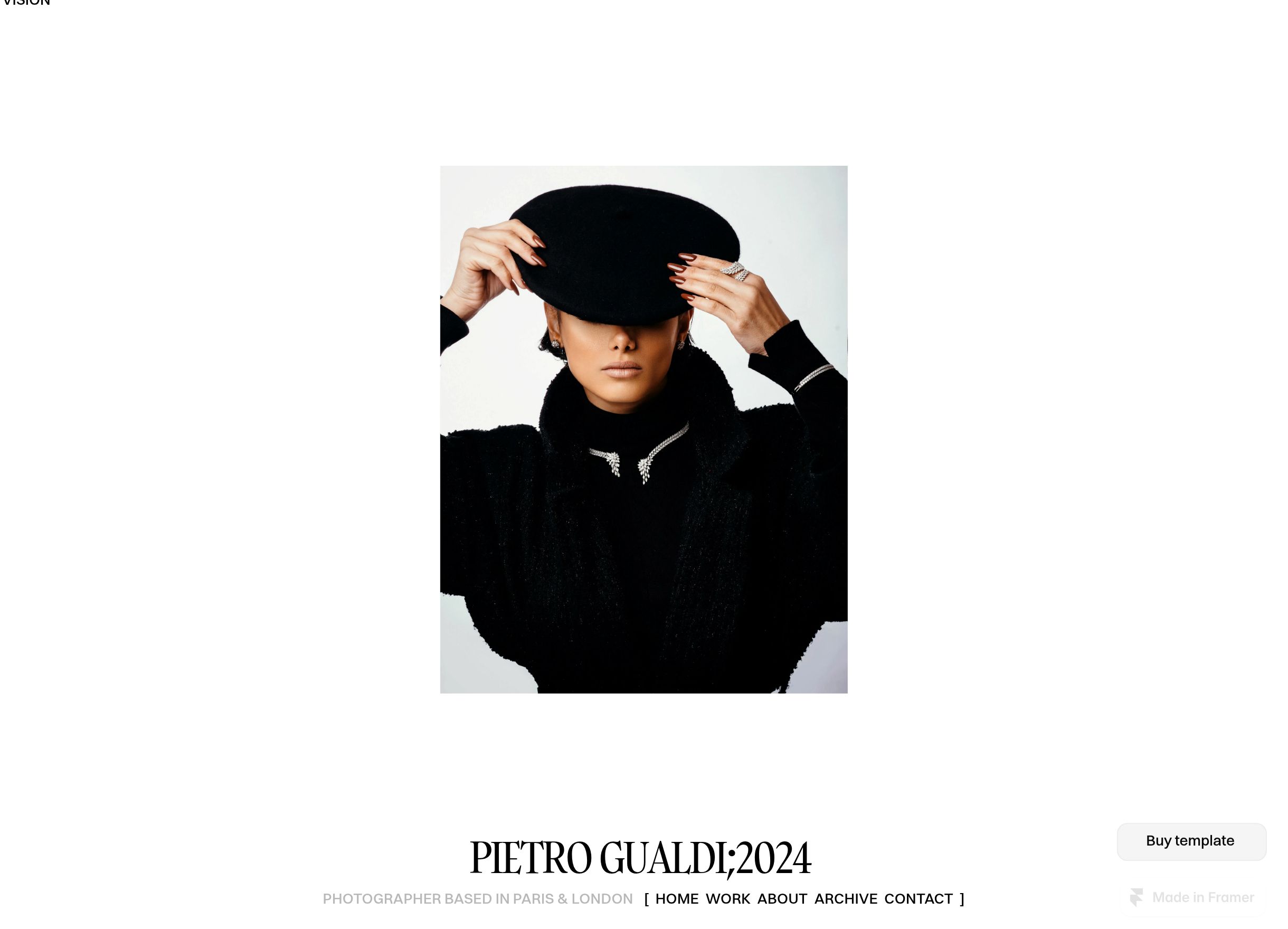
Gualdi is modern and minimalist, with a striking black-and-white palette. It provides an entire 7-page website template built around “illustration frames,” a gallery-style grid layout for artists to showcase up to 12 works per page. Functionality, Gualdi has a responsive layout that preserves illustration details across screens, and CMS support for multiple projects or series.

7. REVIX
By NutsDev

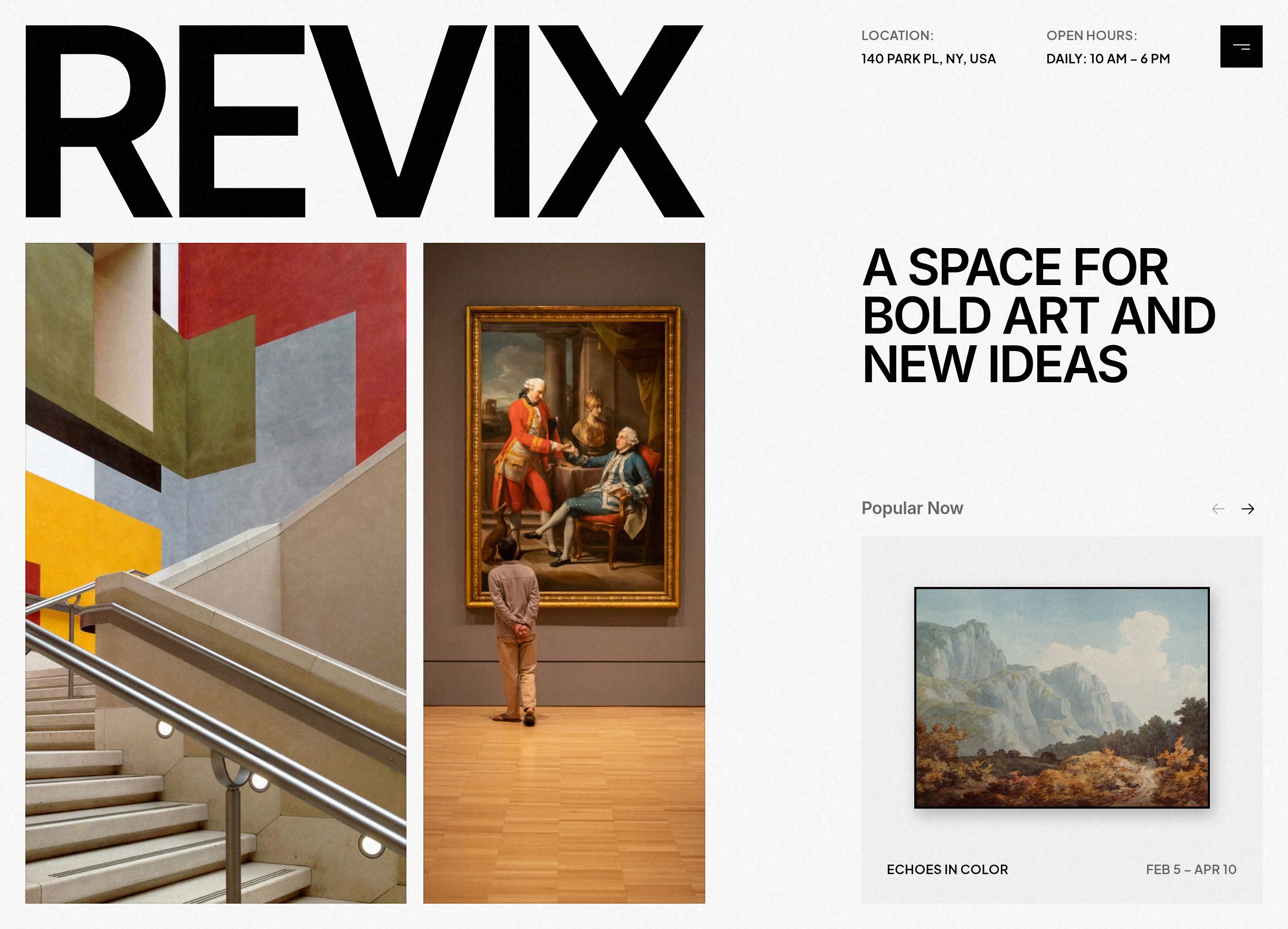
For those creating animation loops or sequential illustrations, REVIX allows previews via thumbnails, animated microinteractions, and smooth scrolling between piece series. Artists will appreciate its balance of playful motion as the self-branded “Art Gallery Website.” On the backend, adjustable project sections, file format compatibility, and mobile breakpoint tuning make this template particularly friendly for animators’ work.

8. SynthCreator
By Anton Radionov

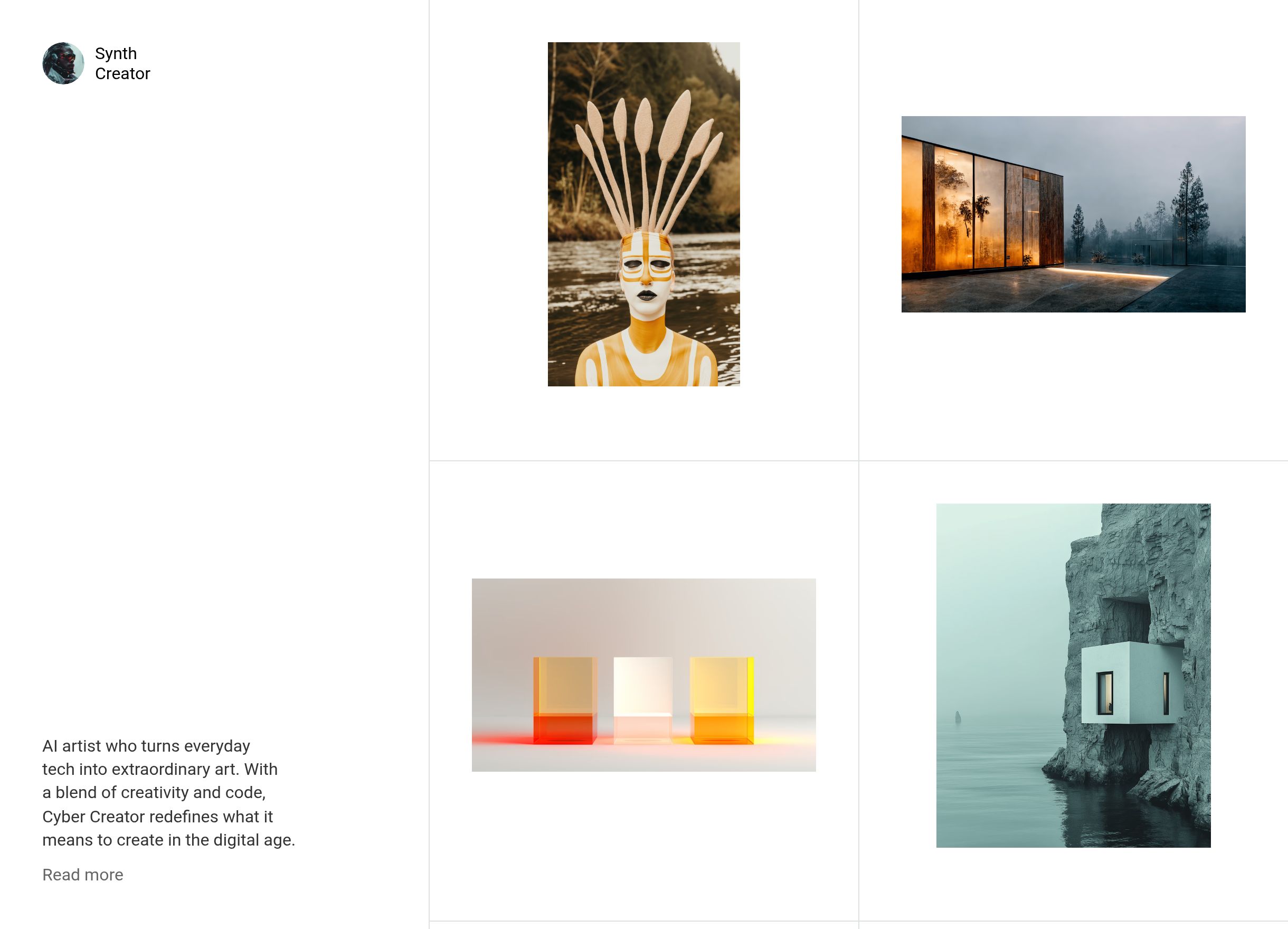
SynthCreator delivers when you want your illustrations to flow on a single page, in one linear, sequential presentation. Its overall design mirrors a digital scrapbook, with work scattered across strategic white space. Customizable touches like animated scroll triggers makes the on-page experience pop, while a preview overlay feature means audiences can see sketches in their before/after state. 

Photographers and videographers

Photographers and videographers have several unique elements to prioritize when designing their websites:

  • Full-width or edge-to-edge displays, to ensure media feels as immersive as possible

  • Functional website support for smooth video playback, embedded clips, slideshows, and key hover effects

  • Dark mode options to avoid washed-out images. (Much more common with white or light-toned color schemes. Most photography sites are recommended to be dark mode.) 

  • Technical work descriptions (e.g. camera lens and settings) 

  • Clear, high-resolution work download or print options.

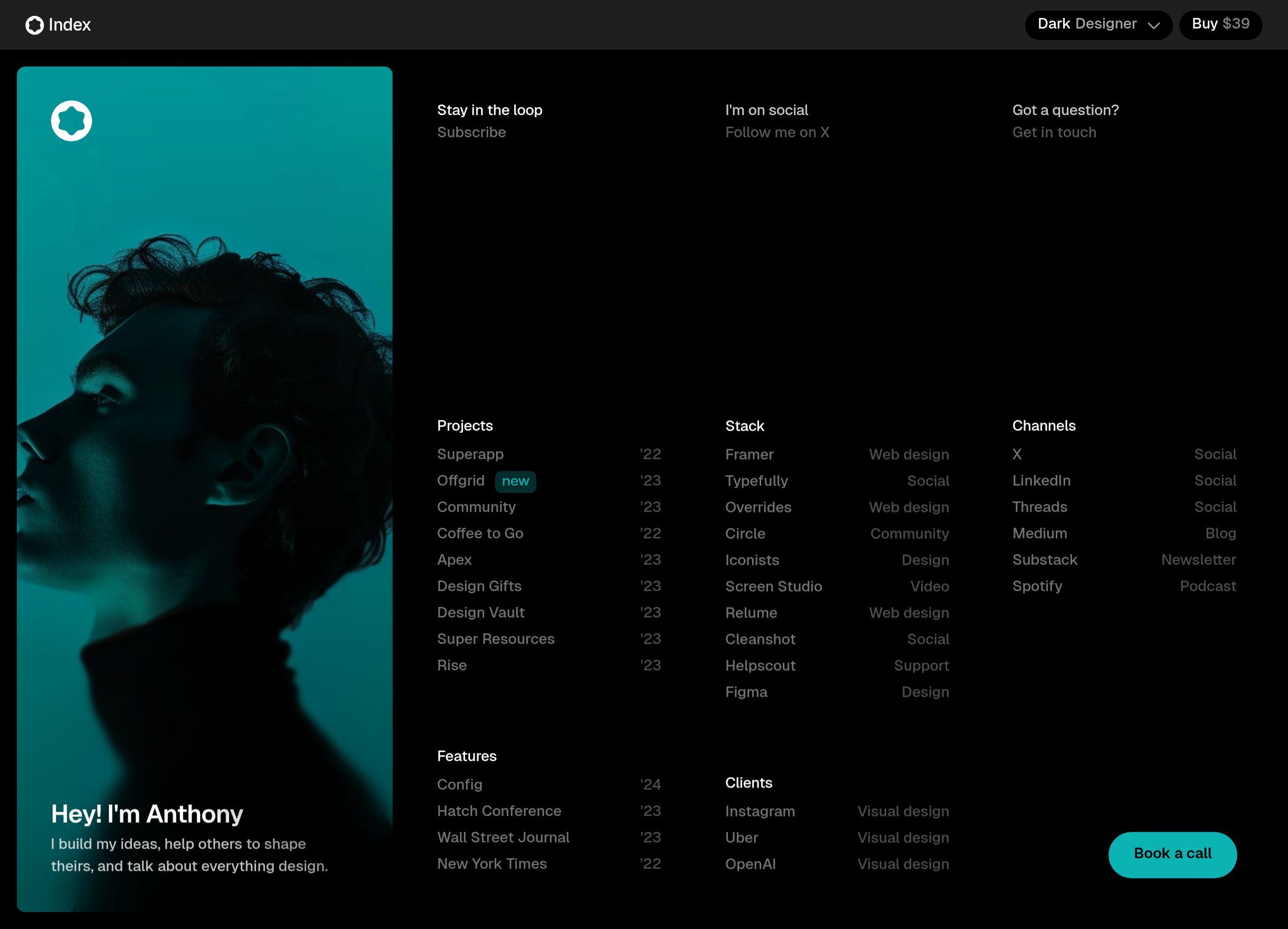
9. Indexy 
By Pixelpal Supply

Indexy puts photography front and center, without any fluff. It’s a no-frills and focused full-screen, one-page template designed for straightforward artists to showcase their core work. 

Containing sharp static typography that overlays images, Indexy provides just enough detail to contextualize the chosen photography, with generous whitespace and shadows adding contrast. Indexy additionally contains responsive image sizing, so photos stay uncompromised across screen types. 

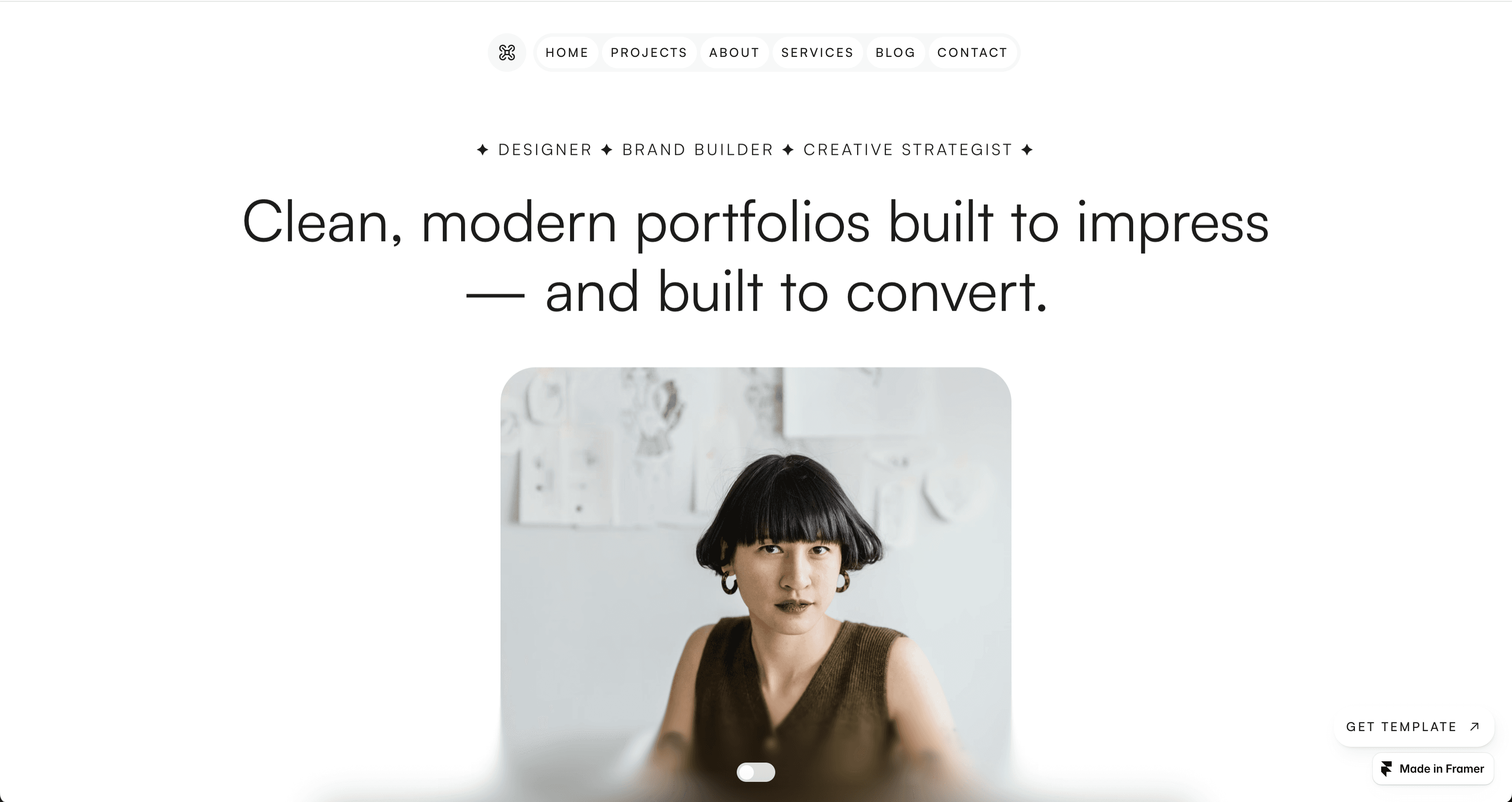
10. Osei
By Lunatique Design

Osei’s website template works particularly well for specialty photographers and videographers (e.g. niche commercial videographers, wedding photographers, etc.) who want to feature themselves as much as their portfolio. 

Its layout flows from a static grid gallery in the “Home” and “Service” pages into more customizable sections, where you can aspect-ratio lock photo and video embeds. It also carries an “About” page with extra features and details. On the backend, it includes video light-boxes, poster-frame thumbnails, and lazy loading to keep performance tight.

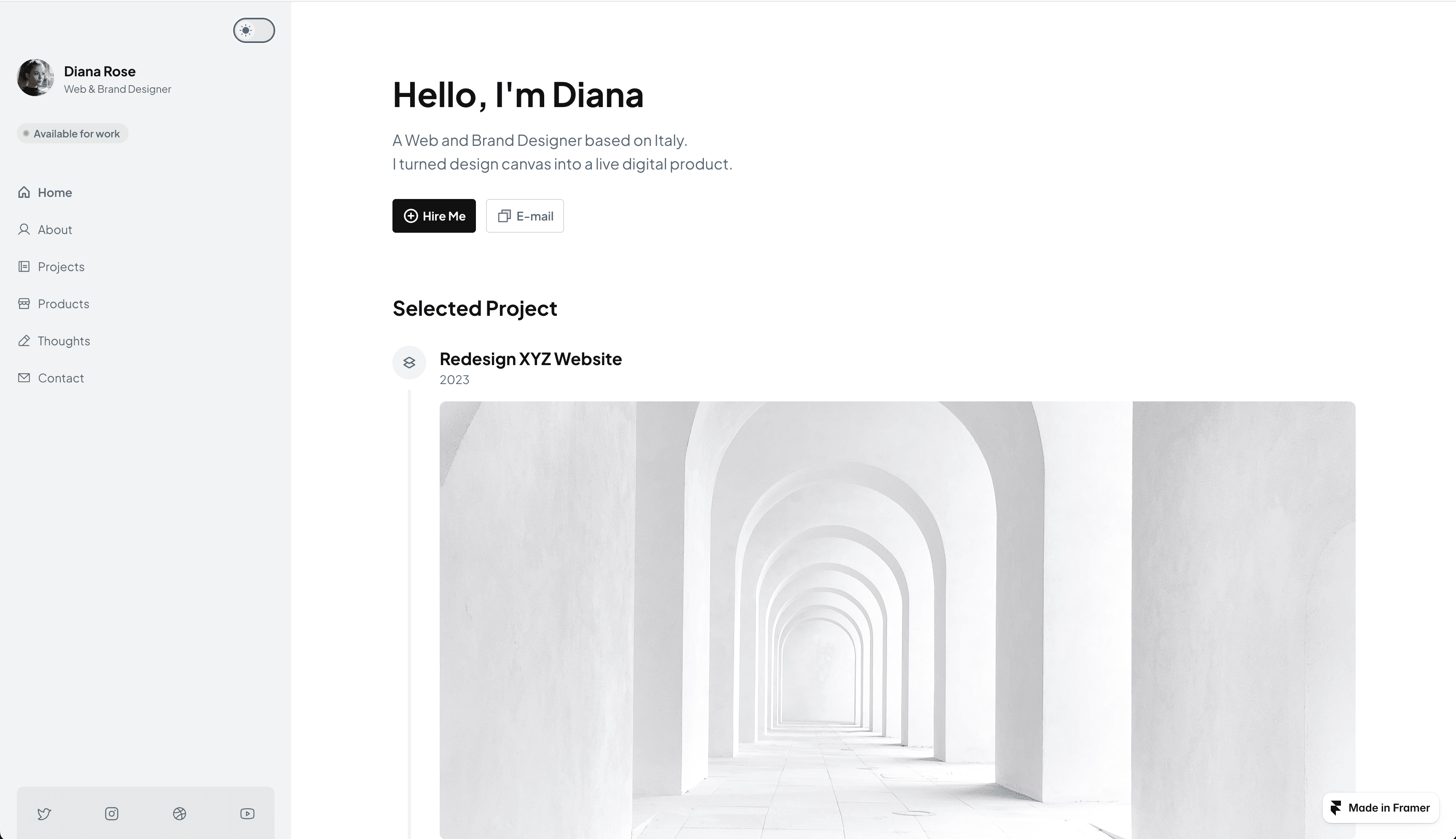
11. BoardaFolio
By Anisa Oktariani

BoardaFolio stands out for its dashboard-style design. It’ll feel familiar and intuitive not just for viewers to navigate, but for artists who want a well-organized, project-focused personal portfolio. Creatives will notice its nine templated pages balance visual-heavy previews themselves, followed by pages dedicated to written-out “Thoughts.” It’s a balanced artist website for photographers, videographers, and creatives to fully narrate their work – to show and to tell. 

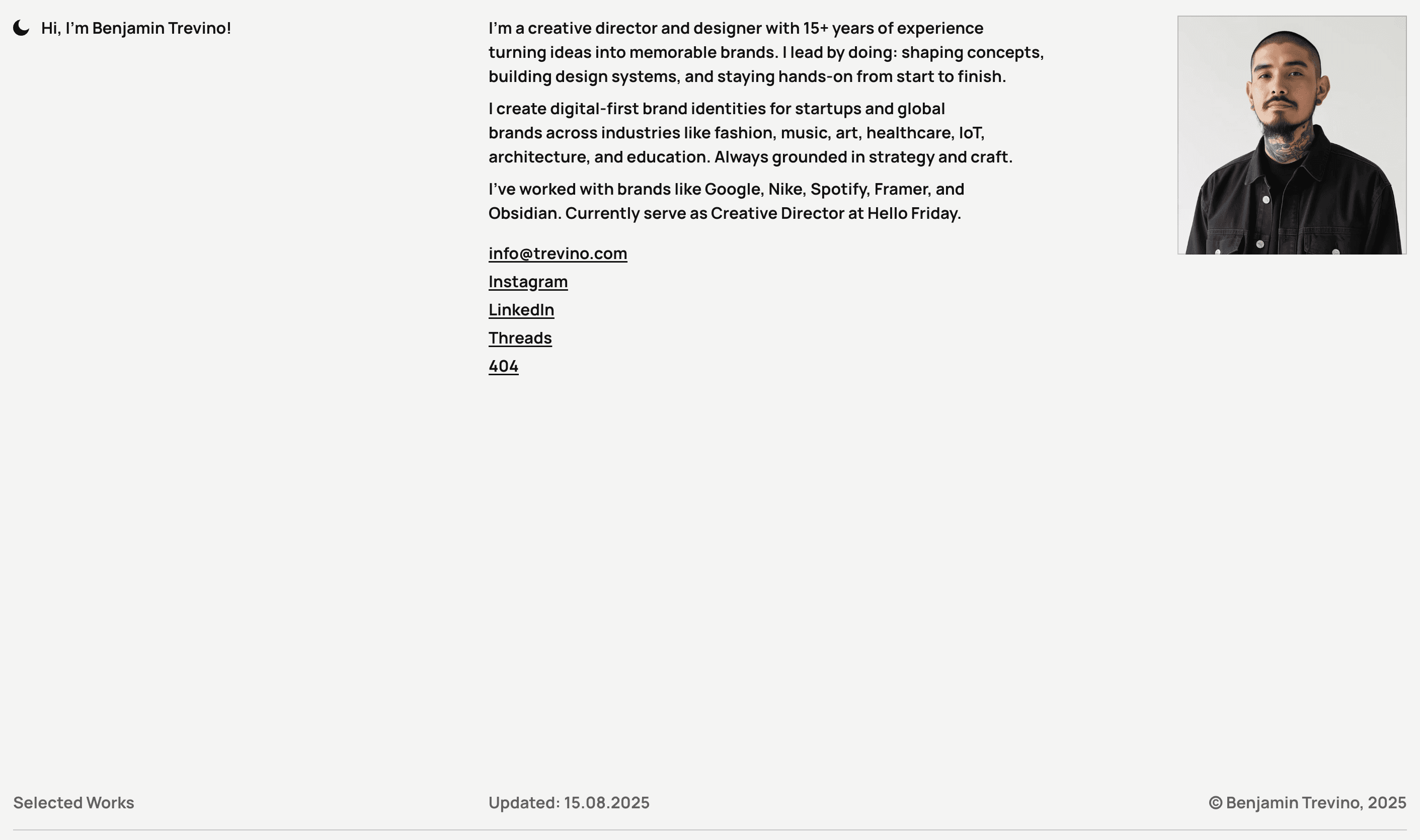
12. Plyń 
By Arkuš Design

Plyń is for minimalist artists. Its aesthetics best reflect portfolios that are monochromatic, strong, architectural, and ultra-contemporary. Plus, it carries several sleek functional page elements, such as fade transitions and a fluid slide-based scroll. For minimalist videographers, Plyń supports video embedding with scrub previews, responsive breakpoints, and metadata overlays so your viewers can read important details behind every preview.

Sculpture and physical media

Useful design elements for sculpture-heavy portfolios:

  • 360-degree or multi-angle image galleries

  • Spatial photography (lighting, shadows) to capture depth

  • Clean backgrounds and minimal distraction so the form and material speak

  • Contact or commission details made prominent (pricing, scale and transport)

13. Mass 
By Plaiter

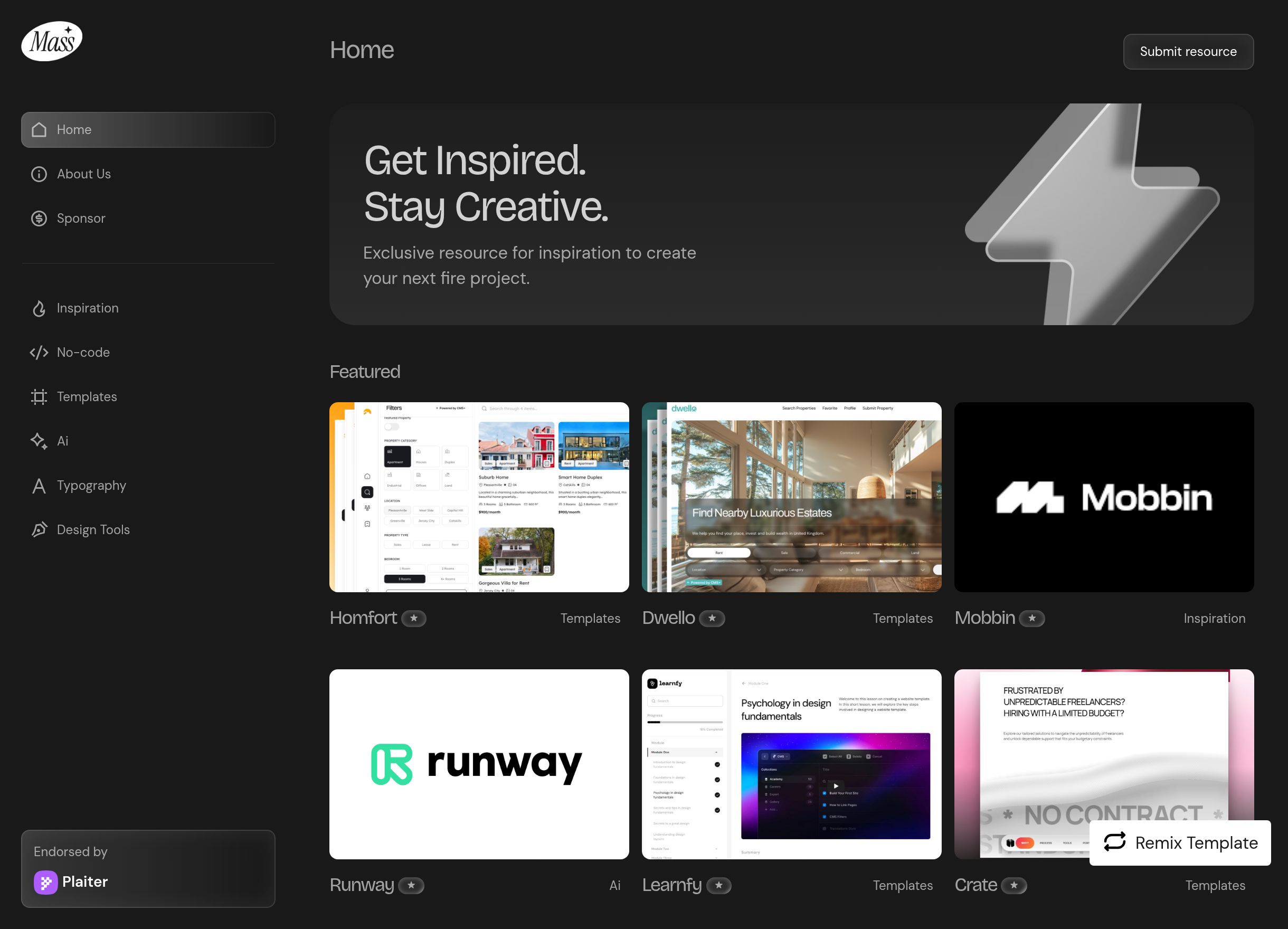
Mass, initially designed for content creators’ website, adapts artfully for physical-media portfolios: think ceramics, sculpture, glassblowing, printmaking, and more. It has a simple vertical dashboard layout to organize your work by type or theme. Once clicked, each page then contains a clear modular layout and spacious built-in galleries for artists to display their art in multiple angles and spatial contexts. Designers will notice how Mass’ lightbox views also toggle between perspectives, lending a complementary contrast to every piece.  

14. Seasons 
By Wize

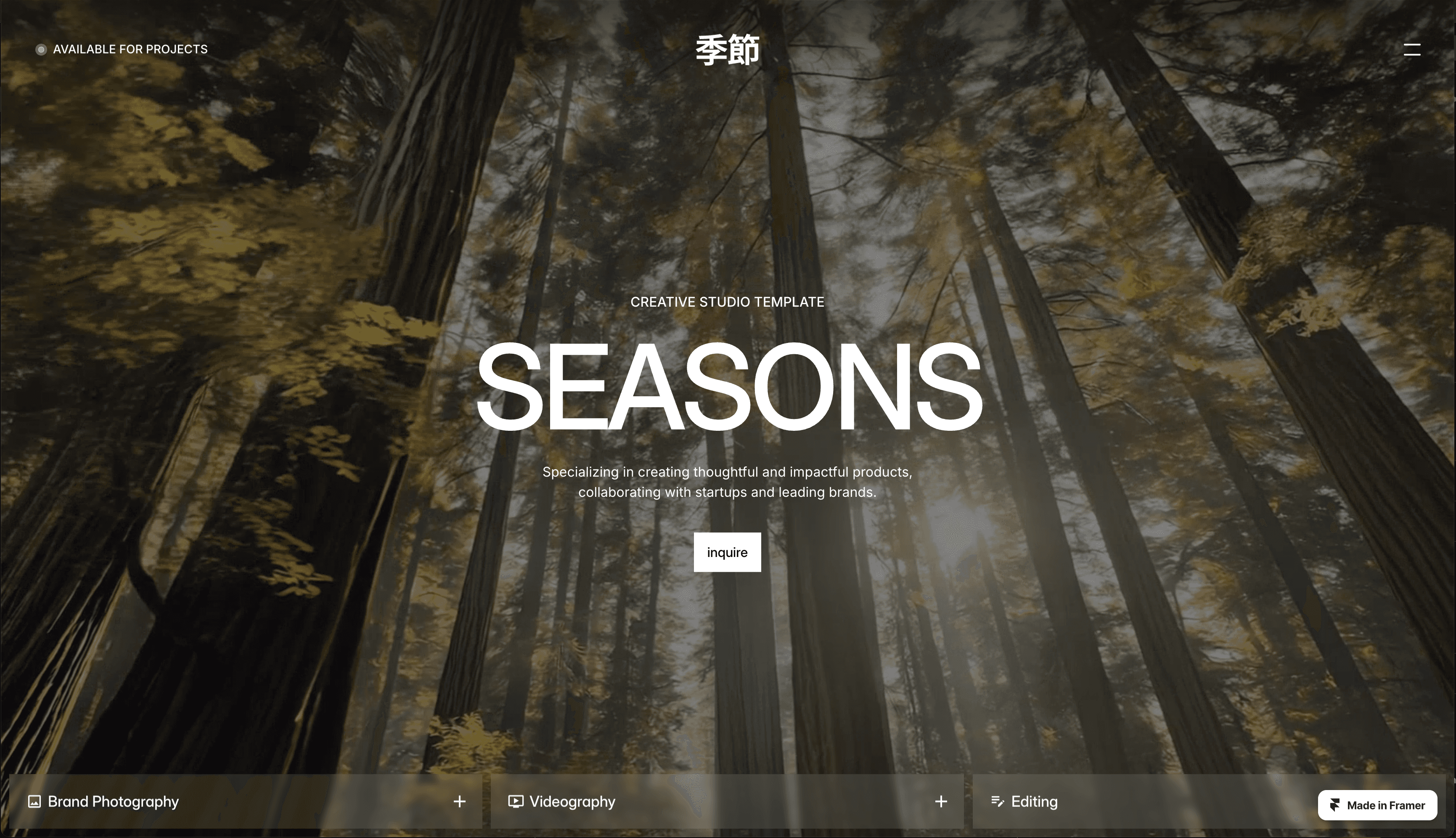
Seasons offers strong, full-screen visuals and clean sectional breaks. It's ideal for studio owners and artists looking for a no-fluff website, one that’s easy to navigate and lets their work shine. The template provides plenty of whitespace around imagery to avoid visual clutter. On the backend, it handles high-res image uploads and responsive scaling, so photos of large media remain impressive even on mobile.

15. Naoto Studio
By Flowit Supply

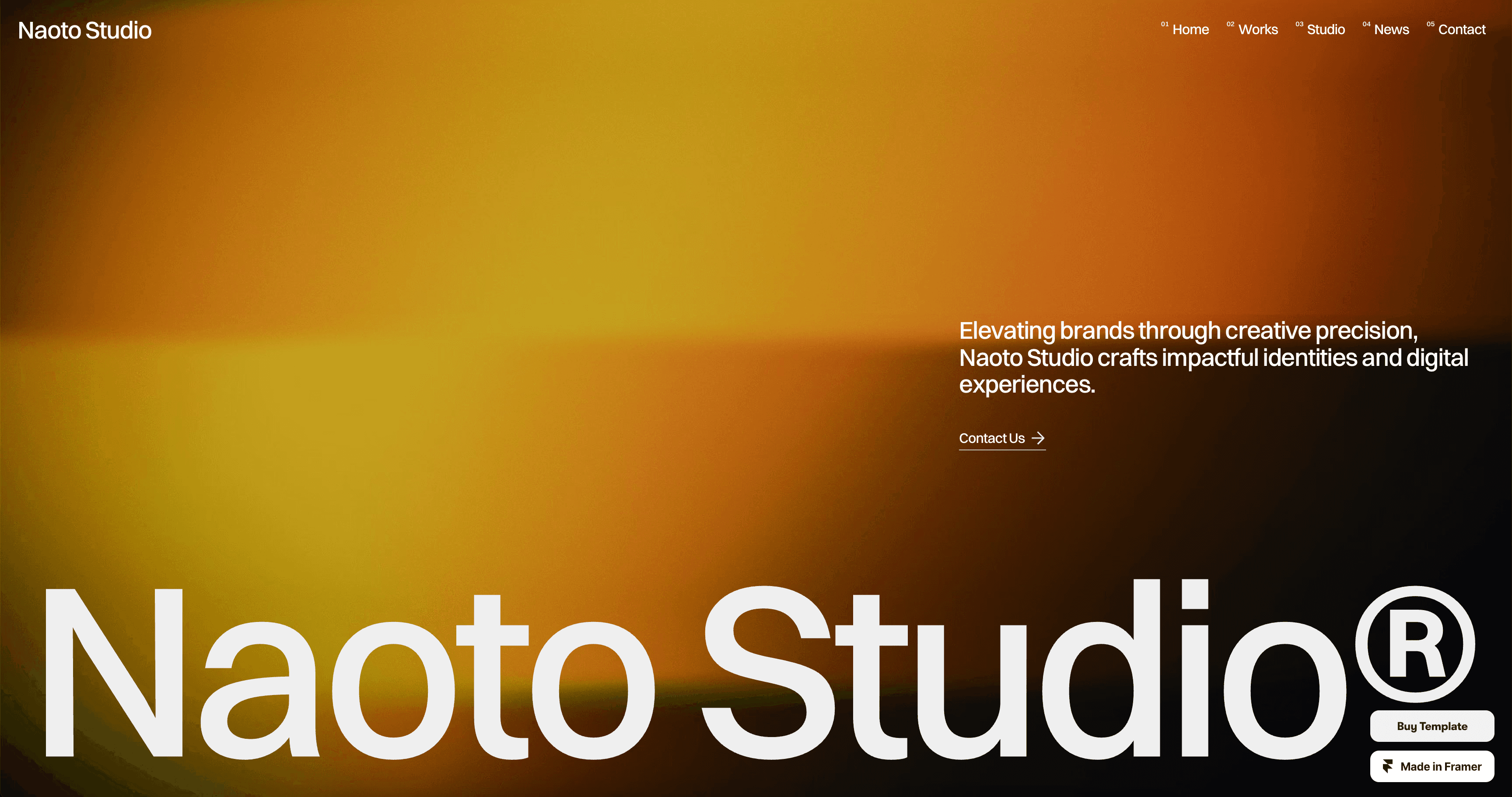
Naoto Studio works well to feature the process behind tactile media – not just the media. Its layout offers both full-width visuals and carousel galleries, great for sequences of form, multi-angle, or scale shots. Designers will like the custom page shadow and light customizations, its user-friendly CMS, and its added text boxes to write the story behind your work.

16. SLANTSUAL
By Jenkate MW

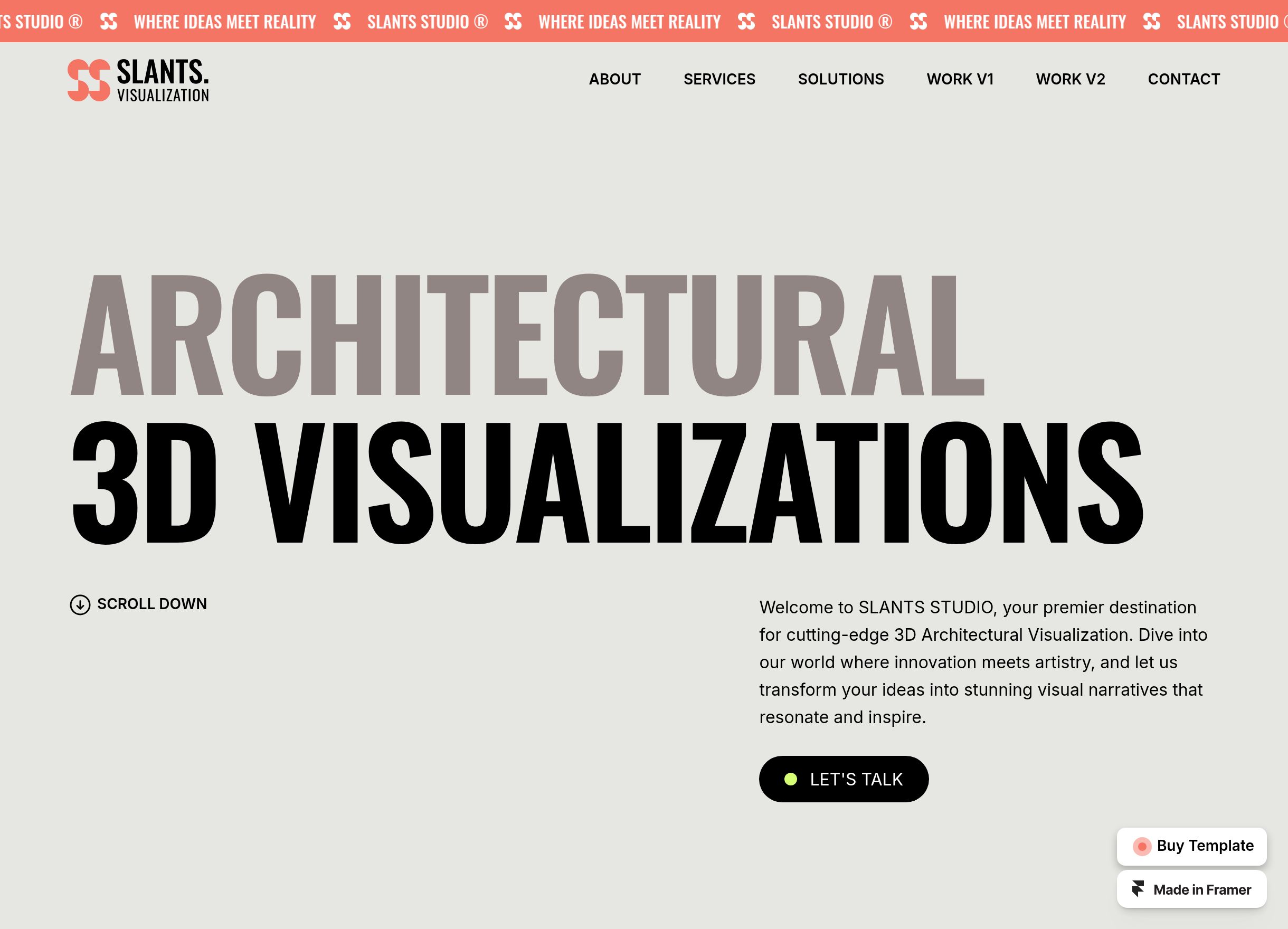
SLANTSUAL describes itself as “the visually striking portfolio template designed for 3D artists, architectural firms, and interior designers.” That tells you a lot about its main elements. Every page centers a portfolio piece, with sections to detail that piece’s story and process. Slantsual also contains tons of custom interactions, layered overlaps, dynamic animations, and customizable page visuals around shadow, texture, and image depth. It’s a strong, comprehensive website builder for any artist serious about the creative process as well as its output. 

Digital artists & graphic designers websites

Digital and graphic artists should consider these key website design elements:

  • Clarity around deliverables, process, version history, and notable past clients

  • Layouts that organize strong vector work

  • A dynamic UI-inspired layouts

  • Ability to embed interactive content (e.g. SVGs, animations, web-components)

  • Strong typography emphasizing your creative point of view

17. Opalhaus© 
By Pentaclay

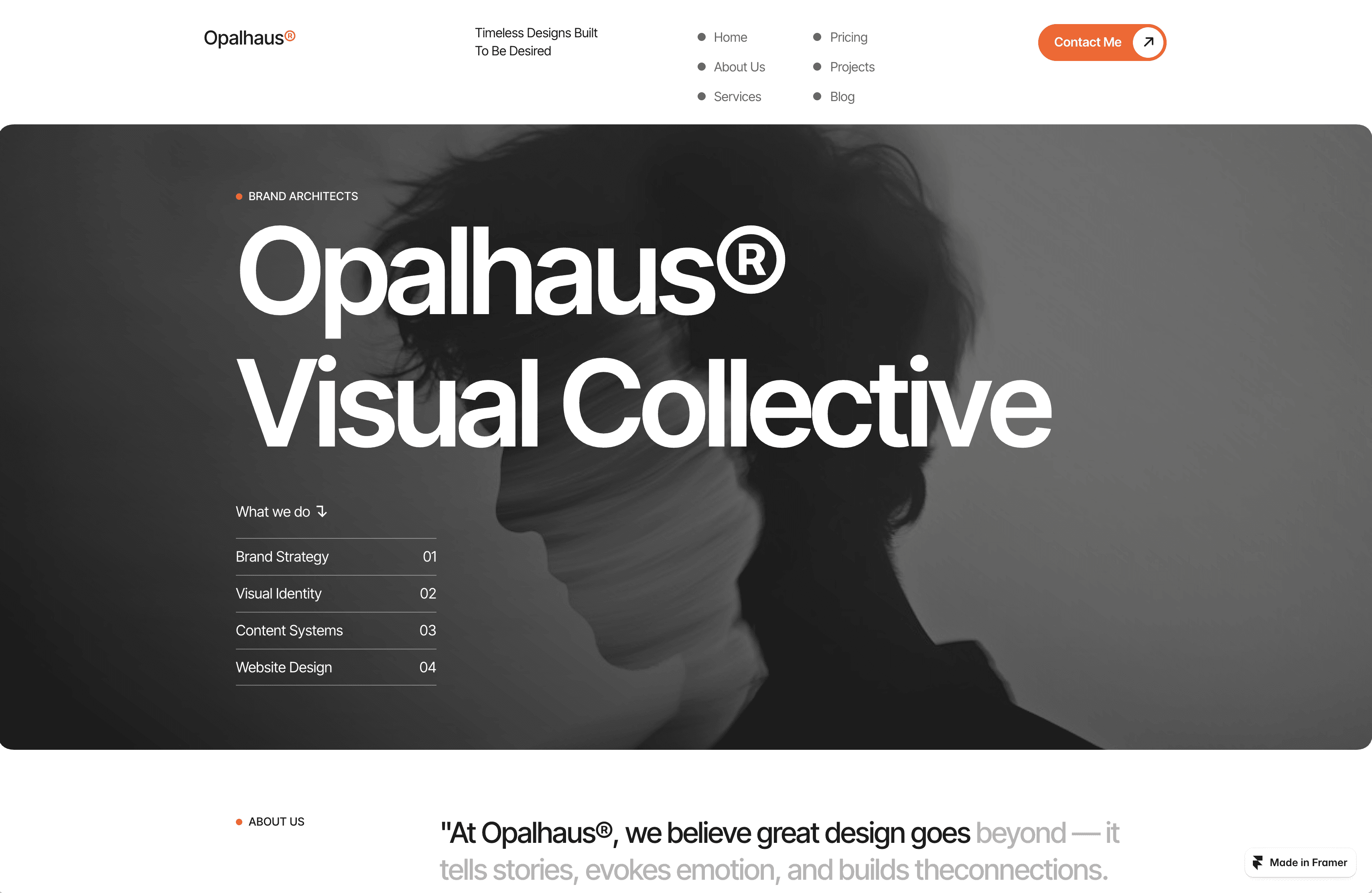
Opalhaus©’ strong, geometric layout contains 13 plug-and-play pages. Artists and studios alike have everything you need inside highly customizable pre-built templates, including pages designed for commercial intent (pricing, contact forms, even privacy and changelogs). Visually, Opalhaus© carries a sharp, modular grid layout, asymmetrical breaks, and vector texture treatments. Graphic designers especially will appreciate the precision of line-weight, typographic contrast, and strategic negative space. Functionally, it supports SVG embedding, high-def visuals, and a clean CMS.

18. Plywood
By Cristian Mielu

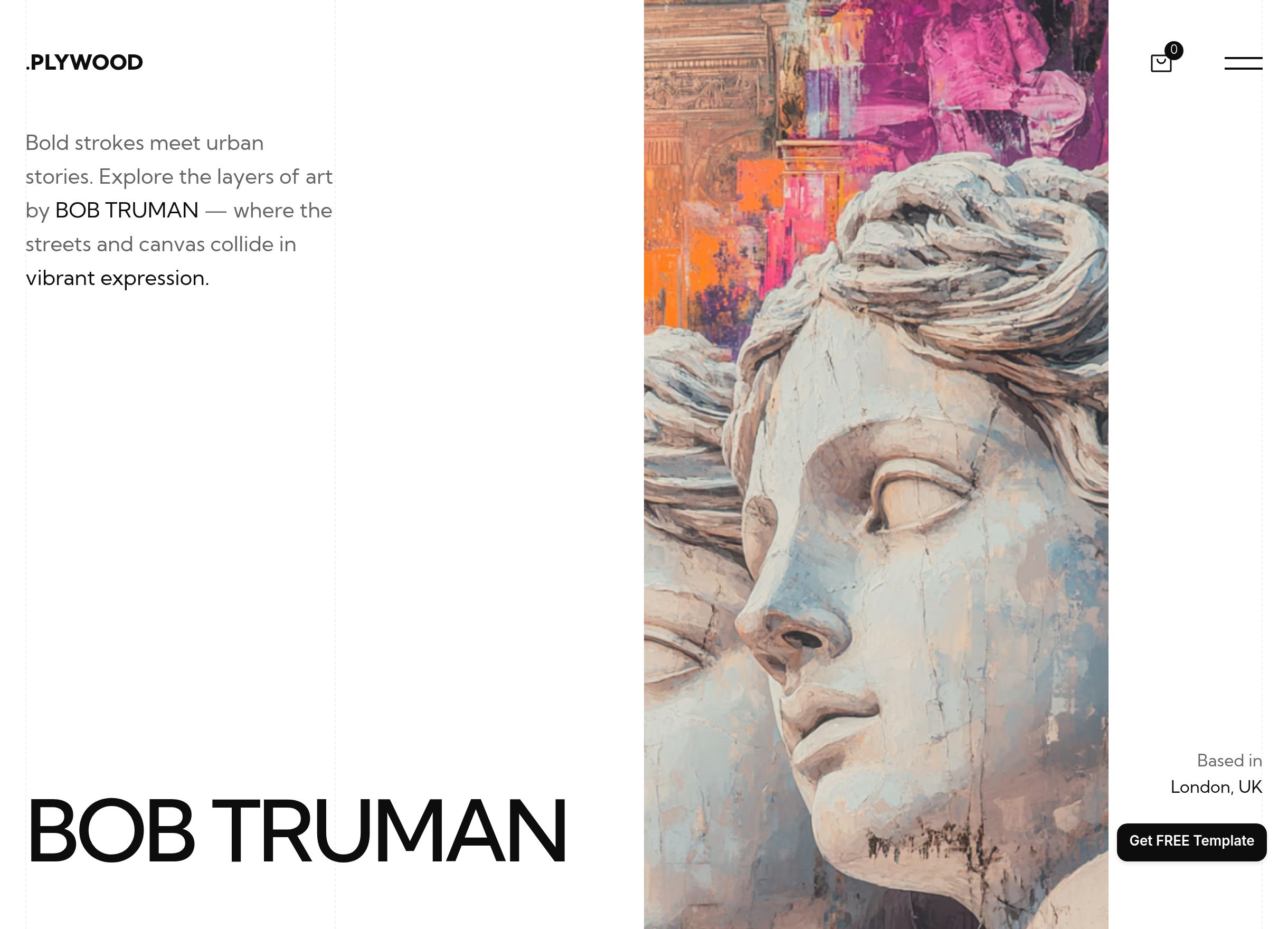
Plywood’s aesthetic is light and playful, great for both commercial digital artists as well as experimental designers. It uses tiled images, hover effects to reveal previews, and comes with several dynamic background variations. Perhaps most useful, Plywood also contains Frameship, a popular Shopify integration. That integration simplifies business functions like secure checkout and non-commissioned inventory management. 

19. Mugen
By Joseph Alexander

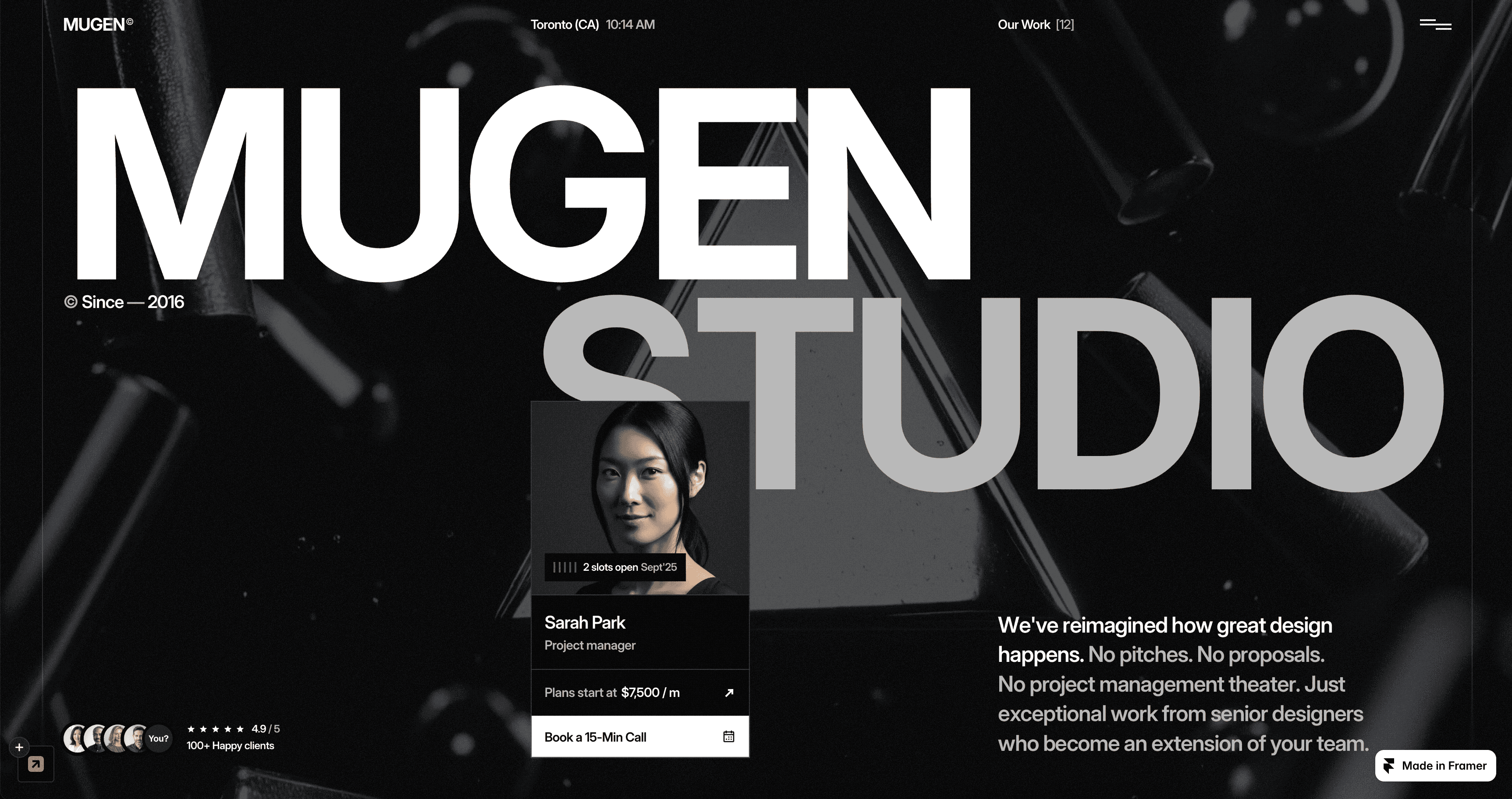
Mugen is one of the few artist website examples designed to earn creatives retainer work. Standout features include a case study-oriented design to better highlight the process and results of your art, plus thoughtful commercial and conversion-focused details. Using Mugen as your online portfolio makes for an exceptional digital business card. Especially when its retainer purposefulness gets paired with its dramatic black color scheme, modular layout, sharp page transitions, and a distinct visual hierarchy.     

20. Pokota
By Jakke Dea

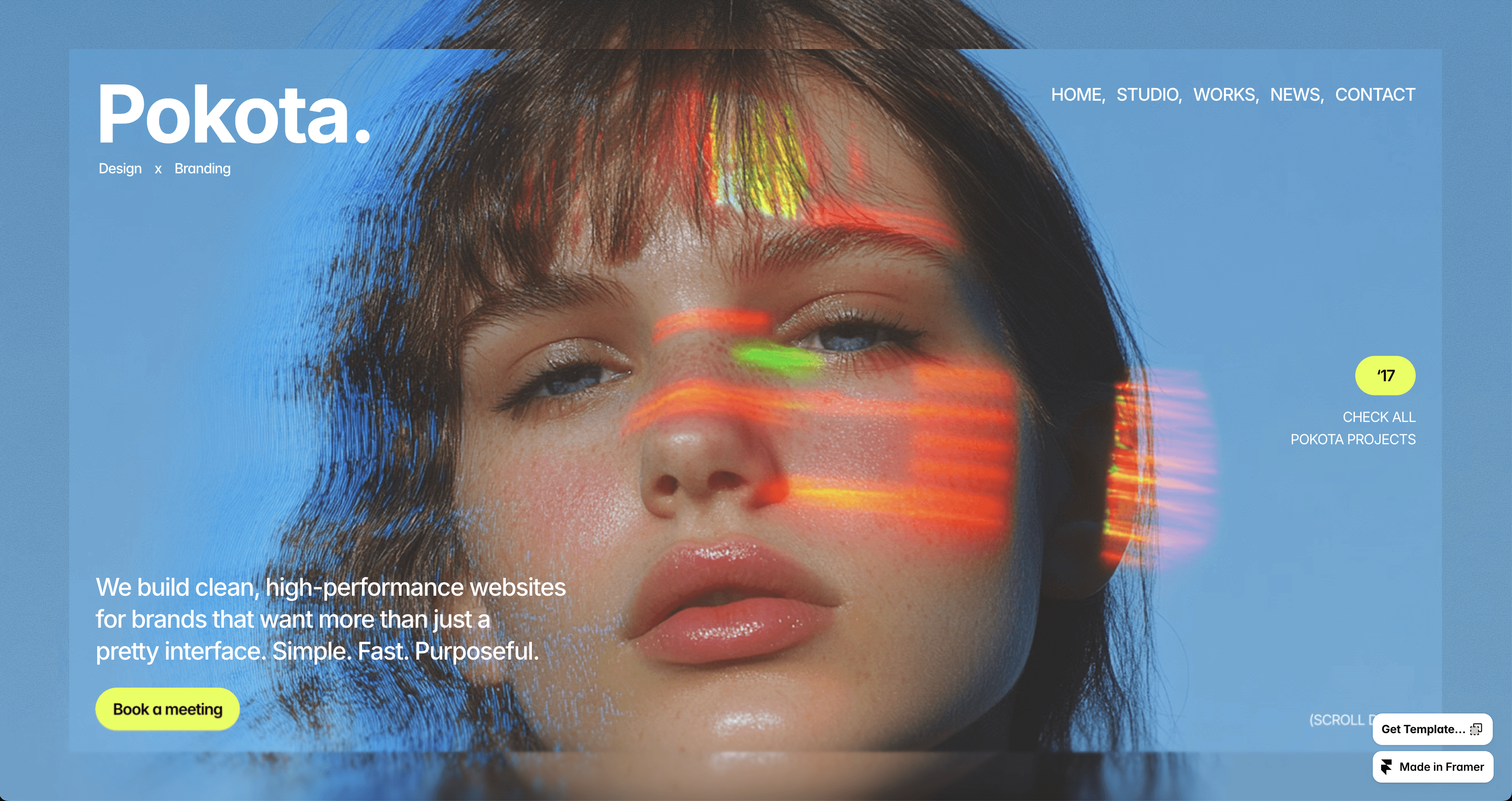
Pokota’s nine pre-built pages let digital and graphic artists promote their personal brand. You get a balance of interactive elements, high-resolution images, and room for text to describe your work. All come wrapped up in Pokota’s signature bold color accents. It also includes a user-friendly CMS and SEO optimization features so your work is seen by your ideal audience.    

How to create a great artist website

The best artist websites combine aesthetic integrity with commercial intent, along with a smooth experience. The goal is to keep visitors fully engaged with your work and inspired to explore more. 

To do so, your website, at a minimum, should do the following: 

  • Emphasize your process. Whether painting, sculpting, illustrating, or digitally designing, people are drawn to how things are made. A “behind-the-scenes” slider, time-lapse, or sketch gallery lends depth and relatability to your portfolio.

  • Use the highest-quality imagery possible. Blurry or compressed images undercut professionalism. Aim for crisp photos that capture material, texture, and scale, or pages using shadows, lighting, and detail.

  • Build an intuitive page flow. Visitors should move seamlessly from your homepage’s hero section to project galleries through your bio and contact forms. That logical hierarchy keeps exploration – and commissions – frictionless.

  • Choose a responsive, mobile-first design. Many collectors, curators, and fans will see your work first on their phone. Opt for a responsive website template with layouts, images, and interactions that resize accordingly.

  • Have 2-3 clear calls to action (CTAs). Whether “see all exhibitions,” “commission me,” or “buy this work,” meaningful prompts let interested visitors take the next step. Make them visible and cohesive with the rest of your design.

  • Include an email/mailing list. Your website should feel like a two-way conversation with your patrons. An email newsletter not only builds personal thought leadership, but is often how you land more work.

Simplify designing your artist website with Framer

Your artist’s website is your business card. Customizable templates from Framer are designed by creatives, for creatives – combining everything a artist needs into one stunning, approachable site.  

Start by browsing Framer’s Marketplace for art and design templates. Pick a design that fits your medium, and wrap in your imagery, process, and branding. Then, when you're ready, sign up for Framer to start customizing and filling out your new site.

It’s also essential to have an online artist portfolio in a time when clients, gallery visitors, collaborators – even curious browsers – expect a peek behind the creative curtain to commission work. That holds true across artistic mediums: from painters and traditional fine artists to commercial graphic designers, mixed-media creatives, and local tattoo artists. 

Your artist website needs to feel as unforgettable and emotive as the work you create. The right artist-specific template makes that simple, allowing your aesthetic, process, and artistic lens to speak.

20 beautiful artist website examples

These inspiring artist website designs fall into five categories: fine art/painting, illustration/animation, photography/videography, physical media, and digital media/graphic design.

Explore these templates and get inspired to create your portfolio. 

Fine art and painting website templates

Useful design elements for painters and fine artists to include on their websites include:

  • Generous white space and framing, to let textures, brush strokes, and color depth breathe.

  • Page formatting that mirrors a gallery space or museum.

  • High-resolution image galleries, with minimal cropping or unwanted scaling distortion.

  • Clean navigation that highlights your best series, exhibitions, and catalogues, past and present. 

  • A strong color experience (color mode toggles, dark/light theme) so the presentation of your work stays true to your fingerprint.

1. Strida

By Nick Stepuk

Strida is especially good for painters whose work contains rich texture and experimental forms. The template’s central design features large, canvas-style image blocks on each of its 8 templated pages, paired with an editorial sidebar for easy navigation. It also supports fullscreen slide transitions, and load time-reducing optimization even for your high-resolution uploads.

2. Artboard 

By Essa Donzo

If you want to showcase your art in an intuitive gallery-style portfolio, Artboard is your template. It contains a core “Project” page ideal for artists’ looking to re-create a gallery visit online. Its additional touches include thoughtful typography, soft page and scroll transitions, and solid categorizing so painters can group works by color, theme, or period.  

3. Makeup

By Blush Creative

Don’t let the name fool you. Makeup doubles as an expressive structured portfolio particularly well-suited for painters, tattoo artists, and fine artists who need to organize pages by theme. It carries a softer visual mood, a unique asymmetrical layout, and overlapping page elements mimicking actual brush strokes. 

On the functional side, it provides visual breakpoints for different screen sizes and supports both dark and light themes so color consistency remains intact.

4. Haze

By Nick Stepuk

Haze allows artists to pick their five best pieces, then features each on its own dedicated page “slide.” That approach offers a straightforward but strategic way for artists to communicate their portfolio without overwhelming clients. L

Likewise, Haze keeps on-page text to a minimum so attention stays locked on the art. Its strict alignment and cohesive page grid stays consistent across all five pages.   

Illustrators / Animators

Top features for illustrators and animators to keep in mind picking a website include:

  • Support for embedded video displays

  • Animated previews or looping GIFs

  • Bold headlines and playful motion effects

  • Dedicated pages for things like character sheets, storyboards, or concept work

  • Templates making it easy to show the process of your work (from sketch to final)

5. Artemis

By Joe Liu

Artemis’ stands out as an animator-friendly website thanks to its simple-to-build “Work Detail” page. This allows animators and illustrators to feature several of your career-spanning best projects, then add brief but relevant descriptions behind the full creation process. Plus, Artemis’ hover reveals allow animation previews and short image loops, while its customizable layered backgrounds on every page gives more spots to subtly feature your work.   

6. Gualdi

By Satto.studio

Gualdi is modern and minimalist, with a striking black-and-white palette. It provides an entire 7-page website template built around “illustration frames,” a gallery-style grid layout for artists to showcase up to 12 works per page. Functionality, Gualdi has a responsive layout that preserves illustration details across screens, and CMS support for multiple projects or series.

7. REVIX

By NutsDev

For those creating animation loops or sequential illustrations, REVIX allows previews via thumbnails, animated microinteractions, and smooth scrolling between piece series. Artists will appreciate its balance of playful motion as the self-branded “Art Gallery Website.” On the backend, adjustable project sections, file format compatibility, and mobile breakpoint tuning make this template particularly friendly for animators’ work.

8. SynthCreator

By Anton Radionov

SynthCreator delivers when you want your illustrations to flow on a single page, in one linear, sequential presentation. Its overall design mirrors a digital scrapbook, with work scattered across strategic white space. Customizable touches like animated scroll triggers makes the on-page experience pop, while a preview overlay feature means audiences can see sketches in their before/after state. 

Photographers and videographers

Photographers and videographers have several unique elements to prioritize when designing their websites:

  • Full-width or edge-to-edge displays, to ensure media feels as immersive as possible

  • Functional website support for smooth video playback, embedded clips, slideshows, and key hover effects

  • Dark mode options to avoid washed-out images. (Much more common with white or light-toned color schemes. Most photography sites are recommended to be dark mode.) 

  • Technical work descriptions (e.g. camera lens and settings) 

  • Clear, high-resolution work download or print options.

9. Indexy 

By Pixelpal Supply

Indexy puts photography front and center, without any fluff. It’s a no-frills and focused full-screen, one-page template designed for straightforward artists to showcase their core work. 

Containing sharp static typography that overlays images, Indexy provides just enough detail to contextualize the chosen photography, with generous whitespace and shadows adding contrast. Indexy additionally contains responsive image sizing, so photos stay uncompromised across screen types. 

10. Osei

By Lunatique Design

Osei’s website template works particularly well for specialty photographers and videographers (e.g. niche commercial videographers, wedding photographers, etc.) who want to feature themselves as much as their portfolio. 

Its layout flows from a static grid gallery in the “Home” and “Service” pages into more customizable sections, where you can aspect-ratio lock photo and video embeds. It also carries an “About” page with extra features and details. On the backend, it includes video light-boxes, poster-frame thumbnails, and lazy loading to keep performance tight.

11. BoardaFolio

By Anisa Oktariani

BoardaFolio stands out for its dashboard-style design. It’ll feel familiar and intuitive not just for viewers to navigate, but for artists who want a well-organized, project-focused personal portfolio. Creatives will notice its nine templated pages balance visual-heavy previews themselves, followed by pages dedicated to written-out “Thoughts.” It’s a balanced artist website for photographers, videographers, and creatives to fully narrate their work – to show and to tell. 

12. Plyń 

By Arkuš Design

Plyń is for minimalist artists. Its aesthetics best reflect portfolios that are monochromatic, strong, architectural, and ultra-contemporary. Plus, it carries several sleek functional page elements, such as fade transitions and a fluid slide-based scroll. For minimalist videographers, Plyń supports video embedding with scrub previews, responsive breakpoints, and metadata overlays so your viewers can read important details behind every preview.

Sculpture and physical media

Useful design elements for sculpture-heavy portfolios:

  • 360-degree or multi-angle image galleries

  • Spatial photography (lighting, shadows) to capture depth

  • Clean backgrounds and minimal distraction so the form and material speak

  • Contact or commission details made prominent (pricing, scale and transport)

13. Mass 

By Plaiter

Mass, initially designed for content creators’ website, adapts artfully for physical-media portfolios: think ceramics, sculpture, glassblowing, printmaking, and more. It has a simple vertical dashboard layout to organize your work by type or theme. Once clicked, each page then contains a clear modular layout and spacious built-in galleries for artists to display their art in multiple angles and spatial contexts. Designers will notice how Mass’ lightbox views also toggle between perspectives, lending a complementary contrast to every piece.  

14. Seasons 

By Wize

Seasons offers strong, full-screen visuals and clean sectional breaks. It's ideal for studio owners and artists looking for a no-fluff website, one that’s easy to navigate and lets their work shine. The template provides plenty of whitespace around imagery to avoid visual clutter. On the backend, it handles high-res image uploads and responsive scaling, so photos of large media remain impressive even on mobile.

15. Naoto Studio

By Flowit Supply

Naoto Studio works well to feature the process behind tactile media – not just the media. Its layout offers both full-width visuals and carousel galleries, great for sequences of form, multi-angle, or scale shots. Designers will like the custom page shadow and light customizations, its user-friendly CMS, and its added text boxes to write the story behind your work.

16. SLANTSUAL

By Jenkate MW

SLANTSUAL describes itself as “the visually striking portfolio template designed for 3D artists, architectural firms, and interior designers.” That tells you a lot about its main elements. Every page centers a portfolio piece, with sections to detail that piece’s story and process. Slantsual also contains tons of custom interactions, layered overlaps, dynamic animations, and customizable page visuals around shadow, texture, and image depth. It’s a strong, comprehensive website builder for any artist serious about the creative process as well as its output. 

Digital artists & graphic designers websites

Digital and graphic artists should consider these key website design elements:

  • Clarity around deliverables, process, version history, and notable past clients

  • Layouts that organize strong vector work

  • A dynamic UI-inspired layouts

  • Ability to embed interactive content (e.g. SVGs, animations, web-components)

  • Strong typography emphasizing your creative point of view

17. Opalhaus© 

By Pentaclay

Opalhaus©’ strong, geometric layout contains 13 plug-and-play pages. Artists and studios alike have everything you need inside highly customizable pre-built templates, including pages designed for commercial intent (pricing, contact forms, even privacy and changelogs). Visually, Opalhaus© carries a sharp, modular grid layout, asymmetrical breaks, and vector texture treatments. Graphic designers especially will appreciate the precision of line-weight, typographic contrast, and strategic negative space. Functionally, it supports SVG embedding, high-def visuals, and a clean CMS.

18. Plywood

By Cristian Mielu

Plywood’s aesthetic is light and playful, great for both commercial digital artists as well as experimental designers. It uses tiled images, hover effects to reveal previews, and comes with several dynamic background variations. Perhaps most useful, Plywood also contains Frameship, a popular Shopify integration. That integration simplifies business functions like secure checkout and non-commissioned inventory management. 

19. Mugen

By Joseph Alexander

Mugen is one of the few artist website examples designed to earn creatives retainer work. Standout features include a case study-oriented design to better highlight the process and results of your art, plus thoughtful commercial and conversion-focused details. Using Mugen as your online portfolio makes for an exceptional digital business card. Especially when its retainer purposefulness gets paired with its dramatic black color scheme, modular layout, sharp page transitions, and a distinct visual hierarchy.     

20. Pokota

By Jakke Dea

Pokota’s nine pre-built pages let digital and graphic artists promote their personal brand. You get a balance of interactive elements, high-resolution images, and room for text to describe your work. All come wrapped up in Pokota’s signature bold color accents. It also includes a user-friendly CMS and SEO optimization features so your work is seen by your ideal audience.    

How to create a great artist website

The best artist websites combine aesthetic integrity with commercial intent, along with a smooth experience. The goal is to keep visitors fully engaged with your work and inspired to explore more. 

To do so, your website, at a minimum, should do the following: 

  • Emphasize your process. Whether painting, sculpting, illustrating, or digitally designing, people are drawn to how things are made. A “behind-the-scenes” slider, time-lapse, or sketch gallery lends depth and relatability to your portfolio.

  • Use the highest-quality imagery possible. Blurry or compressed images undercut professionalism. Aim for crisp photos that capture material, texture, and scale, or pages using shadows, lighting, and detail.

  • Build an intuitive page flow. Visitors should move seamlessly from your homepage’s hero section to project galleries through your bio and contact forms. That logical hierarchy keeps exploration – and commissions – frictionless.

  • Choose a responsive, mobile-first design. Many collectors, curators, and fans will see your work first on their phone. Opt for a responsive website template with layouts, images, and interactions that resize accordingly.

  • Have 2-3 clear calls to action (CTAs). Whether “see all exhibitions,” “commission me,” or “buy this work,” meaningful prompts let interested visitors take the next step. Make them visible and cohesive with the rest of your design.

  • Include an email/mailing list. Your website should feel like a two-way conversation with your patrons. An email newsletter not only builds personal thought leadership, but is often how you land more work.

Simplify designing your artist website with Framer

Your artist’s website is your business card. Customizable templates from Framer are designed by creatives, for creatives – combining everything a artist needs into one stunning, approachable site.  

Start by browsing Framer’s Marketplace for art and design templates. Pick a design that fits your medium, and wrap in your imagery, process, and branding. Then, when you're ready, sign up for Framer to start customizing and filling out your new site.

It’s also essential to have an online artist portfolio in a time when clients, gallery visitors, collaborators – even curious browsers – expect a peek behind the creative curtain to commission work. That holds true across artistic mediums: from painters and traditional fine artists to commercial graphic designers, mixed-media creatives, and local tattoo artists. 

Your artist website needs to feel as unforgettable and emotive as the work you create. The right artist-specific template makes that simple, allowing your aesthetic, process, and artistic lens to speak.

20 beautiful artist website examples

These inspiring artist website designs fall into five categories: fine art/painting, illustration/animation, photography/videography, physical media, and digital media/graphic design.

Explore these templates and get inspired to create your portfolio. 

Fine art and painting website templates

Useful design elements for painters and fine artists to include on their websites include:

  • Generous white space and framing, to let textures, brush strokes, and color depth breathe.

  • Page formatting that mirrors a gallery space or museum.

  • High-resolution image galleries, with minimal cropping or unwanted scaling distortion.

  • Clean navigation that highlights your best series, exhibitions, and catalogues, past and present. 

  • A strong color experience (color mode toggles, dark/light theme) so the presentation of your work stays true to your fingerprint.

1. Strida

By Nick Stepuk

Strida is especially good for painters whose work contains rich texture and experimental forms. The template’s central design features large, canvas-style image blocks on each of its 8 templated pages, paired with an editorial sidebar for easy navigation. It also supports fullscreen slide transitions, and load time-reducing optimization even for your high-resolution uploads.

2. Artboard 

By Essa Donzo

If you want to showcase your art in an intuitive gallery-style portfolio, Artboard is your template. It contains a core “Project” page ideal for artists’ looking to re-create a gallery visit online. Its additional touches include thoughtful typography, soft page and scroll transitions, and solid categorizing so painters can group works by color, theme, or period.  

3. Makeup

By Blush Creative

Don’t let the name fool you. Makeup doubles as an expressive structured portfolio particularly well-suited for painters, tattoo artists, and fine artists who need to organize pages by theme. It carries a softer visual mood, a unique asymmetrical layout, and overlapping page elements mimicking actual brush strokes. 

On the functional side, it provides visual breakpoints for different screen sizes and supports both dark and light themes so color consistency remains intact.

4. Haze

By Nick Stepuk

Haze allows artists to pick their five best pieces, then features each on its own dedicated page “slide.” That approach offers a straightforward but strategic way for artists to communicate their portfolio without overwhelming clients. L

Likewise, Haze keeps on-page text to a minimum so attention stays locked on the art. Its strict alignment and cohesive page grid stays consistent across all five pages.   

Illustrators / Animators

Top features for illustrators and animators to keep in mind picking a website include:

  • Support for embedded video displays

  • Animated previews or looping GIFs

  • Bold headlines and playful motion effects

  • Dedicated pages for things like character sheets, storyboards, or concept work

  • Templates making it easy to show the process of your work (from sketch to final)

5. Artemis

By Joe Liu

Artemis’ stands out as an animator-friendly website thanks to its simple-to-build “Work Detail” page. This allows animators and illustrators to feature several of your career-spanning best projects, then add brief but relevant descriptions behind the full creation process. Plus, Artemis’ hover reveals allow animation previews and short image loops, while its customizable layered backgrounds on every page gives more spots to subtly feature your work.   

6. Gualdi

By Satto.studio

Gualdi is modern and minimalist, with a striking black-and-white palette. It provides an entire 7-page website template built around “illustration frames,” a gallery-style grid layout for artists to showcase up to 12 works per page. Functionality, Gualdi has a responsive layout that preserves illustration details across screens, and CMS support for multiple projects or series.

7. REVIX

By NutsDev

For those creating animation loops or sequential illustrations, REVIX allows previews via thumbnails, animated microinteractions, and smooth scrolling between piece series. Artists will appreciate its balance of playful motion as the self-branded “Art Gallery Website.” On the backend, adjustable project sections, file format compatibility, and mobile breakpoint tuning make this template particularly friendly for animators’ work.

8. SynthCreator

By Anton Radionov

SynthCreator delivers when you want your illustrations to flow on a single page, in one linear, sequential presentation. Its overall design mirrors a digital scrapbook, with work scattered across strategic white space. Customizable touches like animated scroll triggers makes the on-page experience pop, while a preview overlay feature means audiences can see sketches in their before/after state. 

Photographers and videographers

Photographers and videographers have several unique elements to prioritize when designing their websites:

  • Full-width or edge-to-edge displays, to ensure media feels as immersive as possible

  • Functional website support for smooth video playback, embedded clips, slideshows, and key hover effects

  • Dark mode options to avoid washed-out images. (Much more common with white or light-toned color schemes. Most photography sites are recommended to be dark mode.) 

  • Technical work descriptions (e.g. camera lens and settings) 

  • Clear, high-resolution work download or print options.

9. Indexy 

By Pixelpal Supply

Indexy puts photography front and center, without any fluff. It’s a no-frills and focused full-screen, one-page template designed for straightforward artists to showcase their core work. 

Containing sharp static typography that overlays images, Indexy provides just enough detail to contextualize the chosen photography, with generous whitespace and shadows adding contrast. Indexy additionally contains responsive image sizing, so photos stay uncompromised across screen types. 

10. Osei

By Lunatique Design

Osei’s website template works particularly well for specialty photographers and videographers (e.g. niche commercial videographers, wedding photographers, etc.) who want to feature themselves as much as their portfolio. 

Its layout flows from a static grid gallery in the “Home” and “Service” pages into more customizable sections, where you can aspect-ratio lock photo and video embeds. It also carries an “About” page with extra features and details. On the backend, it includes video light-boxes, poster-frame thumbnails, and lazy loading to keep performance tight.

11. BoardaFolio

By Anisa Oktariani

BoardaFolio stands out for its dashboard-style design. It’ll feel familiar and intuitive not just for viewers to navigate, but for artists who want a well-organized, project-focused personal portfolio. Creatives will notice its nine templated pages balance visual-heavy previews themselves, followed by pages dedicated to written-out “Thoughts.” It’s a balanced artist website for photographers, videographers, and creatives to fully narrate their work – to show and to tell. 

12. Plyń 

By Arkuš Design

Plyń is for minimalist artists. Its aesthetics best reflect portfolios that are monochromatic, strong, architectural, and ultra-contemporary. Plus, it carries several sleek functional page elements, such as fade transitions and a fluid slide-based scroll. For minimalist videographers, Plyń supports video embedding with scrub previews, responsive breakpoints, and metadata overlays so your viewers can read important details behind every preview.

Sculpture and physical media

Useful design elements for sculpture-heavy portfolios:

  • 360-degree or multi-angle image galleries

  • Spatial photography (lighting, shadows) to capture depth

  • Clean backgrounds and minimal distraction so the form and material speak

  • Contact or commission details made prominent (pricing, scale and transport)

13. Mass 

By Plaiter

Mass, initially designed for content creators’ website, adapts artfully for physical-media portfolios: think ceramics, sculpture, glassblowing, printmaking, and more. It has a simple vertical dashboard layout to organize your work by type or theme. Once clicked, each page then contains a clear modular layout and spacious built-in galleries for artists to display their art in multiple angles and spatial contexts. Designers will notice how Mass’ lightbox views also toggle between perspectives, lending a complementary contrast to every piece.  

14. Seasons 

By Wize

Seasons offers strong, full-screen visuals and clean sectional breaks. It's ideal for studio owners and artists looking for a no-fluff website, one that’s easy to navigate and lets their work shine. The template provides plenty of whitespace around imagery to avoid visual clutter. On the backend, it handles high-res image uploads and responsive scaling, so photos of large media remain impressive even on mobile.

15. Naoto Studio

By Flowit Supply

Naoto Studio works well to feature the process behind tactile media – not just the media. Its layout offers both full-width visuals and carousel galleries, great for sequences of form, multi-angle, or scale shots. Designers will like the custom page shadow and light customizations, its user-friendly CMS, and its added text boxes to write the story behind your work.

16. SLANTSUAL

By Jenkate MW

SLANTSUAL describes itself as “the visually striking portfolio template designed for 3D artists, architectural firms, and interior designers.” That tells you a lot about its main elements. Every page centers a portfolio piece, with sections to detail that piece’s story and process. Slantsual also contains tons of custom interactions, layered overlaps, dynamic animations, and customizable page visuals around shadow, texture, and image depth. It’s a strong, comprehensive website builder for any artist serious about the creative process as well as its output. 

Digital artists & graphic designers websites

Digital and graphic artists should consider these key website design elements:

  • Clarity around deliverables, process, version history, and notable past clients

  • Layouts that organize strong vector work

  • A dynamic UI-inspired layouts

  • Ability to embed interactive content (e.g. SVGs, animations, web-components)

  • Strong typography emphasizing your creative point of view

17. Opalhaus© 

By Pentaclay

Opalhaus©’ strong, geometric layout contains 13 plug-and-play pages. Artists and studios alike have everything you need inside highly customizable pre-built templates, including pages designed for commercial intent (pricing, contact forms, even privacy and changelogs). Visually, Opalhaus© carries a sharp, modular grid layout, asymmetrical breaks, and vector texture treatments. Graphic designers especially will appreciate the precision of line-weight, typographic contrast, and strategic negative space. Functionally, it supports SVG embedding, high-def visuals, and a clean CMS.

18. Plywood

By Cristian Mielu

Plywood’s aesthetic is light and playful, great for both commercial digital artists as well as experimental designers. It uses tiled images, hover effects to reveal previews, and comes with several dynamic background variations. Perhaps most useful, Plywood also contains Frameship, a popular Shopify integration. That integration simplifies business functions like secure checkout and non-commissioned inventory management. 

19. Mugen

By Joseph Alexander

Mugen is one of the few artist website examples designed to earn creatives retainer work. Standout features include a case study-oriented design to better highlight the process and results of your art, plus thoughtful commercial and conversion-focused details. Using Mugen as your online portfolio makes for an exceptional digital business card. Especially when its retainer purposefulness gets paired with its dramatic black color scheme, modular layout, sharp page transitions, and a distinct visual hierarchy.     

20. Pokota

By Jakke Dea

Pokota’s nine pre-built pages let digital and graphic artists promote their personal brand. You get a balance of interactive elements, high-resolution images, and room for text to describe your work. All come wrapped up in Pokota’s signature bold color accents. It also includes a user-friendly CMS and SEO optimization features so your work is seen by your ideal audience.    

How to create a great artist website

The best artist websites combine aesthetic integrity with commercial intent, along with a smooth experience. The goal is to keep visitors fully engaged with your work and inspired to explore more. 

To do so, your website, at a minimum, should do the following: 

  • Emphasize your process. Whether painting, sculpting, illustrating, or digitally designing, people are drawn to how things are made. A “behind-the-scenes” slider, time-lapse, or sketch gallery lends depth and relatability to your portfolio.

  • Use the highest-quality imagery possible. Blurry or compressed images undercut professionalism. Aim for crisp photos that capture material, texture, and scale, or pages using shadows, lighting, and detail.

  • Build an intuitive page flow. Visitors should move seamlessly from your homepage’s hero section to project galleries through your bio and contact forms. That logical hierarchy keeps exploration – and commissions – frictionless.

  • Choose a responsive, mobile-first design. Many collectors, curators, and fans will see your work first on their phone. Opt for a responsive website template with layouts, images, and interactions that resize accordingly.

  • Have 2-3 clear calls to action (CTAs). Whether “see all exhibitions,” “commission me,” or “buy this work,” meaningful prompts let interested visitors take the next step. Make them visible and cohesive with the rest of your design.

  • Include an email/mailing list. Your website should feel like a two-way conversation with your patrons. An email newsletter not only builds personal thought leadership, but is often how you land more work.

Simplify designing your artist website with Framer

Your artist’s website is your business card. Customizable templates from Framer are designed by creatives, for creatives – combining everything a artist needs into one stunning, approachable site.  

Start by browsing Framer’s Marketplace for art and design templates. Pick a design that fits your medium, and wrap in your imagery, process, and branding. Then, when you're ready, sign up for Framer to start customizing and filling out your new site.

Design bold. Launch fast.