Search
Connect Framer to Claude Code, Codex in ChatGPT, Cursor, and more AI’s
Skip the MCP setup. Framer works directly with Claude Code, Cursor, Codex, and other AI tools. Native access to Framer with your own AI agents for deeper capabilities, custom skills, and the latest model advancements.

Codex in ChatGPT
Connect Codex to Framer with full access to your canvas, components, CMS, and more. Get Codex in ChatGPT.
Connect Codex to Framer with full access to your canvas, components, CMS, and more. Get Codex in ChatGPT.
Copy install prompt

Claude Code
Connect Claude to Framer with full access to your canvas, components, CMS, and more. Get Claude Code.
Copy install prompt
Copy install prompt

Cursor
Connect Cursor to Framer with full access to your canvas, components, CMS, and more. Get Cursor.
Connect Cursor to Framer with full access to your canvas, components, CMS, and more. Get Cursor.
Copy install prompt

Antigravity
Connect Google Antigravity to Framer with full access to your canvas, components, CMS, and more. Get Antigravity.
Copy install prompt
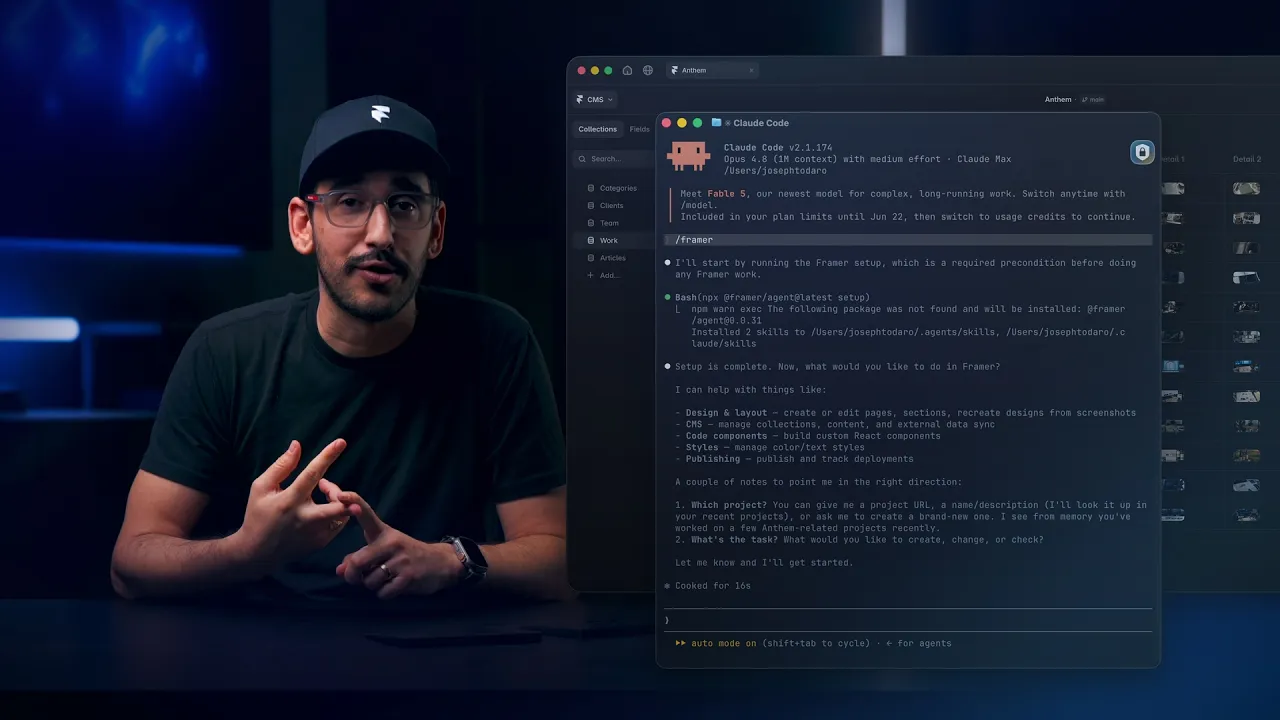
Learn how to Connect Framer to Claude, Codex, Cursor, and more
Opus 4.7 · Claude Max
/Users/paul
> npx @framer/agent setup
Run the install prompt
Run the install prompt in your preferred AI. This installs the bridge your agent uses to talk to Framer. If asked to pick a folder to work from, pick any folder like your Desktop.
Opus 4.7 · Claude Max
/Users/paul
> npx @framer/agent setup
Run the install prompt
Run the install prompt in your preferred AI. This installs the bridge your agent uses to talk to Framer. If asked to pick a folder to work from, pick any folder like your Desktop.
> npx @framer/agent setup
⏺ Bash (npx @framer/agent setup)\ Installed 2 skills to /Users/paul/.agents/skills, /Users/paul/.claude/skills
> /framer
Connect to your projects
In your AI agent, run the /framer skill to connect it to your Framer project and grant access to the project from your browser. This establishes the connection between your external AI and your Framer project.
⏺ Bash (npx @framer/agent setup)\ Installed 2 skills to /Users/paul/.agents/skills, /Users/paul/.claude/skills
Connected to your Site project (session 6). What would you like me to help you with?
> List all the blogposts in my project
Write your first prompt
Tell your agent what to build, change, or fix. It works directly in your Framer project without the need to have it open. This means you can update anything in your project and even publish remotely.
Connect Framer to Claude Code, ChatGPT Codex, Cursor, and more
7:13
Frequently asked questions
Do I need to set up a Framer MCP server?
No. Framer doesn’t require a separate MCP server. If you’re searching for a Framer MCP, the native Framer External Agent connection gives Claude Code, Cursor, Codex, Antigravity CLI, and other AI tools direct access to your canvas, components, CMS, and project context, without manual MCP setup.
Which AI agents are supported?
Framer Agent works with any AI that can run a terminal command or call an MCP tool, including Claude Code, Codex, Cursor, Antigravity CLI, and Windsurf. If your agent supports tools or a terminal, it can connect.
Can the agent edit my live site?
No. The agent works on your canvas in the Framer editor, not on your published site. Changes only go live when you choose to publish them yourself or tell the agent.
Does the agent have access to my CMS?
Yes. Once connected, the agent can read and write CMS collections, including creating, updating, and deleting items. You stay in control of what gets published.
Is it safe to give an agent access to my project?
The agent only has access to the projects you explicitly connect it to. It cannot access other projects, your account settings, or billing. You can revoke access at any time.
What happens if the agent makes a mistake?
Framer has branching, so every change made by an external agent automatically happens on a branch. You can undo changes, review the branch, and decide when to merge it back into your main branch.
What should I do when my AI asks me to choose a folder to work from?
External Agents running on your machine need a folder to work from. They use it to save temporary files that make working with your Framer project more efficient. You can choose any folder in any location, such as your Desktop or Documents.
What external agents can do in Framer
Connect Framer to Claude Code, Codex in ChatGPT, Cursor, and more AI’s
Skip the MCP setup. Framer works directly with Claude Code, Cursor, Codex, and other AI tools. Native access to Framer with your own AI agents for deeper capabilities, custom skills, and the latest model advancements.
Codex in ChatGPT
Connect Codex to Framer with full access to your canvas, components, CMS, and more. Get Codex in ChatGPT.
Copy install prompt
Claude Code
Connect Claude to Framer with full access to your canvas, components, CMS, and more. Get Claude Code.
Copy install prompt
Cursor
Connect Cursor to Framer with full access to your canvas, components, CMS, and more. Get Cursor.
Copy install prompt
Antigravity
Connect Google Antigravity to Framer with full access to your canvas, components, CMS, and more. Get Antigravity.
Copy install prompt
Learn how to Connect Framer to Claude, Codex, Cursor, and more
Opus 4.7 · Claude Max
/Users/paul
> npx @framer/agent setup
Run the install prompt
Run the install prompt in your preferred AI. This installs the bridge your agent uses to talk to Framer. If asked to pick a folder to work from, pick any folder like your Desktop.
> npx @framer/agent setup
⏺ Bash (npx @framer/agent setup)\ Installed 2 skills to /Users/paul/.agents/skills, /Users/paul/.claude/skills
> /framer
Connect to your projects
In your AI agent, run the /framer skill to connect it to your Framer project and grant access to the project from your browser. This establishes the connection between your external AI and your Framer project.
⏺ Bash (npx @framer/agent setup)\ Installed 2 skills to /Users/paul/.agents/skills, /Users/paul/.claude/skills
Connected to your Site project (session 6). What would you like me to help you with?
> List all the blogposts in my project
Write your first prompt
Tell your agent what to build, change, or fix. It works directly in your Framer project without the need to have it open. This means you can update anything in your project and even publish remotely.
Connect Framer to Claude Code, ChatGPT Codex, Cursor, and more
7:13
Frequently asked questions
Do I need to set up a Framer MCP server?
No. Framer doesn’t require a separate MCP server. If you’re searching for a Framer MCP, the native Framer External Agent connection gives Claude Code, Cursor, Codex, Antigravity CLI, and other AI tools direct access to your canvas, components, CMS, and project context, without manual MCP setup.
Which AI agents are supported?
Framer Agent works with any AI that can run a terminal command or call an MCP tool, including Claude Code, Codex, Cursor, Antigravity CLI, and Windsurf. If your agent supports tools or a terminal, it can connect.
Can the agent edit my live site?
No. The agent works on your canvas in the Framer editor, not on your published site. Changes only go live when you choose to publish them yourself or tell the agent.
Does the agent have access to my CMS?
Yes. Once connected, the agent can read and write CMS collections, including creating, updating, and deleting items. You stay in control of what gets published.
Is it safe to give an agent access to my project?
The agent only has access to the projects you explicitly connect it to. It cannot access other projects, your account settings, or billing. You can revoke access at any time.
What happens if the agent makes a mistake?
Framer has branching, so every change made by an external agent automatically happens on a branch. You can undo changes, review the branch, and decide when to merge it back into your main branch.
What should I do when my AI asks me to choose a folder to work from?
External Agents running on your machine need a folder to work from. They use it to save temporary files that make working with your Framer project more efficient. You can choose any folder in any location, such as your Desktop or Documents.
What external agents can do in Framer
Layouts
Create responsive layouts that adapt cleanly across pages and breakpoints.
Collaborate
Work with teammates and agents while keeping changes organized.
Components
Reuse shared building blocks so edits stay consistent everywhere.
App
Connect external agents directly to Framer projects and pages.
Publish
Ship updates from design to a live site without leaving Framer.
CMS
Structure dynamic content and let agents update it safely.
Your next idea starts here
Create personal portfolio
Build startup site
Launch landing page
Start company blog
