Search
Compare AI and visual website builders
Compare Framer with AI builders, code tools, and visual website builders. Framer helps you generate pages with AI, edit them on the canvas, manage CMS content, and publish production sites from one workflow.











Compare AI builders and visual website builders
Best for fast starts, generated interfaces, prototypes, and code-assisted workflows before a site stack takes over.
Best for visual site design, templates, CMS, hosting, and editing pages on a canvas before publishing.
Compare AI website builders and code tools
Criteria
Framer
Lovable
v0
Claude Code
Codex
Best for
AI-generated sites, editable on the canvas
App UI and prototypes
Generated app interfaces
Codebase assistance
Code tasks
AI workflow
Internal and external agents
Prompt-to-app flows
Prompt-to-interface
Codebase AI
Code assistant
Output
Editable website
Generated app UI
Generated app UI
Code edits
Generated code
Site management
CMS in the canvas
App project setup
App project setup
Repo workflow
Repo workflow
Publishing and hosting
Built in
Export or deploy
Deploy on Vercel
Uses your codebase
Uses your codebase
SEO / AEO
SEO and AEO
SEO depends on setup
SEO depends on setup
Depends on codebase
Depends on codebase
Compare visual website builders
Criteria
Framer
Webflow
Figma Sites
Wix
Squarespace
WordPress
Best for
AI, CMS, and publishing in one workflow
Class-based visual site building
Design-led sites
Small business sites
Brand sites
Content-heavy sites
AI workflow
AI pages and agents
Visual builder
Design AI
AI site setup
Template setup
Plugins or tools
Design control
Visual canvas
Class-based visual control
Figma canvas
Template editor
Template editor
Themes, blocks, and code
Content workflow
CMS in the canvas
CMS and collections
Design-to-site workflow
Site content tools
Site content tools
Plugins
Publishing and hosting
Built in
Built in
Built-in publishing
Built in
Built in
Depends on hosting setup
SEO / AEO
SEO and AEO
SEO controls
Controls vary
Native SEO controls
Native SEO controls
Core and plugins
Build AI-generated websites you can edit on the canvas
Featured models

Horizon shift
Adaptive strategy

Capital forms
Early signals

Generate a page with AI, then refine layout, copy, components, and breakpoints on the canvas.
Branches
Search…
All
main
1m

home-2026
3m

use-cases
publishing
8m

content
10m
Changes
Home
/pricing
Updates

Shaders
Vectors
Merge to main
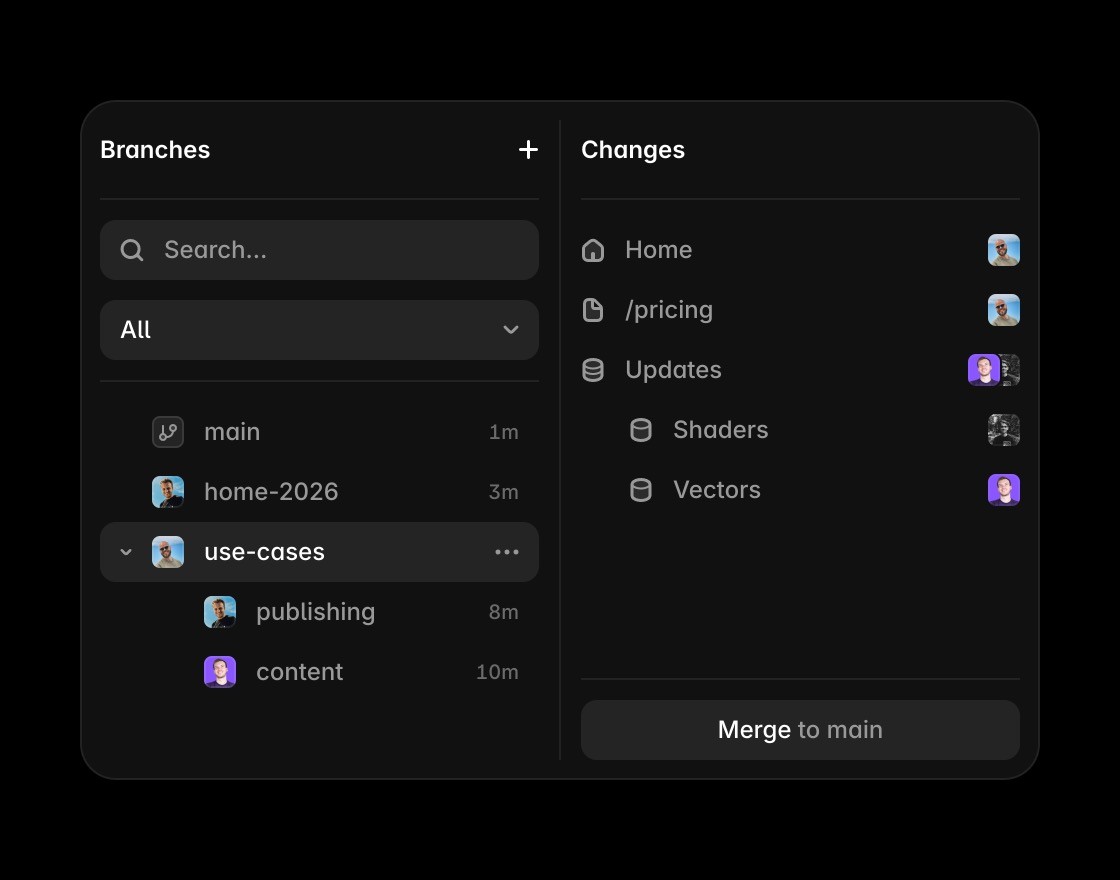
Explore site updates in branches, review work with your team, and publish approved changes.

Edit CMS content, metadata, headings, and FAQs next to the page they support.
Parallel®
Product
Support
Get access
Login

How it works
Menu

Reuse sections, components, type styles, and breakpoints as the site grows.
Frequently asked questions
What is the best AI website builder for professional sites?
Use Framer when you need AI-assisted creation, design control, CMS, SEO, hosting, and publishing in one workflow. Code-first tools can generate interfaces. Framer keeps the website editable on the canvas so designers, marketers, and founders can keep improving it.
How is Framer different from Lovable and v0?
Lovable and v0 focus on generated app interfaces and code-first workflows. Framer focuses on publishable websites. You can use AI to create or update pages, then edit layout, typography, components, breakpoints, CMS content, and SEO in the same visual project.
Is Framer better than Webflow for AI website building?
Webflow gives teams a structured visual builder. Framer puts AI-assisted page creation, canvas editing, CMS, SEO, hosting, analytics, and publishing in one workflow, so teams can create and maintain production sites from one place.
Can Framer replace a visual website builder?
Yes, for marketing sites, landing pages, blogs, resource hubs, and campaign pages. Framer gives teams visual editing, CMS, SEO controls, hosting, redirects, and publishing in one workflow. Other builders can still fit teams that need a specific plugin ecosystem, commerce stack, or custom back-end setup.
Does Framer include hosting, CMS, and SEO?
Yes. Framer includes CMS collections, dynamic pages, metadata, social previews, redirects, analytics, performance tools, hosting, SSL, CDN delivery, and publishing. Teams can design, manage content, optimize search, and ship updates from the same platform.
Who should choose a code-first AI builder instead of Framer?
Choose a code-first AI builder when the main outcome is an app prototype, custom product interface, or engineering-owned codebase. Choose Framer when the outcome is a production website that needs visual design control, CMS content, SEO, hosting, and publishing.
From AI draft to production website
Generate a page, refine the design, and publish from the same canvas.
Review site updates with branches and comments before you publish.
Update CMS content, metadata, FAQs, and answer-ready copy in one place.
Edit titles, descriptions, headings, and structured content close to the page.
Publish with hosting, SSL, CDN delivery, redirects, and performance handled.
Start from templates, examples, components, and plugins when speed matters.
Get started with Framer
Get started with Framer
Get started with Framer
